Mineuniverse
Resource Packs
Rainbow eXP-Bar

Rainbow eXP-Bar

RESOURCE PACK
XP-Bar in a rainbowstlye.
by Malcho
Download Claim this project
140,778 downloads
0 likes
Updated Oct 14, 2026
0 hypes
16x Miscellaneous
Advertisement Remove ads with Premium →

About

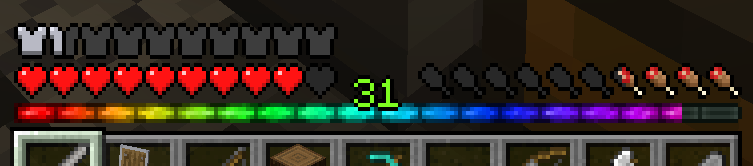
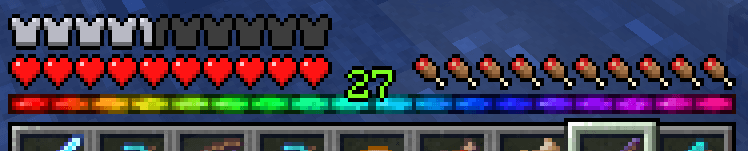
Changes the XP-Bar into a rainbow.

Tag me a screenshot, if you like this mod 😉

If you play a version older than 1.20.4, try the version for 1.20.1. (There is a warning, but the difference is just a number. )


Screenshot of Bar

Changelog

  • 2025-10-01 Updated to 1.21.9 and future releases (till something breaks again)
  • 2025-07-15 Updated to 1.21.7
  • 2025-06-22 Updated to 1.21.6
  • 2025-06-06 Downgrade to 1.18.*
  • 2025-03-30 Updated to 1.21.5
  • 2025-01-01 Updated to 1.21.4
  • 2024-10-23 Updated to 1.21.3
  • 2024-08-21 Downgrade to 1.20.1
  • 2024-06-15 Updated to 1.21
  • 2024-04-27 Updated to 1.20.5
  • 2023-12-21 Release for Minecraft 1.20.4

Credits

Inspired by 32louis old resource pack "Rainbow XP bar and ping".

 

Rainbow eXP-Bar 1.21.9+.zip
MC 1.21.9, 1.21.10, 1.21.11, 26.1, 26.1.1, 26.1.2, 26.2, 26.3
Release 2025-10-01 Get
Rainbow eXP-Bar 1.21.7.zip
MC 1.21.8, 1.21.7
Release 2025-07-16 Get
Rainbow eXP-Bar 1.21.6.zip
MC 1.21.6
Release 2025-06-22 Get
Rainbow eXP-Bar.zip
MC 1.18.1, 1.18.2, 1.18, 1.18-Snapshot
Release 2025-06-06 Get
Rainbow eXP-Bar.zip
MC 1.21.5
Release 2025-03-30 Get
Rainbow eXP-Bar.zip
MC 1.21.4
Release 2025-01-01 Get
Rainbow eXP-bar.zip
MC 1.21.3
Release 2024-10-23 Get
Rainbow eXP-Bar.zip
MC 1.20.1
Release 2024-08-21 Get
Rainbow eXP-Bar.zip
MC 1.21, 1.21.1
Release 2024-06-15 Get
Rainbow eXP-Bar.zip
MC 1.20.5, 1.20.6
Release 2024-04-27 Get
Rainbow-XP-bar for 1.20.4.zip
MC 1.20.4
Release 2023-12-20 Get

Requirements & install

How to use this resource pack in Minecraft
Resolution
16x
Minecraft
1.21.9 – 26.3
Install folder
.minecraft/resourcepacks

How to install resource packs

  1. Download the resource pack .zip file (do not extract it).
  2. In Minecraft open Options → Resource Packs → Open Pack Folder.
  3. Drop the .zip into the resourcepacks folder (.minecraft/resourcepacks).
  4. Move the pack to the Selected column and click Done.
Browse more: 16x resource packs 32x resource packs 64x resource packs 128x resource packs 256x resource packs 512x+ resource packs Resource Packs for 26.3 All resource packs
Advertisement Remove ads with Premium →

You Might Also Like