Mineuniverse
Resource Packs
Rails 3D

Rails 3D

RESOURCE PACK
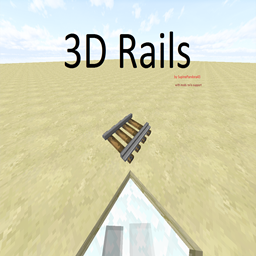
3D Rails for minecraft with rails from mods
by supinepandora43
Download Claim this project
Add a badge to your pageLink to Rails 3D from a README, website or forum post.
Preview: Badge

Badges update automatically and link to the resource pack page on MineUniverse.

4,929 downloads
0 likes
0 followers
Updated Oct 14, 2026
0 hypes
Follow0
16x Animated Miscellaneous Mod Support Traditional
Advertisement Remove ads with Premium →

 Supports:

  1. Minecraft Rails
  2. Better RailRoads
  3. Charset Transport Carts and Rails
  4. Extra Rails
  5. Steve Carts Reborn
  6. Thaumcraft (mystical activator rail)
  7. Rails Plus
  8. RailCraft (upgrades currently not supported)

1.14.4 version (with fixes and more, WIP) on github https://github.com/SupinePandora43/Rails-3D 


Features:

  1. mod rail support
  2. specular maps (dont tested, because my computer is potato, please if you can: upload rails screenshots with shaders)
  3. animation (for some rails)
  4. Russian localization(added for some mods)


!!!WARNING!!!

  • curved/turned rails supports only x16/x64 textures(other resolution dont tested) please set hight priority to this resourcepack
  • if you have other x16/x64 texture, please set lower priority to this resourcepack

Rails 3D 2.0
MC 1.15-Snapshot, 1.15, 1.15.2, 1.15.1
Release 2020-05-14 Get
Rails 3D 2.0
MC 1.14.4, 1.14.1, 1.14.3, 1.14, 1.14.2, 1.14-Snapshot
Release 2020-05-11 Get
Rails 3D 1.1 (for 1.10)
MC 1.10-Snapshot, 1.10.2, 1.10, 1.10.1
Beta 2018-09-28 Get
Rails 3D 1.1
MC 1.12.1, 1.12, 1.11, 1.11.1, 1.11.2, 1.11-Snapshot, 1.12.2, 1.12-Snapshot
Beta 2018-09-28 Get
Rails 3D
MC 1.12.1, 1.12, 1.11, 1.11.1, 1.11.2, 1.11-Snapshot, 1.12.2, 1.12-Snapshot
Beta 2018-09-21 Get

Requirements & install

How to use this resource pack in Minecraft
Resolution
16x
Minecraft
1.14.1 – 1.15.2
Install folder
.minecraft/resourcepacks

How to install resource packs

  1. Download the resource pack .zip file (do not extract it).
  2. In Minecraft open Options → Resource Packs → Open Pack Folder.
  3. Drop the .zip into the resourcepacks folder (.minecraft/resourcepacks).
  4. Move the pack to the Selected column and click Done.
Browse more: 16x resource packs 32x resource packs 64x resource packs 128x resource packs 256x resource packs 512x+ resource packs Resource Packs for 1.15.2 All resource packs

More from supinepandora43

Advertisement Remove ads with Premium →

You Might Also Like