Mineuniverse
Resource Packs
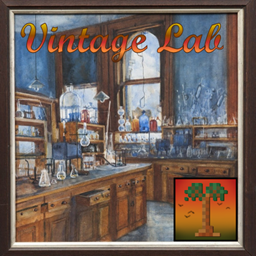
Prehistoric Nature Vintage Lab

Prehistoric Nature Vintage Lab

RESOURCE PACK
Changes Prehistoric Nature lab equipment a more old-fashioned or steampunk feel
by Aecht_Rob
Download Claim this project
Add a badge to your pageLink to Prehistoric Nature Vintage Lab from a README, website or forum post.
Preview: Badge

Badges update automatically and link to the resource pack page on MineUniverse.

43,336 downloads
0 likes
0 followers
Updated Oct 14, 2026
0 hypes
Follow0
16x Mod Support Steampunk Traditional
Advertisement Remove ads with Premium →

Our Community Server:

Cenotopia-invite


Our Help and Support Server:

Cenotopia-invite

https://twitter.com/cenotopia


Give feedback and input, get help, join discussion, sneak-peaks of development, share builds, play, see other modpacks and servers, and much more.


Support me on Patreon please! https://www.patreon.com/aecht_rob


This official resourcepack changes the textures and some models for the various lab equipment in Prehistoric Nature to give it a more vintage feel. It may help it blend in with other mods that use a similar style.


The release currently supports the following, but is not yet complete:


Lab Bench 

Hopper Lab Bench

Coal Tar Processor

Acid Bath

DNA Recombiner Machine

Microscope
Fossil Sorter


Do you want to your own server to play this, or any other mods with friends? Drop my promotional code aechtrob into your order and pick up a cool 25% off with the wonderful Bisect Hosting by clicking on the image:

https://i.ibb.co/1XVS6xH/vertical-dark-text.png

Prehistoric Nature Vintage Lab 1.12.2 v.1.2 (PN v. 62+).zip
MC 1.12.2
Release 2025-03-21 Get
Prehistoric Nature Vintage Lab 1.12.2 v.1.1.zip
MC 1.12.2
Release 2023-01-16 Get
Prehistoric Nature Vintage Lab 1.12.2.zip
MC 1.12.2
Release 2022-11-24 Get

Requirements & install

How to use this resource pack in Minecraft
Resolution
16x
Minecraft
1.12.2
Install folder
.minecraft/resourcepacks

How to install resource packs

  1. Download the resource pack .zip file (do not extract it).
  2. In Minecraft open Options → Resource Packs → Open Pack Folder.
  3. Drop the .zip into the resourcepacks folder (.minecraft/resourcepacks).
  4. Move the pack to the Selected column and click Done.
Browse more: 16x resource packs 32x resource packs 64x resource packs 128x resource packs 256x resource packs 512x+ resource packs Resource Packs for 1.12.2 All resource packs

More from Aecht_Rob

Advertisement Remove ads with Premium →

You Might Also Like