Mineuniverse
Resource Packs
Potion Effect Tooltip Icons (Java)

Potion Effect Tooltip Icons (Java)

RESOURCE PACK
Adds icons for status effects, with support for some mods.
by Bareneil
Download Claim this project
6,076 downloads
0 likes
Updated Oct 14, 2026
0 hypes
16x Miscellaneous Mod Support Modern
Advertisement Remove ads with Premium →

✨ Icon Effects Tooltip ✨
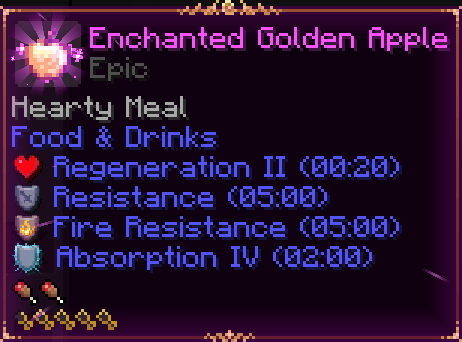
This resource pack adds icons for all status effects, making tooltips more visual, clear, and immersive.
It also includes compatibility with some mods that add new effects.

Features

✔ Minimalist & lightweight
✔ Vanilla-friendly pixel art style
✔ Works in tooltips for better clarity

Preview

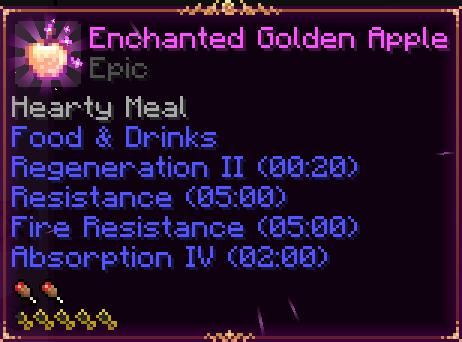
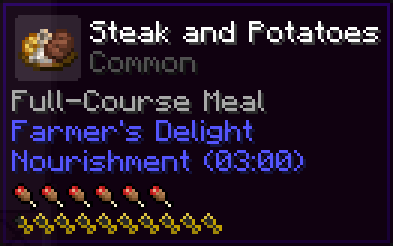
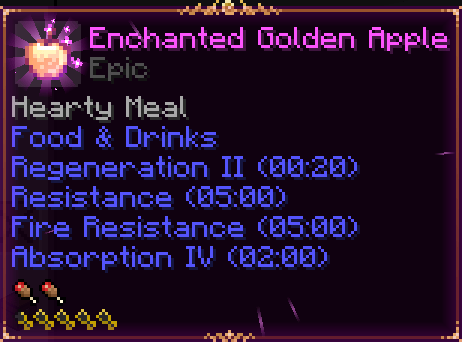
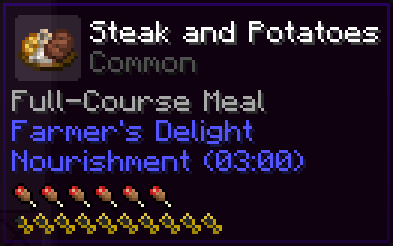
🔸 Before (Default Minecraft)

  • Tooltips show only text, making it harder to identify effects quickly.

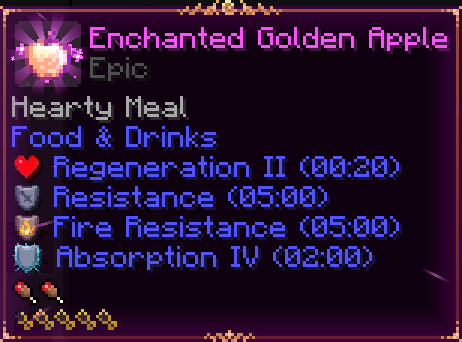
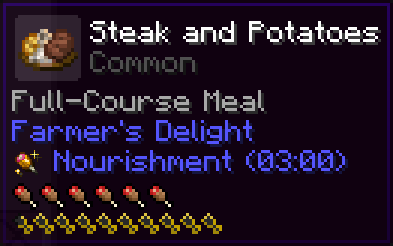
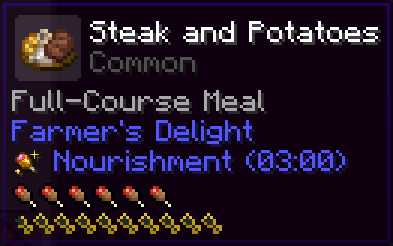
🔹 After (With this pack)

  • Each status effect has a icon, easy to recognize at a glance.

🌍 Supported Languages:

  • English (United States)
  • English (United Kingdom)
  • English (Australia)
  • English (Canada)
  • English (New Zealand)
  • English (Ireland)
  • English (South Africa)
  • English (Pirate Speak)
  • Español (Argentina)
  • Español (Chile)
  • Español (Ecuador)
  • Español (España)
  • Español (Mexico)
  • Español (Uruguay)
  • Español (Venezuela)

🛠 Compatible with modded effects:
  • Buzzier Bees
  • Caverns And Chasms
  • Effecticons
  • Farmers Delight
  • Illage And Spillage
  • Legionary
  • Loot N Explore
  • Minecraft
  • Quark
  • Ranged Weapon
  • Spell Power
  • Stalwart Dungeons
  • Unusual End
§dEffect_Tooltip_Icons1.20-26.x.zip
MC 1.21.2-Snapshot, 1.21, 1.21.6-snapshot, 1.20.2-Snapshot, 1.20.5-Snapshot, 1.21.1-Snapshot, 1.20.2, 1.21.8, 1.20.5, 1.21.5, 1.21.4, 1.21.5-Snapshot, 1.20.1, 1.20, 1.20.6
Release 2026-09-17 Get
§dEffect§8_§dTooltip§8_§dIcons§8.zip
MC 1.17.1, 1.21.2-Snapshot, 1.21, 1.21.6-snapshot, 1.18.1, 1.20.2-Snapshot, 1.20.5-Snapshot, 1.19-Snapshot, 1.21.1-Snapshot, 1.16.5, 1.19.3, 1.20.2, 1.19.4, 1.21.8, 1.17
Release 2025-11-18 Get

Requirements & install

How to use this resource pack in Minecraft
Resolution
16x
Minecraft
1.21 – 1.21.8
Install folder
.minecraft/resourcepacks

How to install resource packs

  1. Download the resource pack .zip file (do not extract it).
  2. In Minecraft open Options → Resource Packs → Open Pack Folder.
  3. Drop the .zip into the resourcepacks folder (.minecraft/resourcepacks).
  4. Move the pack to the Selected column and click Done.
Browse more: 16x resource packs 32x resource packs 64x resource packs 128x resource packs 256x resource packs 512x+ resource packs Resource Packs for 1.21.8 All resource packs

More from Bareneil

Advertisement Remove ads with Premium →

You Might Also Like