Mineuniverse
Resource Packs
Poke Hotbar

Poke Hotbar

RESOURCE PACK
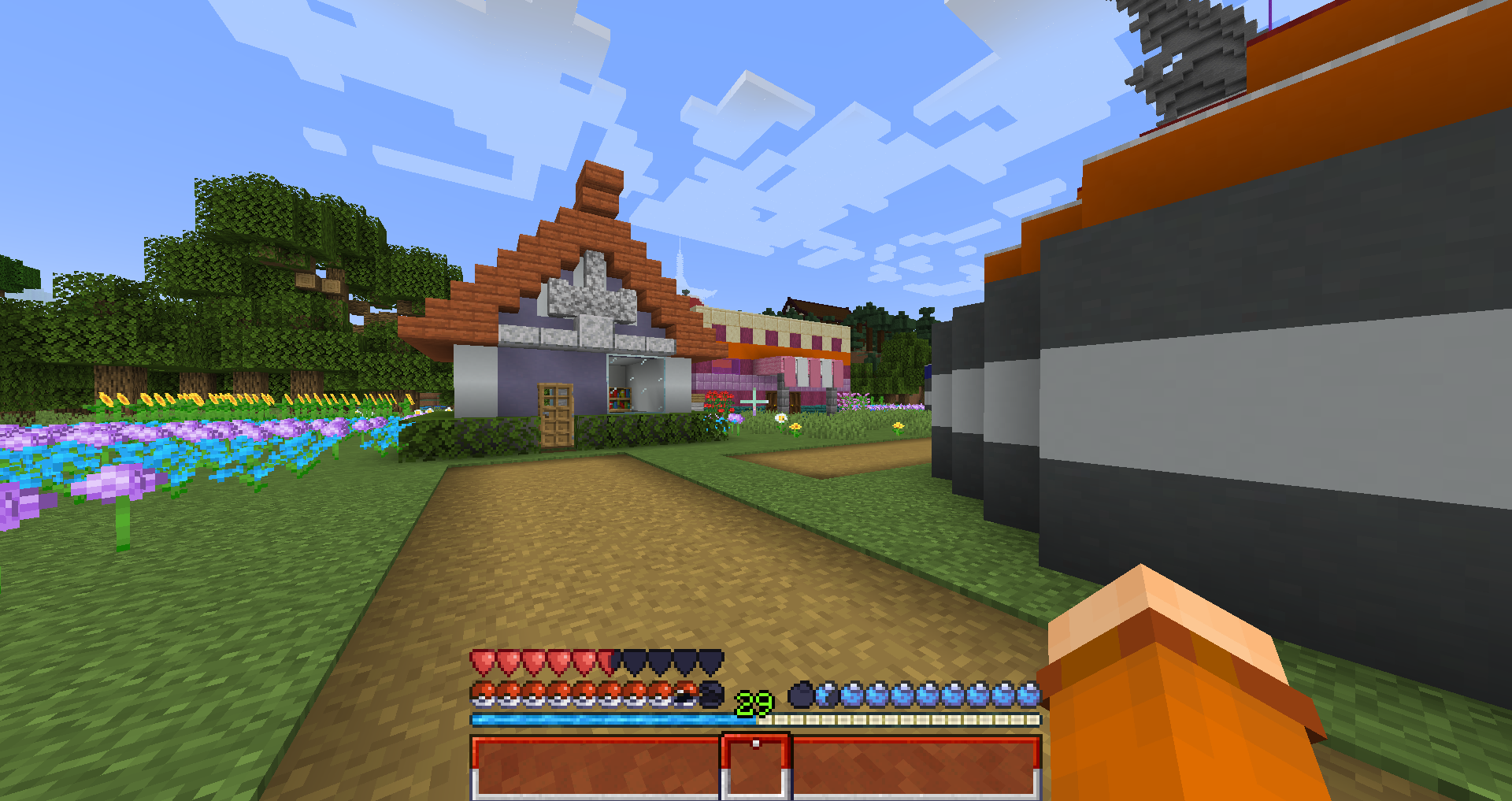
Transform your default hotbar into a Pokémon one, changing the hearts for Pokeballs and the hunger bar for Oran Berries / Oren Fruits (Compatible with Appleskin)
by ByBoxi
Download Claim this project
5,461 downloads
0 likes
Updated Oct 14, 2026
0 hypes
16x Miscellaneous Mod Support Modern Traditional
Advertisement Remove ads with Premium →

This resourcepack changes the normal Minecraft hotbar to have a Pokémon theme.

The hearts will be pokéballs of different types depending on the potion effect or the circumstances: Normal hearts will be common PokeBalls / Poison hearts are Safari Balls / Wither hearts are Net Balls / Absorption hearts are GS Balls / Frozen hearts are Dive Balls / Mob hearts are Heal Balls.
Also the hunger bar has been changed to be Oran Berries or Oren Fruits, and they have a green version for when you have the hunger effect.

The default experience bar now has the iconic colors of the original expbar of Pokémon.
And the Slotbar a red-coloured theme with a pokeball selector.

It is also compatible with appleskin, with tiny custom textures and of course 0 incompatibilities

Resourcepack made mostly for my friend BlackJack_Unity! <3

Pokemon Hotbar 1.20.zip
MC 1.20.1, 1.20, 1.20-Snapshot
Release 2024-01-14 Get

Requirements & install

How to use this resource pack in Minecraft
Resolution
16x
Minecraft
1.20-Snapshot – 1.20.1
Install folder
.minecraft/resourcepacks

How to install resource packs

  1. Download the resource pack .zip file (do not extract it).
  2. In Minecraft open Options → Resource Packs → Open Pack Folder.
  3. Drop the .zip into the resourcepacks folder (.minecraft/resourcepacks).
  4. Move the pack to the Selected column and click Done.
Browse more: 16x resource packs 32x resource packs 64x resource packs 128x resource packs 256x resource packs 512x+ resource packs Resource Packs for 1.20.1 All resource packs

More from ByBoxi

Advertisement Remove ads with Premium →

You Might Also Like