Mineuniverse
Resource Packs
Player Health Indicator

Player Health Indicator

RESOURCE PACK
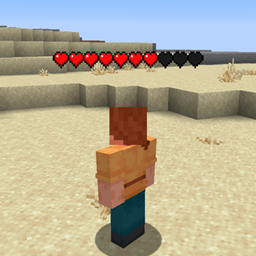
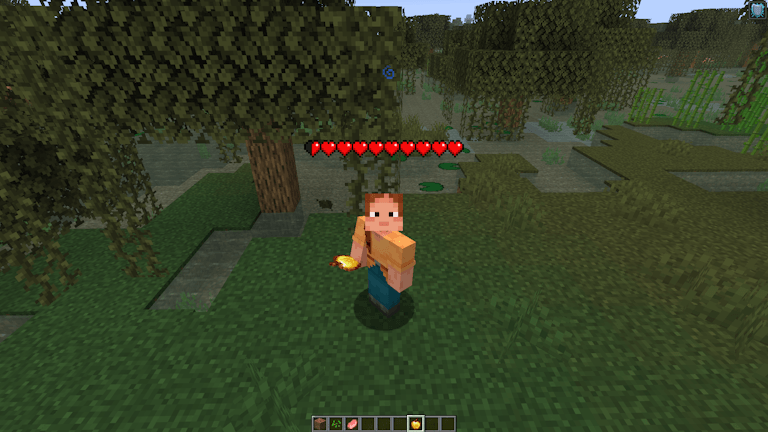
See Opponents health bar / hearts easily
by NetherSpark_Studios
Download Claim this project
15,205 downloads
0 likes
0 followers
Updated Oct 14, 2026
0 hypes
Follow0
Data Packs Miscellaneous Modern
Advertisement Remove ads with Premium →

This texture pack displays the health of any player, but it calculates it based on percentage rather than actual health values. Because of this, the hearts shown may not match the player’s real health in certain situations.

For example, if a player has a maximum of 200 hearts but currently has 100 hearts left, the pack will display only 5 hearts (since it’s showing 50% health), instead of the full 100 hearts.

In normal gameplay with default health values, this usually isn’t noticeable, and the display will appear accurate. However, in modded or custom scenarios with increased health, the difference becomes clear.

How to Use

  1. Download and install the texture pack
  2. Install Fabric
  3. Ensure you have EMF and ETF in your mods folder
  4. Launch your game and activate


Netherspark Health Indicator.zip
MC 26.1, 26.1.1, 26.1.2, 26.2
Release 2026-08-07 Get
Health Indicator v1.zip
MC 26.1, 26.1.1, 26.1.2
Release 2026-04-28 Get

Requirements & install

How to use this resource pack in Minecraft
Resolution
Not specified
Minecraft
26.1 – 26.2
Install folder
.minecraft/resourcepacks

How to install resource packs

  1. Download the resource pack .zip file (do not extract it).
  2. In Minecraft open Options → Resource Packs → Open Pack Folder.
  3. Drop the .zip into the resourcepacks folder (.minecraft/resourcepacks).
  4. Move the pack to the Selected column and click Done.
Browse more: 16x resource packs 32x resource packs 64x resource packs 128x resource packs 256x resource packs 512x+ resource packs Resource Packs for 26.2 All resource packs

More from NetherSpark_Studios

Advertisement Remove ads with Premium →

You Might Also Like