Mineuniverse
Resource Packs
PixelForge's fanmade resource pack

PixelForge's fanmade resource pack

RESOURCE PACK
Fanmade resource pack made from comments on youtube
by Pixel_Forge
Download Claim this project
38 downloads
0 likes
Updated Oct 14, 2026
0 hypes
32x Miscellaneous
Advertisement Remove ads with Premium →

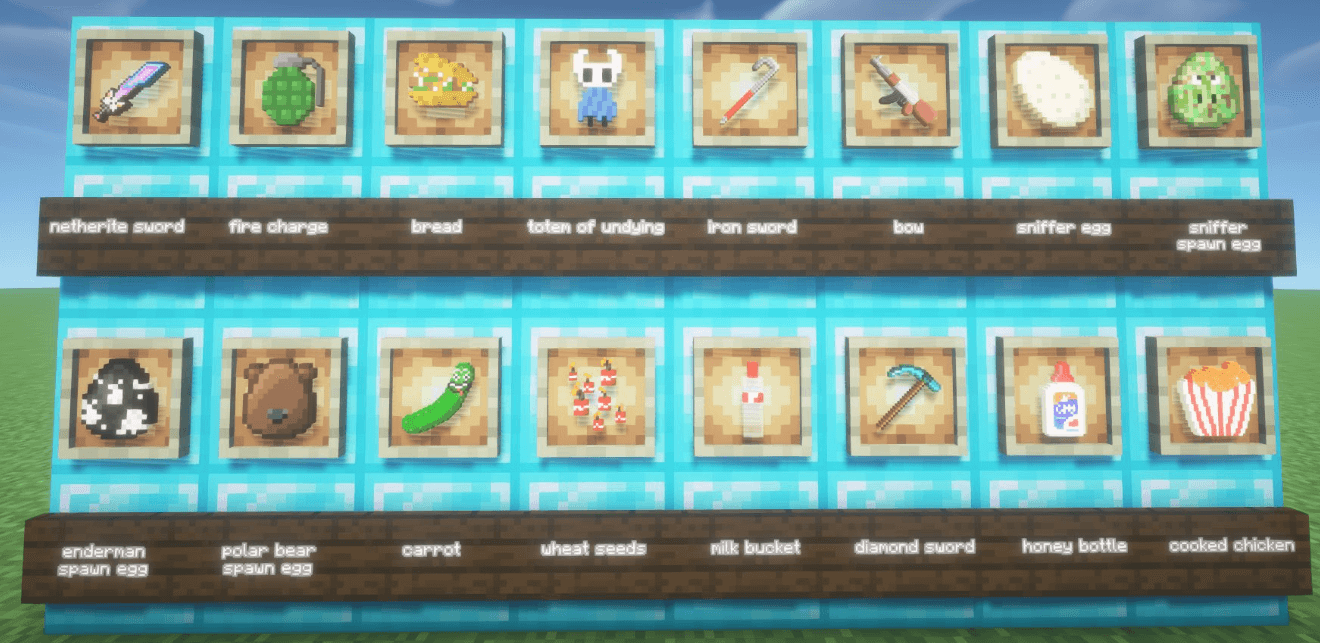
PixelForge's fanmade resource pack adds textures to a bunch of random stuff in Minecraft. It's mainly focused on adding textures that my viewers suggest in the comments on my Youtube channel.


  • It's a work in progress, I'm adding and updating my recource pack every time I upload a new video. (Might change in the future)
  • If you want to suggest some textures yourself you can check out my YouTube channel and comment on my latest video.

Pixelforge's fanmade resource pack 26.1.X 1.0.5
MC 26.1, 26.1.1, 26.1.2
Release 2026-09-05 Get
Pixelforge's fanmade resource pack 26.1.X 1.0.4
MC 26.1, 26.1.1, 26.1.2
Release 2026-08-31 Get
Pixelforge's fanmade resource pack 26.1.X 1.0.3
MC 26.1, 26.1.1, 26.1.2
Release 2026-08-25 Get
Pixelforge's fanmade resource pack 26.1.X 1.0.2
MC 26.1, 26.1.1, 26.1.2
Release 2026-08-21 Get
Pixelforge's fanmade resource pack 26.1.X 1.0.1
MC 26.1, 26.1.1, 26.1.2
Release 2026-08-17 Get
Pixelforge's fanmade resource pack 26.1.X 1.0.0
MC 26.1, 26.1.1, 26.1.2
Release 2026-08-15 Get

Requirements & install

How to use this resource pack in Minecraft
Resolution
32x
Minecraft
26.1 – 26.1.2
Install folder
.minecraft/resourcepacks

How to install resource packs

  1. Download the resource pack .zip file (do not extract it).
  2. In Minecraft open Options → Resource Packs → Open Pack Folder.
  3. Drop the .zip into the resourcepacks folder (.minecraft/resourcepacks).
  4. Move the pack to the Selected column and click Done.
Browse more: 16x resource packs 32x resource packs 64x resource packs 128x resource packs 256x resource packs 512x+ resource packs Resource Packs for 26.1.2 All resource packs
Advertisement Remove ads with Premium →

You Might Also Like