Mineuniverse
Resource Packs
Pink Hearts & Mushrooms GUI

Pink Hearts & Mushrooms GUI

RESOURCE PACK
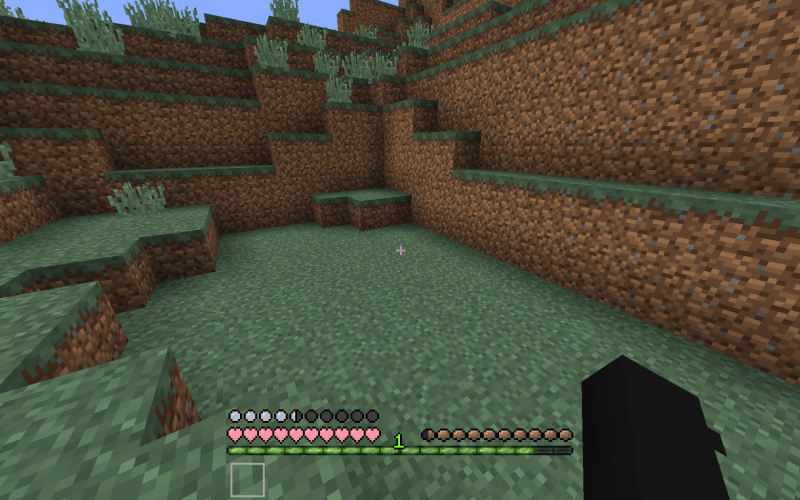
A Minecraft resource pack with a transparent hotbar, mushroom hunger bar, circle armor bar, and pink heart health bar.
by kiannaisnotreal
Download Claim this project
Add a badge to your pageLink to Pink Hearts & Mushrooms GUI from a README, website or forum post.
Preview: Badge

Badges update automatically and link to the resource pack page on MineUniverse.

2,489 downloads
0 likes
0 followers
Updated Oct 14, 2026
0 hypes
Follow0
16x Miscellaneous
Advertisement Remove ads with Premium →

Try out my GUI Texture Pack! The resource pack is a Minecraft resource pack that changes the GUI, affecting the health, hunger, armor, and toolbar. The health bar is somewhat similar to the default vanilla Minecraft heath bar, but with pink hearts instead. The hunger bar is a small brown mushroom (the same texture as the Minecraft brown mushroom), which makes it slightly easier to see more on your screen. The armor bar are small dots that are the same color as the default vanilla Minecraft armor bar, but replaced with circles instead. This again has the same purpose as the hunger bar: to make more room to see your Minecraft game. The toolbar is completely transparent and has a gray square outline when a slot is selected. I added this to be able to see more on your game screen. I also added extra features to this pack such as a smaller crosshair, pink animal hearts, and other pink features.


This resource pack works for all versions of Minecraft above 1.8.


Enjoy using my pack!

PinkHeartsandMushroomsGUI.zip
MC 1.8.7, 1.8.4, 1.8.8, 1.8.3, 1.8.6, 1.8, 1.8.2, 1.8.5, 1.8.9, 1.8.1
Release 2020-12-17 Get

Requirements & install

How to use this resource pack in Minecraft
Resolution
16x
Minecraft
1.8.2 – 1.8.9
Install folder
.minecraft/resourcepacks

How to install resource packs

  1. Download the resource pack .zip file (do not extract it).
  2. In Minecraft open Options → Resource Packs → Open Pack Folder.
  3. Drop the .zip into the resourcepacks folder (.minecraft/resourcepacks).
  4. Move the pack to the Selected column and click Done.
Browse more: 16x resource packs 32x resource packs 64x resource packs 128x resource packs 256x resource packs 512x+ resource packs Resource Packs for 1.8.9 All resource packs
Advertisement Remove ads with Premium →

You Might Also Like