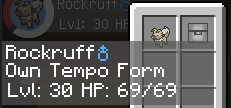
This is a Datapack used for adding the Own Tempo Rockruff from the official games into Pixelmon! Typically, any Rockruff in Pixelmon is capable of evolving into Dusk Form Lycanroc, but this Datapack changes things around to be more accurate to the official games.
How it functions: Only Own Tempo Rockruff will be capable of evolving into Dusk Form Lycanroc, and can't be evolved into Midday or Midnight Lycanroc either. The Rockruff will always have Own Tempo as its ability.
How it spawns: Approximately 1 in 20 Rockruff will have the Own Tempo form in all areas where Rockruff can spawn (which is similar to how the spawning for it worked on Pokemon Scarlet and Violet). Additionally, this chance is only 1 in 10 in Ultra Space. Of course, you can edit this Datapack yourself to change the spawn rates however you'd like.
Breeding: Like in the official games, Dusk Form Lycanrock is capable of breeding Own Tempo Rockruff, although in Pixelmon the breeding will require an Everstone to be held, as is the case will passing down any form in Pixelmon.
Commands: Own Tempo Rockruff can be given with a command by typing this command: /pokegive <username> Rockruff form:dusk
Other notes: Rockruff appears as "Own Tempo Form" in the game (assuming you've installed the Lang Resource Pack), but the internal form name is "dusk" to allow it to pass down from Lycanroc when breeding.