Mineuniverse
Resource Packs
Overgrown Flowery GUI - Sunshine Hunger

Overgrown Flowery GUI - Sunshine Hunger

RESOURCE PACK
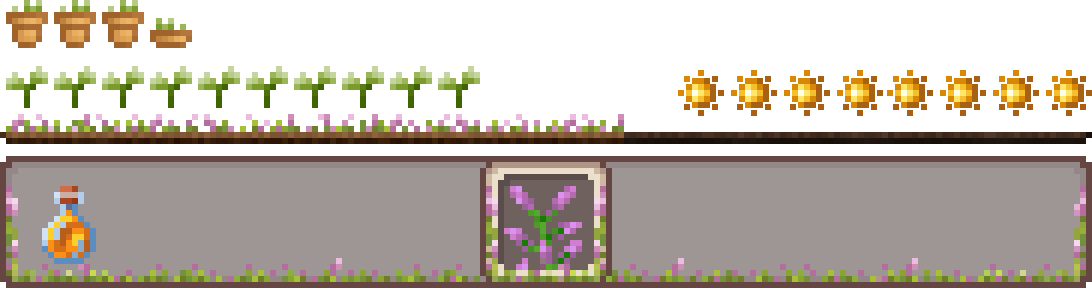
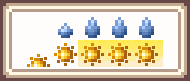
Turn Overgrown Flowery GUIs water droplets into Sunshine! This pack replaces the food shanks with sunshine icons, with compatibility for Thirst Was Taken and other Thirst mods.
by coolbot100s
Download Claim this project
Add a badge to your pageLink to Overgrown Flowery GUI - Sunshine Hunger from a README, website or forum post.
Preview: Badge

Badges update automatically and link to the resource pack page on MineUniverse.

14,297 downloads
0 likes
0 followers
Updated Oct 14, 2026
0 hypes
Follow0
16x Miscellaneous Mod Support
Advertisement Remove ads with Premium →

Overgrown Flowery GUI Banner

Do you like drinking water in Minecraft? Do you love using Overgrown Flowery GUI?
Now you don't have to choose between the two!

This resource pack was spun off as its own project due to the unique challenge of making water look like water when food... already looks like water.
We solve the issue by turning food into sunshine instead!

This project still Requires Overgrown Flowery GUI or Overgrown Flowery Hotbar for the full experience, as it only changes the hunger bar by itself.

modrinth curseforge Planet Minecraft Overgrown Flowery GUI Collection discord github Support us

Hotbar Showcase

Overgrown Flowery GUI - Sunshine Hunger v1.0.1
MC 1.21.2-Snapshot, 1.21, 1.21.6-snapshot, 1.20.2-Snapshot, 1.20.5-Snapshot, 1.21.1-Snapshot, 1.20.2, 1.21.8, 1.20.5, 1.21.5, 1.21.4, 1.21.5-Snapshot, 1.20.6, 1.21.1, 1.21.6, 1.21.3
Release 2026-03-28 Get
Overgrown Flowery GUI - Sunshine Hunger
MC 1.20.2, 1.21.2-Snapshot, 1.21, 1.20.5, 1.20.2-Snapshot, 1.20.5-Snapshot, 1.21.1-Snapshot, 1.21.4, 1.21.5-Snapshot, 1.20.3-Snapshot, 1.20.3, 1.20.6, 1.20.4, 1.21-Snapshot, 1.21.3
Release 2025-01-19 Get

Requirements & install

How to use this resource pack in Minecraft
Resolution
16x
Minecraft
1.21.2-Snapshot – 1.21.8
Install folder
.minecraft/resourcepacks

How to install resource packs

  1. Download the resource pack .zip file (do not extract it).
  2. In Minecraft open Options → Resource Packs → Open Pack Folder.
  3. Drop the .zip into the resourcepacks folder (.minecraft/resourcepacks).
  4. Move the pack to the Selected column and click Done.
Browse more: 16x resource packs 32x resource packs 64x resource packs 128x resource packs 256x resource packs 512x+ resource packs Resource Packs for 1.21.8 All resource packs

More from coolbot100s

Advertisement Remove ads with Premium →

You Might Also Like