Mineuniverse
Resource Packs
‎ Ourcraft‎

‎ Ourcraft‎

RESOURCE PACK
Pure Communism in the Minecraft (Ourcraft*) Title-Screen.
by Benny
Download Claim this project
841 downloads
0 likes
Updated Oct 14, 2026
0 hypes
Font Packs Miscellaneous
Advertisement Remove ads with Premium →

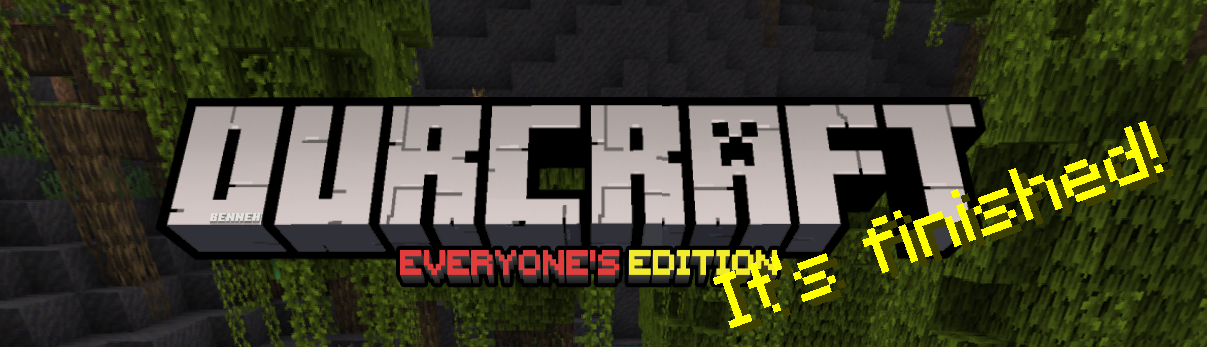
This Pack Replaces the logo Image on the 'Minecraft' title screen image from saying 'Minecraft, Java Edition' to saying 'Ourcraft, Everyone's Edition'

I hope this'll give you a little chuckle every time you open the game.


In-Game
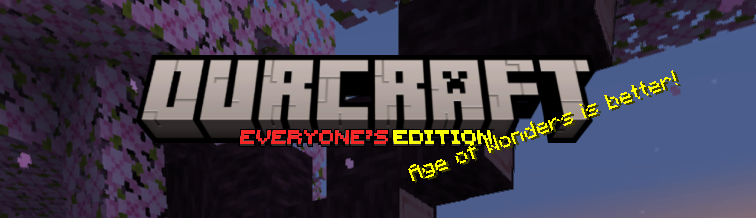
In-Game (old)

What it looks like in-game.


If you don't know how to install Resourcepacks, I suggest this.


The meme this pack started out as.


<a href="https://modrinth.com/resourcepack/ourcraft" target="_blank">
  <img src="https://lh3.googleusercontent.com/u/1/drive-viewer/AITFw-wtlyl-ofNjYpeBMks4q8OxbAwwVlGfYHxD-MlUIGUT79sHD_tBykV1wHRJbXAN5CHHOZPRKUE0xf5NlBDiqXQ4nWeZ=w1960-h3088" alt="Clickable Image">
</a>



1.20x
MC 1.20.1, 1.20
Release 2023-07-26 Get
1.19x
MC 1.19.3, 1.19.4, 1.19-Snapshot, 1.19.2, 1.19.1, 1.19
Release 2023-04-11 Get
1.18x
MC 1.18.1, 1.18.2, 1.18, 1.18-Snapshot
Release 2023-04-11 Get

Requirements & install

How to use this resource pack in Minecraft
Resolution
Not specified
Minecraft
1.19-Snapshot – 1.20.1
Install folder
.minecraft/resourcepacks

How to install resource packs

  1. Download the resource pack .zip file (do not extract it).
  2. In Minecraft open Options → Resource Packs → Open Pack Folder.
  3. Drop the .zip into the resourcepacks folder (.minecraft/resourcepacks).
  4. Move the pack to the Selected column and click Done.
Browse more: 16x resource packs 32x resource packs 64x resource packs 128x resource packs 256x resource packs 512x+ resource packs Resource Packs for 1.20.1 All resource packs

More from Benny

Advertisement Remove ads with Premium →

You Might Also Like