Mineuniverse
Resource Packs
oSzoukaua's: Totem HUD overlays

oSzoukaua's: Totem HUD overlays

RESOURCE PACK
Changes the Totems of undying's appearance when held, allowing for a HUD overlay effect
by oSzoukaua
Download Claim this project
Add a badge to your pageLink to oSzoukaua's: Totem HUD overlays from a README, website or forum post.
Preview: Badge

Badges update automatically and link to the resource pack page on MineUniverse.

510 downloads
0 likes
0 followers
Updated Oct 14, 2026
0 hypes
Follow0
16x Miscellaneous
Advertisement Remove ads with Premium →

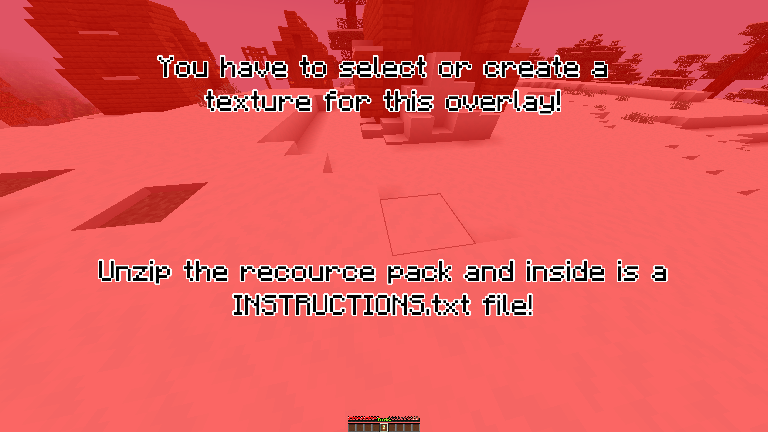
This resource pack is made for Customization!  it changed what the totem looks like when it is held, only for the player holding it, and allows for a overlay on your HUD that can be changed to anything.


The totem of undying looks the same as the vanilla Totem (Mostly) while in containers, your hand(in third person), the floor, and in an item frame, but when it is held (either hand) and the player holding it is in first person, it appears as a texture that spans your whole screen, that can be customized to display any image youd like!


By Default the totem overlay will be a message telling you that you need to select an overlay texture, you can do this by unzipping the file and reading the instructions :)


Example/demonstration:


To change the texture, unzip the resource pack, go to assets > minecraft > textures > item


Inside the textures folder is a file named overlay.png, change the texture of the "overlay" .png file to change the overlay texture when holding the Totem in-game


NOTE: This resource pack contains some pre-made overlays, you are free to use them and modify them!


also note that the screen overlay is attached to the hand holding the totem, meaning that it is subject the the hand sway of that hand in first person.


Enjoy! ^-^


Version 1.3 - 1.19.3
MC 1.19.3
Release 2023-09-12 Get
Version 1.3 - 1.19.0 + 1.19.1 + 1.19.2
MC 1.19.2, 1.19.1, 1.19
Release 2023-09-12 Get
Version 1.3 - 1.18.0 + 1.18.1 + 1.18.2
MC 1.18.1, 1.18.2, 1.18
Release 2023-09-12 Get
Version 1.3 - 1.17.0 + 1.17.1
MC 1.17.1, 1.17
Release 2023-09-12 Get
Version 1.3 - 1.16.2 + 1.16.3 + 1.16.4 + 1.16.5
MC 1.16.3, 1.16.5, 1.16.4, 1.16.2
Release 2023-09-12 Get
Version 1.3 - 1.20.0 + 1.20.1
MC 1.20.1, 1.20, 1.20-Snapshot
Release 2023-07-22 Get
Version 1.3 - 1.19.4
MC 1.19.4-Snapshot, 1.19.4
Release 2023-04-29 Get
Version 1.1 - 1.19.4
MC 1.19.4-Snapshot, 1.19.4
Release 2023-04-27 Get
Version 1.2 - 1.19.4
MC 1.19.4-Snapshot, 1.19.4
Release 2023-04-27 Get

Requirements & install

How to use this resource pack in Minecraft
Resolution
16x
Minecraft
1.19.1 – 1.20.1
Install folder
.minecraft/resourcepacks

How to install resource packs

  1. Download the resource pack .zip file (do not extract it).
  2. In Minecraft open Options → Resource Packs → Open Pack Folder.
  3. Drop the .zip into the resourcepacks folder (.minecraft/resourcepacks).
  4. Move the pack to the Selected column and click Done.
Browse more: 16x resource packs 32x resource packs 64x resource packs 128x resource packs 256x resource packs 512x+ resource packs Resource Packs for 1.20.1 All resource packs
Advertisement Remove ads with Premium →

You Might Also Like