Mineuniverse
Resource Packs
NoMore Pumpkin Blur

NoMore Pumpkin Blur

RESOURCE PACK
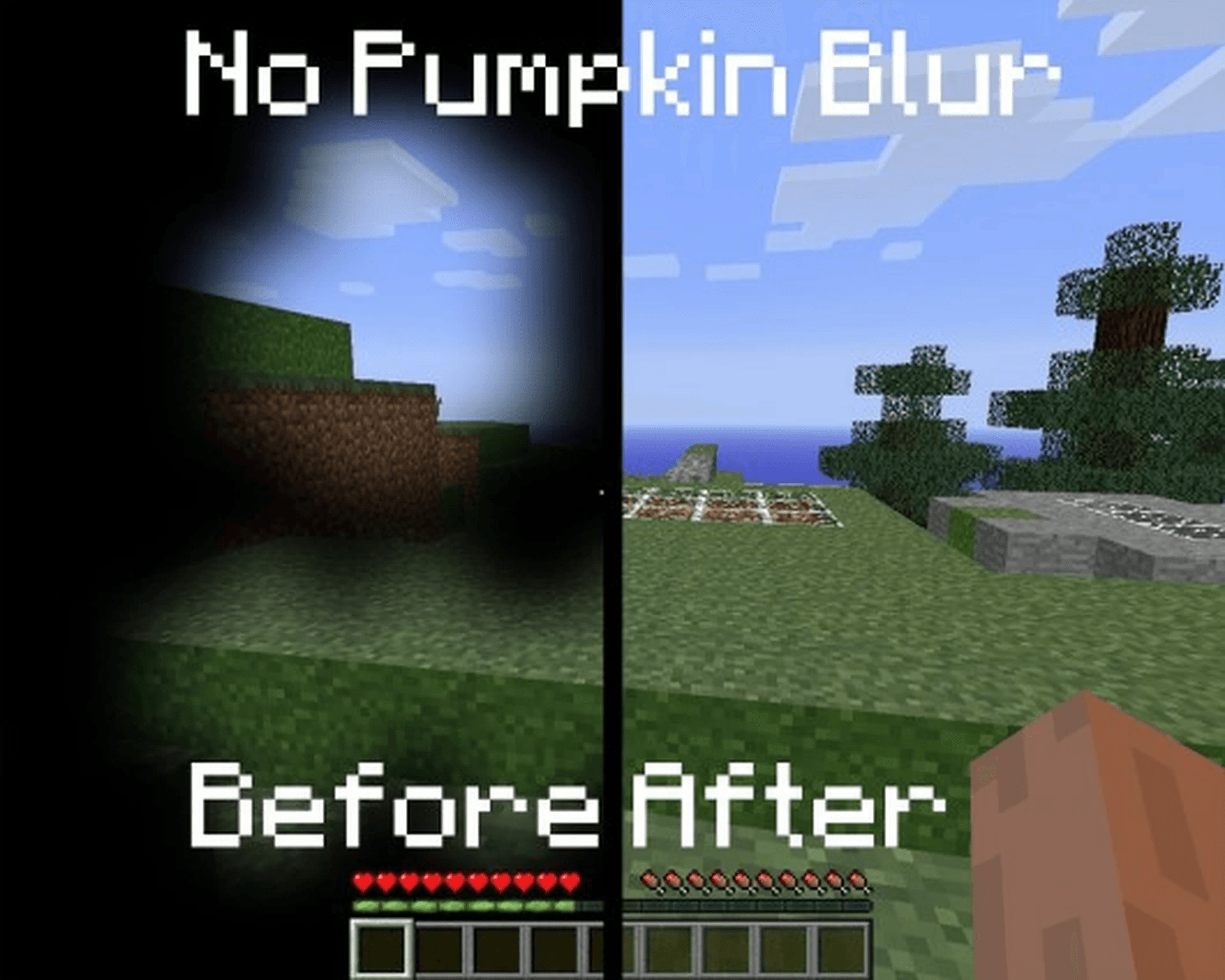
This Texture Pack Removes the Pumpkin Blur when you wear a carved pumpkin
by Seriusgamer07
Download Claim this project
1,383 downloads
0 likes
0 followers
Updated Oct 14, 2026
0 hypes
Follow0
Data Packs Miscellaneous
Advertisement Remove ads with Premium →

**🎃 No more Pumpkin Blur**

**✨ Say goodbye to the pumpkin blur!**

Tired of the annoying blurry overlay when wearing a carved pumpkin?
This pack removes the blur effect so you can finally see clearly while staying safe from Endermen 👀💥

**🔧 What it does:**

- ✅ Removes the carved pumpkin overlay
- ✅ Keeps everything else vanilla-friendly
- ✅ Perfect for survival, PvP, or just looking cool!

**🧩 Works with:**

Minecraft Java Edition

Compatible with Vanilla, OptiFine, Sodium, and more

Plug-and-play — no setup needed!

**📦 Installation:**

Download the pack

Drop it into your resourcepacks folder

Enable it in-game

Done! 🎉

💬 Feedback welcome! Enjoy a clearer Minecraft experience!

§No More Pumpkin Blurs.zip
MC 1.16.3, 1.13.1, 1.16-Snapshot, 1.17.1, 1.21.2-Snapshot, 1.21, 1.21.6-snapshot, 1.15-Snapshot, 1.16.1, 1.18.1, 1.20.2-Snapshot, 1.20.5-Snapshot, 1.14.3, 1.15, 1.16, 1.13
Release 2025-06-13 Get

Requirements & install

How to use this resource pack in Minecraft
Resolution
Not specified
Minecraft
1.16.3 – 1.21.6-snapshot
Install folder
.minecraft/resourcepacks

How to install resource packs

  1. Download the resource pack .zip file (do not extract it).
  2. In Minecraft open Options → Resource Packs → Open Pack Folder.
  3. Drop the .zip into the resourcepacks folder (.minecraft/resourcepacks).
  4. Move the pack to the Selected column and click Done.
Browse more: 16x resource packs 32x resource packs 64x resource packs 128x resource packs 256x resource packs 512x+ resource packs Resource Packs for 1.21.6-snapshot All resource packs

More from Seriusgamer07

Advertisement Remove ads with Premium →

You Might Also Like