Mineuniverse
Resource Packs
Newer textures

Newer textures

RESOURCE PACK
These textures keep the simple look of Minecraft while adding some new aspects into the game!
by peacefulpotatoes
Download Claim this project
431 downloads
0 likes
0 followers
Updated Oct 14, 2026
0 hypes
Follow0
16x Traditional
Advertisement Remove ads with Premium →

Some of these texture changes are:

Flipped Hunger Bar

Blue boss bars

Bluestone instead of Redstone

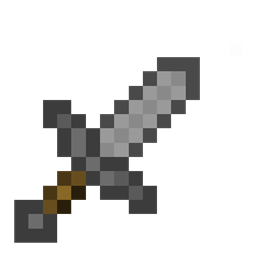
Shorter swords called "Daggers"

Some word changes to item names


I also Changed some of the default textures from their 1.8.9 look to the 1.14+ look that modern versions of Minecraft including but not limited to:

Emerald

Wool (every color)


Preview:


https://www.youtube.com/watch?v=BrrEEJKh2hw&t=104s


Feedback is always welcome. I will try and release frequent updates based on suggestions and criticism from the comments.

1.8. Minecraft textures.zip
MC 1.8.9
Alpha 2021-01-26 Get
1.8 Minecraft textures.zip
MC 1.8.9
Release 2020-12-09 Get
1.8.9 Minecrtaft textures.zip
MC 1.8.9
Release 2020-12-06 Get

Requirements & install

How to use this resource pack in Minecraft
Resolution
16x
Minecraft
1.8.9
Install folder
.minecraft/resourcepacks

How to install resource packs

  1. Download the resource pack .zip file (do not extract it).
  2. In Minecraft open Options → Resource Packs → Open Pack Folder.
  3. Drop the .zip into the resourcepacks folder (.minecraft/resourcepacks).
  4. Move the pack to the Selected column and click Done.
Browse more: 16x resource packs 32x resource packs 64x resource packs 128x resource packs 256x resource packs 512x+ resource packs Resource Packs for 1.8.9 All resource packs
Advertisement Remove ads with Premium →

You Might Also Like




