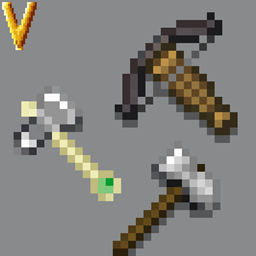
Tetra is a wonderful mod about creating modular tools, much like Tinker's Construct; however, Tetra's textures I feel are rather outdated, using assets from before the 1.14 texture update.

Using Ron0's shading in Textrapack I fully reshaped, reshaded, and moved all but a few of Tetra's tool and weapon modules. They look better than ever and now fit nearly perfectly into any modern version of your game!

Textrapack is required for this pack to look right.
Make sure to load Modern Tetra above/after Textrapack, otherwise not all weapons and tools will be updated correctly.
This resource pack makes direct use of some binding/wrap/handle textures by Ron0. The vast majority of colors and default binding textures are by Ron0. This is so all modules have a stylistic synergy even though I didn't make some myself.
All usage of Ron0's assets are done with permission.
- If and when Tetra gets a modules update, I'll update these textures accordingly.
- If an addon mod comes out that adds stuff I like I'll do the same.
- Art of Forging (deprecated)
- Tetra Delight (use Tetracelium + Tetra Delight)
Feel free to use this in modpacks as long as Ron's Textrapack allows it.
More Modded GUI Revision Dark
Eyeful Iron - unpublished as of yet