Mineuniverse
Resource Packs
Magnet and Stick Magnet

Magnet and Stick Magnet

RESOURCE PACK
Turns sticks into magnets while held. Any item renamed to "Magnet" and placed in the last slot in your hotbar or inventory will also work as a magnet without being held.
by EmpressTofu
Download Claim this project
Add a badge to your pageLink to Magnet and Stick Magnet from a README, website or forum post.
Preview: Badge

Badges update automatically and link to the resource pack page on MineUniverse.

665 downloads
0 likes
0 followers
Updated Oct 14, 2026
0 hypes
Follow0
Data Packs Miscellaneous
Advertisement Remove ads with Premium →

I was tired of the overpowered magnets found everywhere and complicated methods to get magnets. So I made this datapack for my friends and I, and now sharing with you. A very simple way to have magnets that aren't overpowered and easy to get without jumping through hoops and down holes.

You will be using it as-is.
1.20 version works down to 1.15
1.21 version works on only 1.21 to 1.21.4

1.21.5 version changes NBTs, requires 1.21.5 version

12.11 version changes NBTs again, requires 1.21.11 version


All it does is make sticks work as a magnet while they're in your main-hand or off-hand.

Any items placed in the last slot of your Hotbar or Inventory and renamed to Magnet will also work as a magnet.

The range is 5 blocks. 
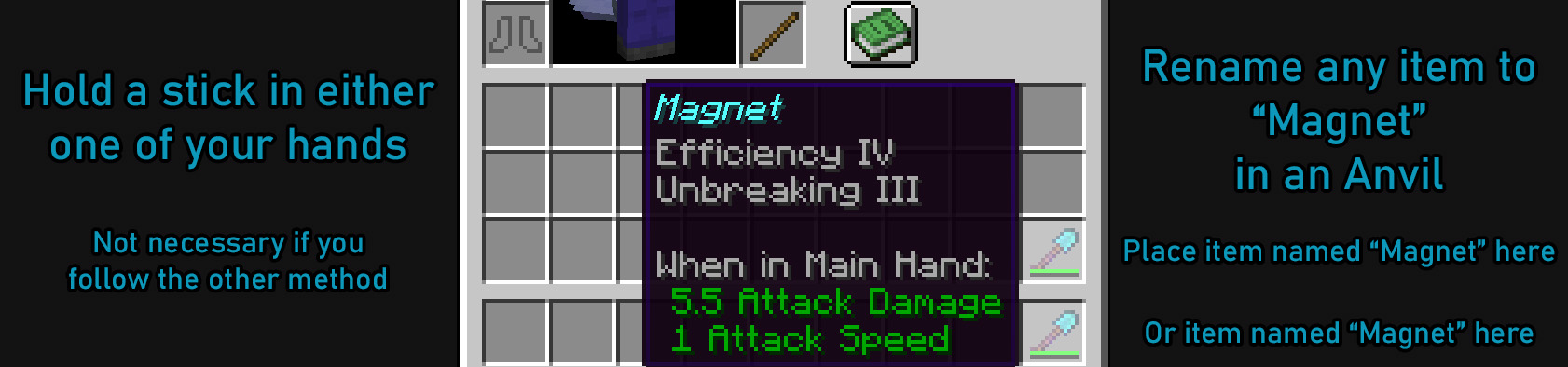
Magnet in Hotbar

You are free to make changes to my datapack as you see fit.


KNOWN BUGS

This pack seems to not work with items renamed to Magnet if you're using mods like Legendary Tooltip which changes the NBT data that makes the Magnet check fail. Still works for sticks, though.


magnet-26.1.zip
MC 1.21.11, 26.1
Release 2026-01-31 Get
magnet-1.21.5.zip
MC 1.21.5
Release 2025-05-05 Get
magnet_and_stick_magnet.zip
MC 1.21
Release 2024-07-07 Get
magnet_and_stick_magnet.zip
MC 1.21
Release 2024-07-06 Get
magnet_and_stick_magnet.zip
MC 1.21
Release 2024-07-05 Get
magnet_and_stick_magnet.zip
MC 1.20.2
Release 2023-09-28 Get
magnet_and_stick_magnet.zip
MC 1.20.2
Release 2023-06-24 Get

Requirements & install

How to use this resource pack in Minecraft
Resolution
Not specified
Minecraft
1.20.2 – 26.1
Install folder
.minecraft/resourcepacks

How to install resource packs

  1. Download the resource pack .zip file (do not extract it).
  2. In Minecraft open Options → Resource Packs → Open Pack Folder.
  3. Drop the .zip into the resourcepacks folder (.minecraft/resourcepacks).
  4. Move the pack to the Selected column and click Done.
Browse more: 16x resource packs 32x resource packs 64x resource packs 128x resource packs 256x resource packs 512x+ resource packs Resource Packs for 26.1 All resource packs

More from EmpressTofu

Advertisement Remove ads with Premium →

You Might Also Like





