Mineuniverse
Resource Packs
LICHPUNK's Paintings

LICHPUNK's Paintings

RESOURCE PACK
Replaces some of the vanilla Minecraft paintings with paintings of my own. The pack was fantasy inspired and follows a similar,
by LICHPUNK
Download Claim this project
121 downloads
0 likes
0 followers
Updated Oct 14, 2026
0 hypes
Follow0
16x Miscellaneous Mod Support Traditional
Advertisement Remove ads with Premium →

What is LICHPUNK's Paintings?

This is the first resource pack I've followed through with and it replaces some of the vanilla Minecraft paintings with pixel art of my own. There are currently 8 new paintings in total:
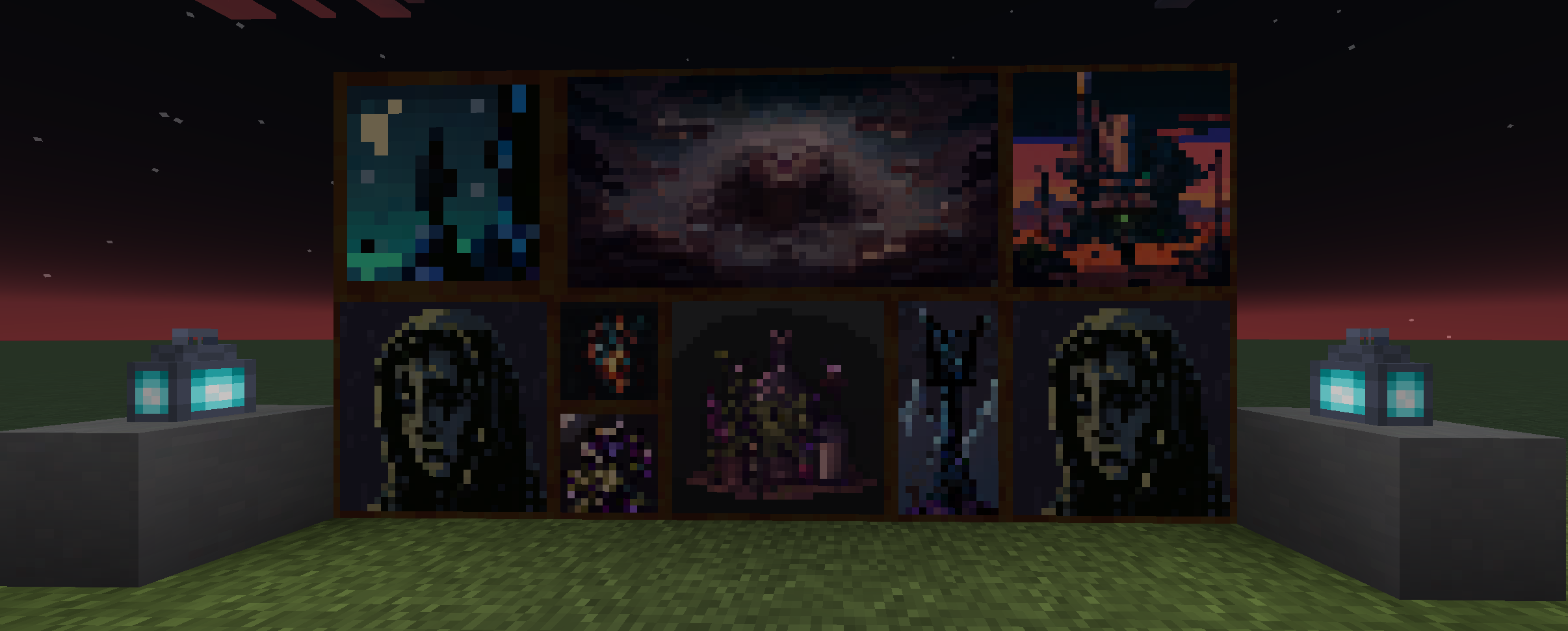
  • 2 New 16x16 (1:1 Block)
  • 1 New 16x32 (1:2 Blocks)
  • 4 New 32x32 (2:2 Blocks)
  • 1 New 64x32 (4:2 Blocks)

What do they look like?

Preview of the paintings that are included in LICHPUNK's Paintings.

Where are they from?

The paintings used in the pack are taken from an unpublished mod I'm currently working on, LichTweaks (though this name will likely change). The mod itself is only covering surface-level modifications, but it's all well-documented and sets a good foundation for content expansion, and when it reaches a public release. The first looks at the mod will be found on my GitHub before anywhere else, though forge will likely follow soon after. I'm a student currently attending university so everything is definitely a WIP I will be pursuing progressively as I finish up my schooling. In the meantime, I hope you enjoy these paintings, I appreciate you checking them out!


Note: I have only tested this pack on 1.19.3, so I can't say for sure if it'll work on early versions.


Thanks,

LICHPUNK

LICHPUNK's Paintings
MC 1.19.3
Beta 2023-02-26 Get

Requirements & install

How to use this resource pack in Minecraft
Resolution
16x
Minecraft
1.19.3
Install folder
.minecraft/resourcepacks

How to install resource packs

  1. Download the resource pack .zip file (do not extract it).
  2. In Minecraft open Options → Resource Packs → Open Pack Folder.
  3. Drop the .zip into the resourcepacks folder (.minecraft/resourcepacks).
  4. Move the pack to the Selected column and click Done.
Browse more: 16x resource packs 32x resource packs 64x resource packs 128x resource packs 256x resource packs 512x+ resource packs Resource Packs for 1.19.3 All resource packs
Advertisement Remove ads with Premium →

You Might Also Like