Mineuniverse
Resource Packs
LCE Potion Bar - Modernized

LCE Potion Bar - Modernized

RESOURCE PACK
Brings Back The Old Legacy Console Edition Potion Bar But In A More Modern Style.
by GalaxyGaming20000
Download Claim this project
100 downloads
0 likes
Updated Oct 14, 2026
0 hypes
16x Miscellaneous Modern
Advertisement Remove ads with Premium →

LCE Potion Bar - Modernized (LPBM)

LPBM Brings the old legacy console edition potion bars which show the stats of the potion on the icon but in an improved and modern style.

Potion Bars & Types:
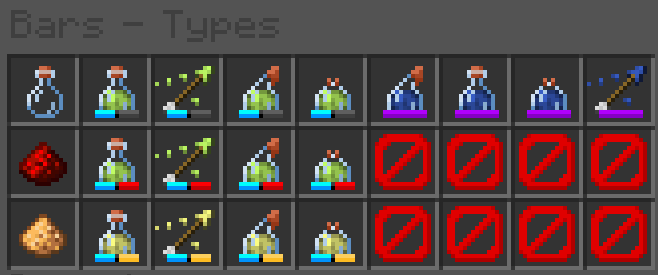
LPBM Potion Types Within A Shulker, Displaying All Possible Types.

All Potions That Give An Effect Will Have A Blue Section of the bar, Next To That Blue Section Is A Secondary Area:

  • If it's Empty, The potion has no modifers placed on it.
  • If It's Red, The potion has been extended with redstone.
  • If It's Yellow, The potion has been amplified with glowstone.

[The following do not show the blue bar.]

  • If It's purple, it does not give any effect.
  • If It's orange, it means the potion is either custom, or unknown. (you may see this if you use unobtainable potions.)

The Bars Will Only Display Within The UI.

[1.21.6+] LCE Potion Bar - Modernized.zip
MC 1.21.8, 1.21.6, 1.21.7, 1.21.9, 1.21.10
Release 2025-11-13 Get

Requirements & install

How to use this resource pack in Minecraft
Resolution
16x
Minecraft
1.21.6 – 1.21.10
Install folder
.minecraft/resourcepacks

How to install resource packs

  1. Download the resource pack .zip file (do not extract it).
  2. In Minecraft open Options → Resource Packs → Open Pack Folder.
  3. Drop the .zip into the resourcepacks folder (.minecraft/resourcepacks).
  4. Move the pack to the Selected column and click Done.
Browse more: 16x resource packs 32x resource packs 64x resource packs 128x resource packs 256x resource packs 512x+ resource packs Resource Packs for 1.21.10 All resource packs

More from GalaxyGaming20000

Advertisement Remove ads with Premium →

You Might Also Like