Mineuniverse
Resource Packs
Lamps Packs

Lamps Packs

RESOURCE PACK
The custom packs
by TreasureCat_Arcade
Download Claim this project
550 downloads
0 likes
0 followers
Updated Oct 14, 2026
0 hypes
Follow0
16x
Advertisement Remove ads with Premium →


==============================================================================================

So what's changed?


Disc Pack changes the games record disc's (and only the disc's give me music suggestions as I'm still updating this pack)

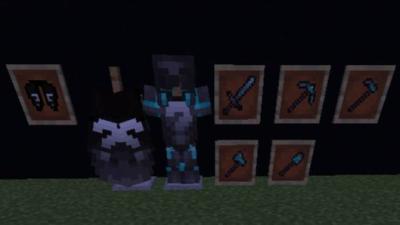
Items changes the elytra texture to black with white question marks & changes netherite armour and tools


Ambience Pack changes the entire game soundtrack IE the menu music, the background music and end music there's even music for when you fight the Ender Dragon (Ambient only changes the background music not the disc's)

=============================================================================================


I dont have any plans to add more or change anything here any time soon sorry

-Lamp

LampPak V.2
MC 1.19.3, 1.19.4, 1.19.2, 1.19.1, 1.19
Release 2023-03-19 Get
LampPack Java
MC 1.19
Release 2022-06-08 Get
El Lamp Pak
MC 1.17.1
Release 2021-08-09 Get
All in One Lamp Pack
MC 1.17.1
Release 2021-07-21 Get
Disc Pack
MC 1.16.5
Beta 2021-05-07 Get
Lamps Items
MC 1.16.5
Beta 2021-05-07 Get
Ambience Pack
MC 1.16.5
Beta 2021-04-23 Get

Requirements & install

How to use this resource pack in Minecraft
Resolution
16x
Minecraft
1.16.5 – 1.19.4
Install folder
.minecraft/resourcepacks

How to install resource packs

  1. Download the resource pack .zip file (do not extract it).
  2. In Minecraft open Options → Resource Packs → Open Pack Folder.
  3. Drop the .zip into the resourcepacks folder (.minecraft/resourcepacks).
  4. Move the pack to the Selected column and click Done.
Browse more: 16x resource packs 32x resource packs 64x resource packs 128x resource packs 256x resource packs 512x+ resource packs Resource Packs for 1.19.4 All resource packs
Advertisement Remove ads with Premium →

You Might Also Like