Mineuniverse
Resource Packs
Iron Warden – Piloted Golem

Iron Warden – Piloted Golem

RESOURCE PACK
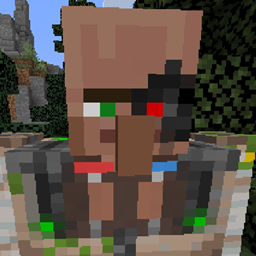
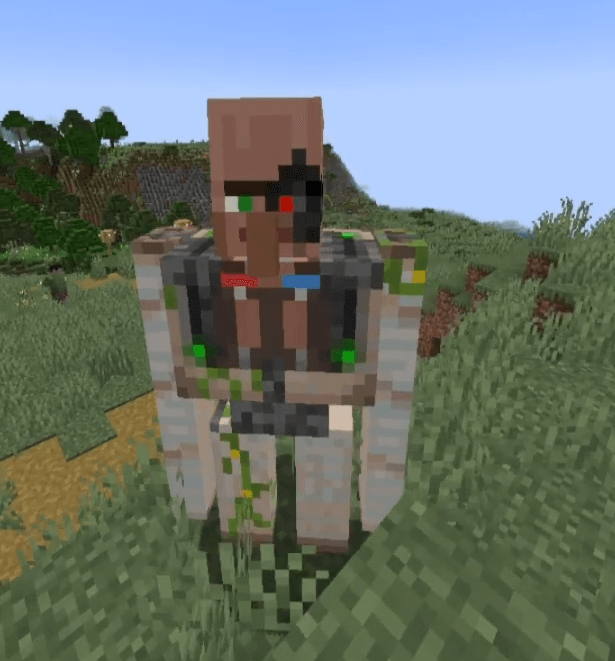
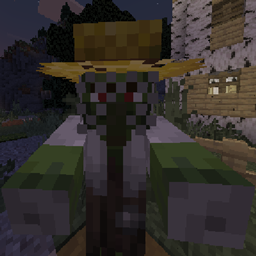
A texture pack that transforms Iron Golems into the Iron Warden, a cybernetically-driven guardian that adapts, endures, and defends its village beyond the limits of its pilot.
by CyborgVillager
Download Claim this project
Add a badge to your pageLink to Iron Warden – Piloted Golem from a README, website or forum post.
Preview: Badge

Badges update automatically and link to the resource pack page on MineUniverse.

164 downloads
0 likes
0 followers
Updated Oct 14, 2026
0 hypes
Follow0
16x Miscellaneous
Advertisement Remove ads with Premium →

Forged not just from iron, but intent.


The Iron Warden is a reinforced Iron Golem housing a cybernetically-augmented villager within its core. When villages reach a breaking point such as raids, sieges, or repeated losses, the Warden is activated as a last line protector!


Unlike standard golems, this unit does not wander aimlessly. The villager pilot observes threats, prioritizes targets, and adapts its response in real time. Every step is deliberate. Every strike is calculated.


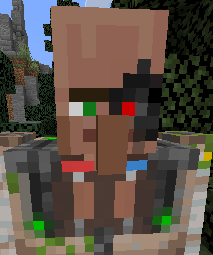
An augmented villager head is visible behind reinforced plating, one eye replaced by a red targeting lens, constantly focusing on priority threats. Even if the head or pilot body is damaged, the villager’s mind has already been pre-uploaded into the suit itself, ensuring the Warden continues its duty long after the pilot can no longer act.

Built to endure.

Programmed to protect.

Awakened only when survival demands it.

Note: This is a texture pack only it replaces the appearance of Iron Golems and does not modify gameplay, AI, or mechanics.. Made this to eventaully be used for a custom mod that I will be working on, figured to make the texture and lore to help brainstorm abilities and such in the meantime.

This texture pack can be used for singleplayer or for multiplayer 👍

Beep Boop Bop

Iron Warden – Piloted Golem.zip
MC 1.20.1
Release 2026-02-15 Get

Requirements & install

How to use this resource pack in Minecraft
Resolution
16x
Minecraft
1.20.1
Install folder
.minecraft/resourcepacks

How to install resource packs

  1. Download the resource pack .zip file (do not extract it).
  2. In Minecraft open Options → Resource Packs → Open Pack Folder.
  3. Drop the .zip into the resourcepacks folder (.minecraft/resourcepacks).
  4. Move the pack to the Selected column and click Done.
Browse more: 16x resource packs 32x resource packs 64x resource packs 128x resource packs 256x resource packs 512x+ resource packs Resource Packs for 1.20.1 All resource packs

More from CyborgVillager

Advertisement Remove ads with Premium →

You Might Also Like