Mineuniverse
Resource Packs
Invisible Helmet / Hide Helmet

Invisible Helmet / Hide Helmet

RESOURCE PACK
Removes helmet from default texture V1.21.3
by MikMikMikMik
Download Claim this project
Add a badge to your pageLink to Invisible Helmet / Hide Helmet from a README, website or forum post.
Preview: Badge

Badges update automatically and link to the resource pack page on MineUniverse.
2,270 downloads
0 likes
0 followers
Updated Oct 14, 2026
0 hypes
Follow0
16x Miscellaneous
Advertisement Remove ads with Premium →

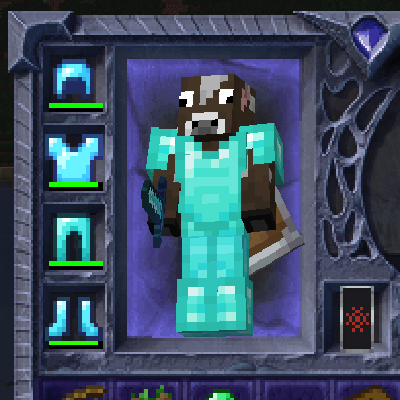
preview

  • V1.21.3 ready
  • Client only
  • Cosmetic only
  • Works for all armors (leather, iron, gold, diamond, netherite, chain mail & the turtle helmet)

This mod hides your helmet, giving you the freedom to fully showcase your character's skin.

Whether you're sporting a custom look or just want to enjoy the visual wonder of Steve his face, this simple mod ensures your helmet won't obscure your style, letting you see your and other character faces as intended.

Warning: Will change your armor to vanilla armor (you can request me to mod armor from a texture pack, if the owner of the texture pack allows it, then I can make the mod for it)

No_Helmet.zip
MC 1.21.3, 1.21.4-Snapshot
Release 2024-11-23 Get

Requirements & install

How to use this resource pack in Minecraft
Resolution
16x
Minecraft
1.21.3 – 1.21.4-Snapshot
Install folder
.minecraft/resourcepacks

How to install resource packs

  1. Download the resource pack .zip file (do not extract it).
  2. In Minecraft open Options → Resource Packs → Open Pack Folder.
  3. Drop the .zip into the resourcepacks folder (.minecraft/resourcepacks).
  4. Move the pack to the Selected column and click Done.
Browse more: 16x resource packs 32x resource packs 64x resource packs 128x resource packs 256x resource packs 512x+ resource packs Resource Packs for 1.21.4-Snapshot All resource packs
Advertisement Remove ads with Premium →

You Might Also Like




