Mineuniverse
Resource Packs
Invisible Armor Stand

Invisible Armor Stand

RESOURCE PACK
Makes armor stands fully invisible while keeping any armor, items, and equipment on them visible.
by Zerw
Download Claim this project
405 downloads
0 likes
Updated Oct 14, 2026
0 hypes
16x
Advertisement Remove ads with Premium →

Invisible Armor Stands

Makes armor stands fully invisible while keeping any armor, items, and equipment on them visible.
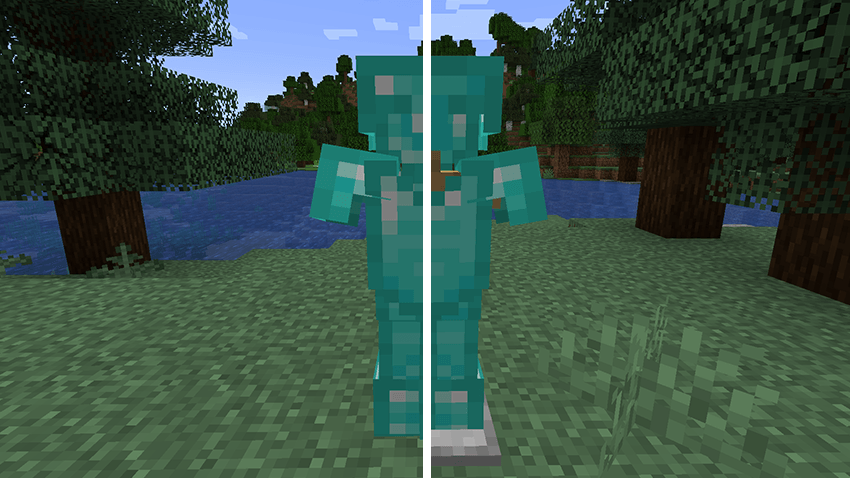
Perfect for clean armor displays, museum builds, shops, adventure maps, and decorative setups where you want floating armor or items without seeing the stand.

Features
- Hides the armor stand model completely
- Armor and held items stay visible
- Lightweight and easy to use
- Works as a simple client-side resource pack

How to use
1. Download and put the pack in your resourcepacks folder
2. Enable "Invisible Armor Stands" in Options > Resource Packs
3. Move it above other packs if needed
4. Press F3 + T in-game to reload resources (or restart the game)

Invisible Armor Stands.zip
MC 1.16.3, 1.17.1, 1.21, 1.16.1, 1.18.1, 1.14.3, 1.15, 1.16, 1.16.5, 1.19.3, 1.20.2, 1.19.4, 1.21.8, 1.14.4, 1.14.1, 1.17, 1.20.5, 1.21.5, 1.18, 1.21.4, 1.20.1, 1.20, 1.20.6
Release 2026-07-22 Get

Requirements & install

How to use this resource pack in Minecraft
Resolution
16x
Minecraft
1.20.1 – 1.21.8
Install folder
.minecraft/resourcepacks

How to install resource packs

  1. Download the resource pack .zip file (do not extract it).
  2. In Minecraft open Options → Resource Packs → Open Pack Folder.
  3. Drop the .zip into the resourcepacks folder (.minecraft/resourcepacks).
  4. Move the pack to the Selected column and click Done.
Browse more: 16x resource packs 32x resource packs 64x resource packs 128x resource packs 256x resource packs 512x+ resource packs Resource Packs for 1.21.8 All resource packs

More from Zerw

Advertisement Remove ads with Premium →

You Might Also Like