Mineuniverse
Resource Packs
IngotUI

IngotUI

RESOURCE PACK
A resource pack inspired by the upcoming OreUI.
by zeit709
Download Claim this project
709 downloads
0 likes
Updated Oct 14, 2026
0 hypes
16x Font Packs Miscellaneous Traditional
Advertisement Remove ads with Premium →


📝 Description

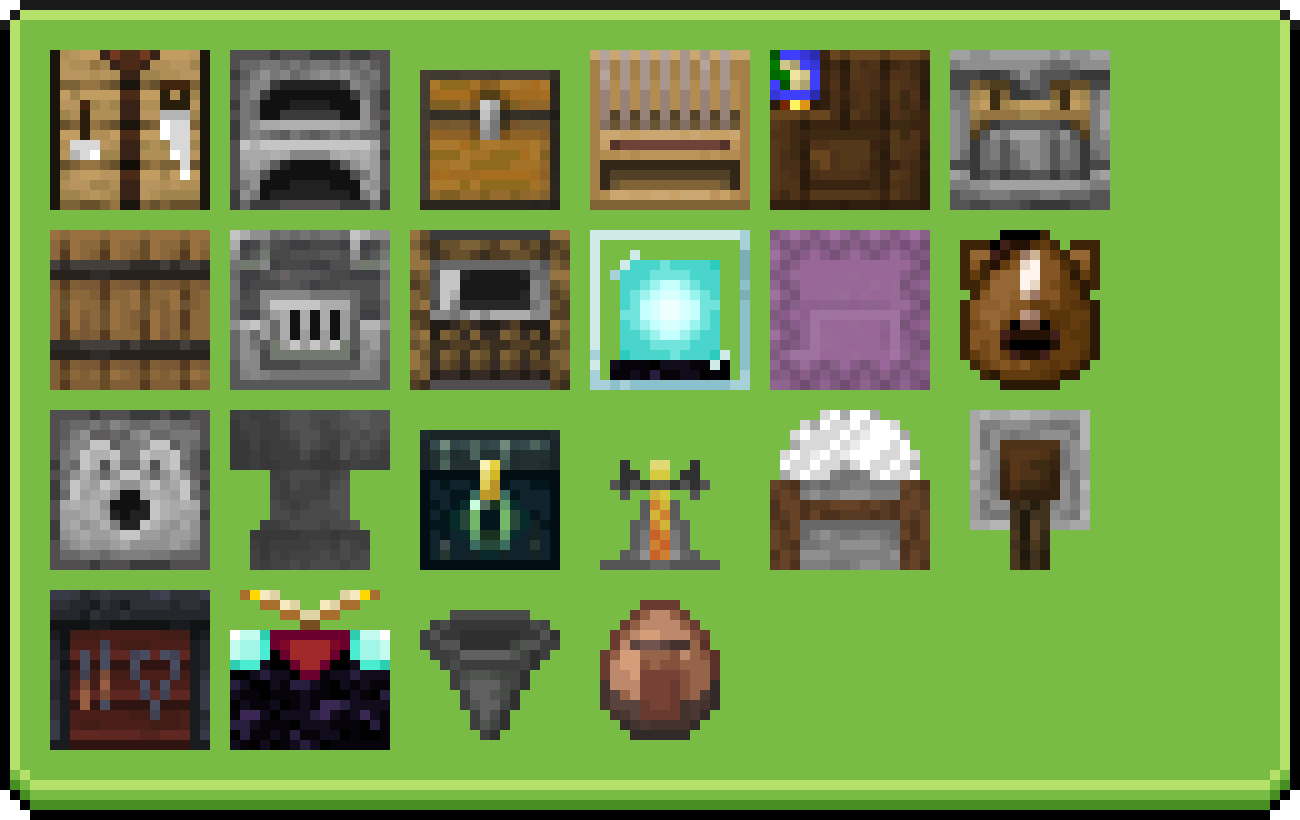
IngotUI modernizes and beautifies Minecraft’s classic interfaces, drawing inspiration from the upcoming OreUI while staying true to the game’s original style. The pack aims to redesign every GUI, giving each container a cleaner, more appealing look.

All interfaces have been updated with a focus on consistency and visual polish, without losing the vanilla feel. A key feature is the color-matched GUIs, where elements like shulker boxes adapt their interface color based on their variant.

Future updates will introduce animated elements, further enhancing immersion while maintaining a cohesive and familiar Minecraft aesthetic.

This pack requires OptiFine or OptiGUI to work properly.

What has been completed!

💡 Inspiration


⚙️ Technical specifications

  • Supported Minecraft version: 26.1 and below
  • Dependencies: Optifine or Optigui
  • Resolution: 16x

📜 Terms of Use

Downloading this content implies full knowledge of the terms and conditions listed in the license and to be bound by them. zeit709 is the only creator and owner of this project.

✅ YOU MAY:

- Modify the resource pack if it's for personal use only.
- Include this resource pack in your mod pack or server.
- Use this resource pack in forms of content such as videos, live, blog posts.
- Remix, transform, and build upon its assets in your own resource pack if credit is given.

❌ YOU MAY NOT:

- Redistribute this pack.
- Port this resource pack to work on Minecraft Bedrock, Dungeon, Legends.
- Include unedited assets in your own pack without permission.
- Include assets from this pack in a paid product.

The creator has the final say about which terms apply to your use of this pack. These terms can change.

IngotUI 2.1
MC 26.1, 26.1.1, 26.1.2, 26.2, 26.3
Release 2026-09-17 Get
IngotUI 2.1
MC 1.21.11, 26.1, 26.1.1, 26.1.2, 26.2
Release 2026-06-19 Get
IngotUI 2.0
MC 1.21.11, 26.1, 26.1.1
Release 2026-04-06 Get
IngotUI 1.3.1
MC 1.21.11
Release 2026-03-01 Get
IngotUI 1.3
MC 1.21.11
Release 2026-02-04 Get
IngotUI 1.2.3
MC 1.21.11
Release 2025-12-09 Get
IngotUI 1.2.2
MC 1.21.10
Release 2025-11-30 Get
IngotUI 1.2.1
MC 1.21.8, 1.21.7, 1.21.9, 1.21.10
Release 2025-11-20 Get
IngotUI 1.2
MC 1.21.8, 1.21.7, 1.21.9, 1.21.10
Release 2025-11-13 Get
IngotUI 1.1
MC 1.21.9, 1.21.10
Release 2025-11-09 Get
IngotUI 1.0
MC 1.21.10
Release 2025-10-29 Get
IngotUI
MC 1.21.8
Release 2025-09-11 Get

Requirements & install

How to use this resource pack in Minecraft
Resolution
16x
Minecraft
1.21.9 – 26.3
Install folder
.minecraft/resourcepacks

How to install resource packs

  1. Download the resource pack .zip file (do not extract it).
  2. In Minecraft open Options → Resource Packs → Open Pack Folder.
  3. Drop the .zip into the resourcepacks folder (.minecraft/resourcepacks).
  4. Move the pack to the Selected column and click Done.
Browse more: 16x resource packs 32x resource packs 64x resource packs 128x resource packs 256x resource packs 512x+ resource packs Resource Packs for 26.3 All resource packs

More from zeit709

Advertisement Remove ads with Premium →

You Might Also Like