Mineuniverse
Resource Packs
Info SD (In-Chat Calculator and Info)

Info SD (In-Chat Calculator and Info)

RESOURCE PACK
Provides an in-chat calculator, along with a couple other informational utilities.
by Serpent_Dagger
Download Claim this project
Add a badge to your pageLink to Info SD (In-Chat Calculator and Info) from a README, website or forum post.
Preview: Badge

Badges update automatically and link to the resource pack page on MineUniverse.

180 downloads
0 likes
0 followers
Updated Oct 14, 2026
0 hypes
Follow0
Data Packs Miscellaneous
Advertisement Remove ads with Premium →

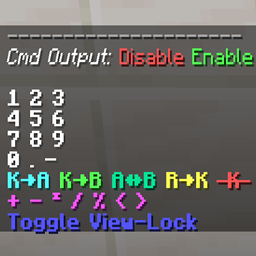
With this datapack, you can access a couple dynamic in-chat informational utilities, including a calculator with support for decimal and negative numbers, as well as some menus that can calculate a few useful in-game metrics, like fall damage and protection effectiveness.

To access these features, you simply run either "/trigger SDCalculator", or "/trigger SDInfoList", depending on what you're looking for. 

To install the datapack, just place the downloaded .zip file into your world save's "datapacks" directory. Do not unzip the file beforehand.


Known limitations, due to the juggling necessary to perform and display non-integer operations with integer scoreboard data:

  • Results on the interval (0, -1) will not display the '-' symbol because Minecraft doesn't do so with the pre-decimal value '-0'.
  • The decimal portions of numbers cannot begin with 0, because Minecraft doesn't track leading 0s. (Example: 1.01 becomes 1.1).
  • It is easy to overflow the scoreboard values with large numbers. To mitigate this, inputs are limited to at most 2 decimal places of used digits.


Here is a video demonstrating how the pack works:

info-sd.zip
MC 1.18.1, 1.18.2, 1.18
Release 2022-03-29 Get
info-sd-v1.1.2.zip
MC 1.18.1, 1.18.2, 1.18
Release 2022-03-29 Get

Requirements & install

How to use this resource pack in Minecraft
Resolution
Not specified
Minecraft
1.18 – 1.18.2
Install folder
.minecraft/resourcepacks

How to install resource packs

  1. Download the resource pack .zip file (do not extract it).
  2. In Minecraft open Options → Resource Packs → Open Pack Folder.
  3. Drop the .zip into the resourcepacks folder (.minecraft/resourcepacks).
  4. Move the pack to the Selected column and click Done.
Browse more: 16x resource packs 32x resource packs 64x resource packs 128x resource packs 256x resource packs 512x+ resource packs Resource Packs for 1.18.2 All resource packs

More from Serpent_Dagger

Advertisement Remove ads with Premium →

You Might Also Like