Mineuniverse
Resource Packs
Immersive Interfaces - Modded Storage Compat

Immersive Interfaces - Modded Storage Compat

RESOURCE PACK
Replaces vanilla container GUIs with the Immersive Interfaces Barrel GUI for Farmer's Delight, Storage Delight, Handcrafted, and Another Furniture.
by Lbostani
Download Claim this project
1,441 downloads
0 likes
Updated Oct 14, 2026
0 hypes
16x Mod Support
Advertisement Remove ads with Premium →

An unofficial addon for Immersive Interfaces that replaces default vanilla container screens with the Barrel GUI from Immersive Interfaces.
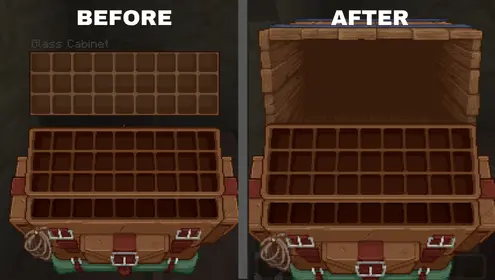
Before vs After

Note: This pack is for storage containers only (cabinets, drawers, cupboards, and baskets). For broader mod support including workstations, crafting tables, and functional blocks, check out Immersive Interfaces - Mod Support Unofficial. I created this pack specifically to add the missing container support that isn't included there!


Supported Mods

  • Farmer's Delight: Cabinets and Baskets (Supports Forge, NeoForge, Fabric & Fabricated/Refabricated)
  • Storage Delight: Drawers, Glass Cabinets, Single-Door Cabinets, Bookshelves with Doors, and Countertops
  • Handcrafted: Cupboards, Desks, Drawers, Shelves, Counters, Nightstands, and Side Tables
  • Another Furniture: Drawers

⚙️ How to Use

Requires the base Immersive Interfaces pack. Place this addon above the base pack in your Resource Packs list.
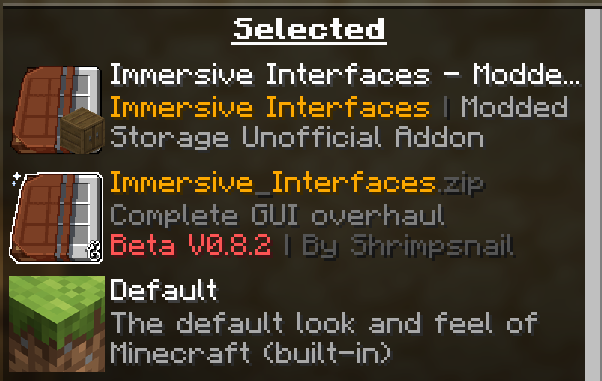

How to arrange packs

Immersive Interfaces - Modded Storage Compat.zip
MC 1.21, 1.20.2, 1.21.8, 1.20.5, 1.21.5, 1.21.4, 1.20.1, 1.20, 1.20.6, 1.21.1, 1.21.6, 1.21.3, 1.21.7, 1.20.4, 1.20.3, 1.21.2, 1.21.9, 1.21.10, 1.21.11, 26.1, 26.1.1, 26.1.2
Release 2026-08-20 Get

Requirements & install

How to use this resource pack in Minecraft
Resolution
16x
Minecraft
1.21.7 – 26.1.2
Install folder
.minecraft/resourcepacks

How to install resource packs

  1. Download the resource pack .zip file (do not extract it).
  2. In Minecraft open Options → Resource Packs → Open Pack Folder.
  3. Drop the .zip into the resourcepacks folder (.minecraft/resourcepacks).
  4. Move the pack to the Selected column and click Done.
Browse more: 16x resource packs 32x resource packs 64x resource packs 128x resource packs 256x resource packs 512x+ resource packs Resource Packs for 26.1.2 All resource packs

More from Lbostani

Advertisement Remove ads with Premium →

You Might Also Like