Close menu
Mods
Browse
Plugins
Bukkit, Spigot & Paper plugins
Maps
Adventure, parkour & survival maps
Resource Packs
Textures from 16x to 512x+
Data Packs
Vanilla-friendly game changes
Shaders
Iris & OptiFine shader packs
Mod Packs
Curated mod collections
Minecraft Versions
Everything for one version
Mod Compatibility
Find mods that work together
Search everything
Mods, packs, shaders & more
Servers
Players
Wiki
Tools
Games
Farms
More
News
How to Craft
Mob Drops
Villager Trades
Biome Spawns
Minecraft Skins
Server of the Month
App
More
News
How to Craft
Mob Drops
Villager Trades
Biome Spawns
Minecraft Skins
Server of the Month
App
Log in
Register
Log in
Register
Resource Packs
Immersive Engineering, Pam's Harvestcraft 2 - Garden Cloche Integration
RESOURCE PACK
Integrates Pam's Harvest craft trees & seeds into Immersive Engineering's garden cloche recipe list, allowing Pam's crops and trees to be grown faster than usual.
by
Rymdskora
Download
Report
Claim this project
Add a badge to your page
Link to Immersive Engineering, Pam's Harvestcraft 2 - Garden Cloche Integration from a README, website or forum post.
Card
Available
Downloads
Version
Dark
Light
Flat
Flat square
For the badge
HTML
BBCode
Markdown
Image URL
<a href="https://mineuniverse.net/resource-pack/immersive-engineering-pam-s-harvestcraft-2-garden-cloche-integration"><img src="https://mineuniverse.net/api/project-badge/immersive-engineering-pam-s-harvestcraft-2-garden-cloche-integration/card.svg" alt="Immersive Engineering, Pam's Harvestcraft 2 - Garden Cloche Integration on MineUniverse" width="420" height="110"></a>
Copy code
Badges update automatically and link to the resource pack page on MineUniverse.
627 downloads
0 likes
0 followers
Updated Oct 14, 2026
0 hypes
Follow
0
Data Packs
Mod Support
Share
Copy link
Copy for Discord
Reddit
X
Home
/
Resource Packs
/
Data Packs
/
Immersive Engineering, Pam's Harvestcraft 2 - Garden Cloche Integration
Advertisement
Remove ads with Premium →
Description
Files (2)
Screenshots (1)
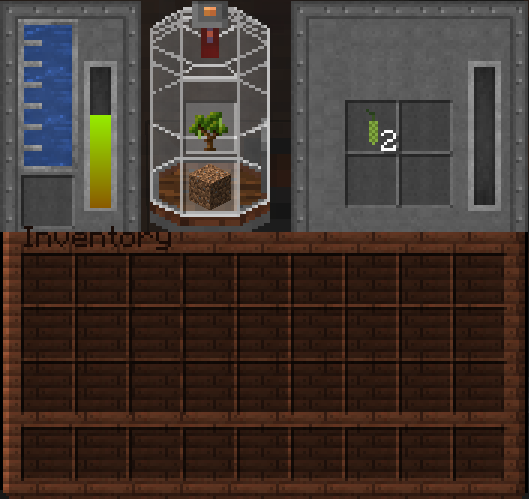
Immersive Engineering Pam's Harvestcraft 2 Garden Cloche Integration
Trees - Fully Integrated.
Use Pam's tree saplings to grow fruits and nuts (It doesn't duplicate the sapling, however hilarious that'd be.)
Sapling's grow 2 fruits or nuts per minute, I'm undecided if this overpowered as I've yet to test it.
Plants - Soon (Aka, It's not implemented.)
Use Pam's seeds to grow seeds into.. FOODS (Crazy Dave would like a word.)
Seed's grow X amount of food per X. (Again, this isn't implemented yet.)
Installation - Steps (Singleplayer.)
Navigate to .Minecraft (This can be different if you're using something like MultiMC, in which case navigate to that installation.)
Open Saves folder.
Open your world.
Open datapacks.
Unzip the zipped file into datapacks.
You are done. Congratulate yourself, however, not too much.
Installation - Steps (Multiplayer.)
Navigate to your server directory.
Find your world file, usually named "world" and open it.
Find "datapacks" in your world file.
Unzip the datapack into your server.
Type /reload in your server, or restart the server.
You are done. Congratulate yourself, however, not too much.
Current Issues
Lemon Sapling is broken, and will not produce anything. This is fixed in an unreleased version, and will be pushed with the addition of seeds.
Versions - List
This is wholly for
1.18.2
+ If you're looking for
1.16.5
crops
(not trees) I direct you to Kimiru's integration which can be found
HERE
.
Immersive_pams_cloche_integration.zip
MC 1.18.2
Beta
2022-09-29
Get
immersive_pams_1-18-2.zip
MC 1.18.2
Beta
2022-09-29
Get
Requirements & install
How to use this resource pack in Minecraft
Resolution
Not specified
Minecraft
1.18.2
Install folder
.minecraft/resourcepacks
How to install resource packs
1
Download the resource pack .zip file (do not extract it).
2
In Minecraft open Options → Resource Packs → Open Pack Folder.
3
Drop the .zip into the resourcepacks folder (.minecraft/resourcepacks).
4
Move the pack to the Selected column and click Done.
Browse more:
16x resource packs
32x resource packs
64x resource packs
128x resource packs
256x resource packs
512x+ resource packs
Resource Packs for 1.18.2
All resource packs
Advertisement
Remove ads with Premium →
Advertisement
Remove ads with Premium →
You Might Also Like
Better End Cities
Makes End Cities far more intricate, and contain more loot. All with Vanilla Blocks.
9,970,478
Quark x Farmer's Delight Bark Cutting Compat
A small datapack that provides the ability to cut Quark's wood on a Farmer's Delight cutting board
9,908,072
Enchantment Descriptions Compat
Adds enchantment descriptions for modded enchantments that are missing them!
9,710,415
Repurposed Structures - Environmental Compat Datapack
Make RS structures have Environmental blocks
976,893
Tensura: Gateways ResourceFix
A resourcepack for the Tensura: Gateways datapack
97,956
Combat x Armory Compat
utilize powerful new moves with brass's armory weapons
997
Report Mod
Reason
Malicious content
Copyright violation
Broken download
Spam
Other
Your email (optional)
Details
Cancel
Submit Report