Mineuniverse
Resource Packs
Harvester

Harvester

RESOURCE PACK
Shows which crops are ready to harvest
by Geenium
Download Claim this project
5,536 downloads
0 likes
Updated Oct 14, 2026
0 hypes
16x Miscellaneous
Advertisement Remove ads with Premium →

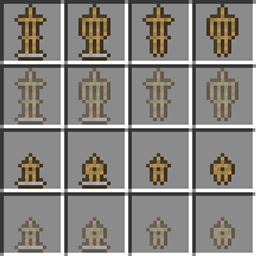
This simple resource pack shows a symbol above fully grown crops to allow you to easily see when they are ready to be harvested.

Supports wheat, carrots, potatoes, beetroots and netherwart.

This resource pack is independent of textures and will work with most other resource packs, simply ensure this resource pack is higher in the list of applied resource packs in-game for it to work properly.


Harvester.zip
MC 1.15.2
Release 2020-02-14 Get

Requirements & install

How to use this resource pack in Minecraft
Resolution
16x
Minecraft
1.15.2
Install folder
.minecraft/resourcepacks

How to install resource packs

  1. Download the resource pack .zip file (do not extract it).
  2. In Minecraft open Options → Resource Packs → Open Pack Folder.
  3. Drop the .zip into the resourcepacks folder (.minecraft/resourcepacks).
  4. Move the pack to the Selected column and click Done.
Browse more: 16x resource packs 32x resource packs 64x resource packs 128x resource packs 256x resource packs 512x+ resource packs Resource Packs for 1.15.2 All resource packs

More from Geenium

Advertisement Remove ads with Premium →

You Might Also Like