Mineuniverse
Resource Packs
GT-PBR

GT-PBR

RESOURCE PACK
This texture pack adds the PBR effect in shaders.
by urantas
Download Claim this project
1,453 downloads
0 likes
Updated Oct 14, 2026
0 hypes
16x Mod Support Photo Realistic
Advertisement Remove ads with Premium →

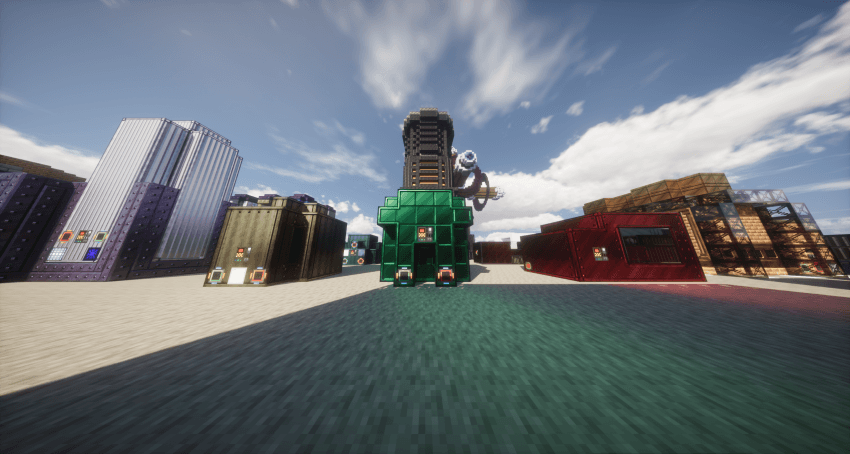
This texture pack add PBR support for GTM, currently most blocks are supported. visual performance can be checked in gallary, suggested to be used with photon, or any other ray tracing shader, complementary and solas are not recommended. POM effect turns to be bugged for photon and bliss due to the render method of GT texture, and this issue may apply to some other shaders. Dont ask question about which shader you should use to have a complete experience, find it yourself


if you cant use or detect it in game, unzip it and use it as a folder

1.0
MC 1.20.1
Release 2025-07-13 Get
GT-PBR.zip
MC 1.20.1
Release 2025-06-20 Get
GT-PBR.zip
MC 1.20.1
Release 2025-05-17 Get

Requirements & install

How to use this resource pack in Minecraft
Resolution
16x
Minecraft
1.20.1
Install folder
.minecraft/resourcepacks

How to install resource packs

  1. Download the resource pack .zip file (do not extract it).
  2. In Minecraft open Options → Resource Packs → Open Pack Folder.
  3. Drop the .zip into the resourcepacks folder (.minecraft/resourcepacks).
  4. Move the pack to the Selected column and click Done.
Browse more: 16x resource packs 32x resource packs 64x resource packs 128x resource packs 256x resource packs 512x+ resource packs Resource Packs for 1.20.1 All resource packs

More from urantas

Advertisement Remove ads with Premium →

You Might Also Like