Mineuniverse
Resource Packs
GregTech Revival 32x

GregTech Revival 32x

RESOURCE PACK
Textures of item, blocks and gui in 32x32 extension for Greg Tech, GregTech, GT
by ILAORE
Download Claim this project
1,634,226 downloads
0 likes
Updated Oct 14, 2026
0 hypes
32x Miscellaneous Mod Support Traditional
Advertisement Remove ads with Premium →

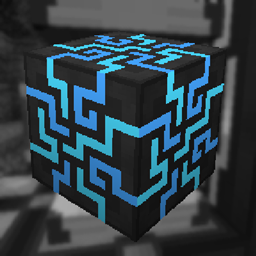
GregTech Revival 32x is a resource pack that improves the textures for the GregTechCEu Modern and Gregtech CE Unofficial mods. It makes the game more realistic by increasing the resolution of the textures to 32x32. You can see examples of the textures below.

I recommend using this resource pack with Faithful 32x for the best visual effect.

Credits:
- Faithful32 Modded: This resource pack was based on the textures for GregTech from Faithful32 Modded.
- Faithful 32x: Some textures from this pack were based on textures from Faithful 32x
- And some textures were from this resource pack. - https://github.com/marisathewitch/Faithful32-GTCEu
- And some textures were from this resource pack (for 1.7.10 version of resourcepack). - https://github.com/marisathewitch/Faithful32-GTCEu

You may also be interested in:
Improved Applied Energistics 2 - 32x32 resource pack for Applied Energistics 2
ILAORE's TFC 32x - 32x32 resource pack for TerraFirmaCraft.
Improved Create 32x - 32x32 resource pack Create

Also, if you download the version of the resource pack for 1.12.2 (if you download textures for 1.20.1, you don’t have to read what is below, you don’t need it), then if you wish, you can go to this path .minecraft\config\ gregtech open the file "gregtech.cfg"
and there in the item "The default color to overlay onto machines", and next to the description "defaultPaintingColor" change the number from 13819135 to 16777215,
this will disable the standard filter that makes the textures for mechanisms with a blue tint.
This is not necessary, but I would recommend doing it.

If you play GT New Horizons (1.7.10), then I advise you to go to the game directory then - GregTech, then Client.cfg, and there find the "machine_metal" item, and just below it, replace the default number to 255, in all three items
This will allow the textures to display and work as I intended, this will remove the blue filter



Official Faithful Website


[ver 0.26] GT Revival 32x 1.19.2-1.20.1-1.21
MC 1.21, 1.20.1, 1.21.1, 1.19.2
Release 2026-09-26 Get
[ver 0.25] GT Revival 32x 1.19.2-1.20.1-1.21
MC 1.21, 1.20.1, 1.21.1, 1.19.2
Release 2026-07-05 Get
[ver 0.24] GT Revival 32x 1.19.2-1.20.1-1.21
MC 1.21, 1.20.1, 1.21.1, 1.19.2
Release 2026-07-02 Get
[ver 0.23] GT Revival 32x 1.19.2-1.20.1-1.21
MC 1.21, 1.20.1, 1.21.1, 1.19.2
Release 2026-06-27 Get
[ver 0.22] GT Revival 32x 1.19.2-1.20.1-1.21
MC 1.21, 1.20.1, 1.21.1, 1.19.2
Release 2025-12-30 Get
[ver 0.21] GT Revival 32x 1.19.2-1.20.1-1.21
MC 1.19.2, 1.20.1, 1.21.1
Release 2025-09-25 Get
[ver 0.20] GT Revival 32x 1.19.2-1.20.1-1.21
MC 1.19.2, 1.20.1, 1.21.1
Release 2025-07-19 Get
GT Revival 32x 1.19.2-1.20.1-1.21 ver 0.19
MC 1.19.2, 1.20.1, 1.21.1
Release 2025-05-19 Get
GT Revival 32x 1.19.2-1.20.1-1.21 ver 0.18
MC 1.19.2, 1.20.1, 1.21.1
Release 2025-05-05 Get
GT Revival 32x 1.19.2-1.20.1-1.21 ver 0.17
MC 1.21, 1.19.2, 1.20.1, 1.21.1
Release 2024-11-10 Get
GregTech Revival 32x 1.19.2-1.20.1-1.21 ver 0.16
MC 1.21, 1.19.2, 1.20.1, 1.21.1
Release 2024-09-09 Get
GregTech Revival 32x 1.19.2-1.20.1-1.21 ver 0.15
MC 1.21, 1.19.2, 1.20.1, 1.21.1
Release 2024-09-06 Get
GregTech Revival 32x 1.19.2-1.20.1-1.21 ver 0.14
MC 1.21, 1.19.2, 1.20.1, 1.21.1
Release 2024-09-05 Get
GregTech Revival 32x 1.19.2-1.20.1-1.21 ver 0.13
MC 1.21, 1.19.2, 1.20.1, 1.21.1
Release 2024-08-25 Get
GregTech Revival 32x 1.7.10 ver 0.01 beta
MC 1.7.10
Beta 2024-08-19 Get
GregTech Revival 32x 1.12.2 ver 0.03
MC 1.12.2
Release 2024-08-18 Get
GregTech Revival 32x 1.19.2-1.20.1-1.21 ver 0.12
MC 1.21, 1.19.2, 1.20.1
Release 2024-07-07 Get
GregTech Revival 32x 1.19.2-1.20.1-1.21 ver 0.11
MC 1.21, 1.19.2, 1.20.1
Release 2024-06-25 Get
GregTech Revival 32x 1.19.2-1.20.1-1.21 ver 0.10
MC 1.21, 1.19.2, 1.20.1
Release 2024-05-03 Get
GregTech Revival 32x 1.19.2-1.20.1 ver 0.09
MC 1.19.2, 1.20.1
Release 2024-05-01 Get
GregTech Revival 32x 1.12.2 ver 0.02
MC 1.12.2
Release 2024-03-02 Get
GregTech Revival 32x 1.19.2-1.20.1 ver 0.08
MC 1.19.2, 1.20.1
Release 2024-02-29 Get
GregTech Revival 32x 1.12.2 ver 0.01
MC 1.12.2
Release 2024-02-28 Get
GregTech Revival 32x 1.19.2-1.20.1 ver 0.07
MC 1.19.2, 1.20.1
Release 2024-02-16 Get
GregTech Revival 32x 1.19.2-1.20.1 ver 0.06
MC 1.19.2, 1.20.1
Release 2024-02-14 Get
GregTech Revival 32x 1.19.2-1.20.1 ver 0.05
MC 1.19.2, 1.20.1
Release 2024-02-10 Get
GregTech Revival 32x 1.19.2-1.20.1 ver 0.04
MC 1.19.2, 1.20.1
Release 2024-02-02 Get
GregTech Revival 32x 1.19.2 ver 0.02
MC 1.19.2
Release 2024-01-22 Get
GregTech Revival 32x 1.20.1 ver 0.02
MC 1.20.1
Release 2024-01-22 Get
GregTech Revival 32x 1.19.2 ver 0.03
MC 1.19.2
Release 2024-01-22 Get
GregTech Revival 32x 1.20.1 ver 0.03
MC 1.20.1
Release 2024-01-22 Get
GregTech Revival 32x 1.20.1 ver 0.01
MC 1.20.1
Release 2024-01-19 Get
GregTech Revival 32x 1.19.2 ver 0.01
MC 1.19.2
Release 2024-01-19 Get

Requirements & install

How to use this resource pack in Minecraft
Resolution
32x
Minecraft
1.7.10 – 1.21.1
Install folder
.minecraft/resourcepacks

How to install resource packs

  1. Download the resource pack .zip file (do not extract it).
  2. In Minecraft open Options → Resource Packs → Open Pack Folder.
  3. Drop the .zip into the resourcepacks folder (.minecraft/resourcepacks).
  4. Move the pack to the Selected column and click Done.
Browse more: 16x resource packs 32x resource packs 64x resource packs 128x resource packs 256x resource packs 512x+ resource packs Resource Packs for 1.21.1 All resource packs

More from ILAORE

Advertisement Remove ads with Premium →

You Might Also Like