Mineuniverse
Resource Packs

Gray Slots GUI Addon for Broken Anachronism

RESOURCE PACK
Gray Slots GUI Addon for Broken Anachronism
by _ForgeUser8334405
Download Claim this project
6,919 downloads
0 likes
0 followers
Updated Oct 14, 2026
0 hypes
Follow0
Miscellaneous
Advertisement Remove ads with Premium →

IMPORTANT!: This is not a full resource pack. This is an addon for a resource pack. You cannot use this on its own, this contains only GUI. For the actual resource pack, go here: http://www.curse.com/texture-packs/minecraft/broken-anachronism-v7-64x-1-5-fo

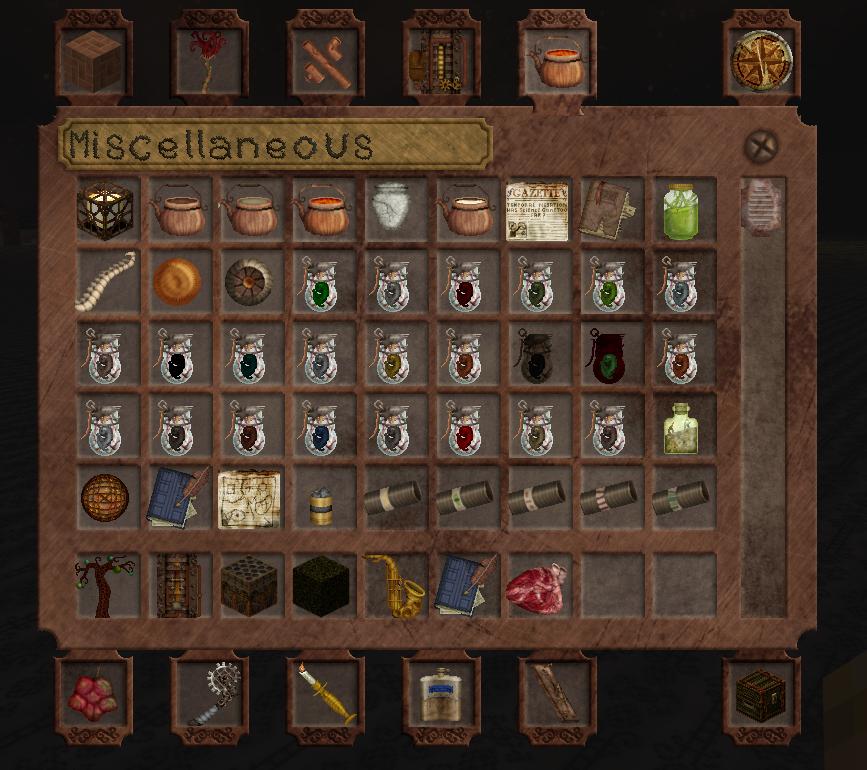
This is the gray slots GUI addon, it is for those who are colorblind or otherwise have issues with the reddish background color of inventory slots and chests and such.

To use it, download Broken Anachronism as well as this, have both packs selected with this addon above the pack itself. It will override the pack's GUI and replace it with the gray slots edition.

BA_-_Gray_Slots_Edition.zip
MC 1.7.4
Release 2014-02-14 Get
Gray_Slots_GUI_Addon_for_Broken_Anachronism.zip
MC 1.7.2
Release 2013-10-31 Get
Broken_Anachronism_v12_-_Gray_Slots_Edition.zip
MC 1.6.2
Release 2013-07-12 Get
Broken_Anachronism_v10_-_Gray_Slots_Edition.zip
MC 1.5.2
Release 2013-06-29 Get
Broken_Anachronism_Test_Pack_The_5th_-Objects.zip
MC 1.4.7
Release 2013-02-04 Get

Requirements & install

How to use this resource pack in Minecraft
Resolution
Not specified
Minecraft
1.4.7 – 1.7.4
Install folder
.minecraft/resourcepacks

How to install resource packs

  1. Download the resource pack .zip file (do not extract it).
  2. In Minecraft open Options → Resource Packs → Open Pack Folder.
  3. Drop the .zip into the resourcepacks folder (.minecraft/resourcepacks).
  4. Move the pack to the Selected column and click Done.
Browse more: 16x resource packs 32x resource packs 64x resource packs 128x resource packs 256x resource packs 512x+ resource packs Resource Packs for 1.7.4 All resource packs

More from _ForgeUser8334405

Advertisement Remove ads with Premium →

You Might Also Like