Mineuniverse
Resource Packs
Garnish's Personal GUI

Garnish's Personal GUI

RESOURCE PACK
Simple tweaks to the hotbar, experience bars, hearts, and more!
by GarnishHat
Download Claim this project
142 downloads
0 likes
Updated Oct 14, 2026
0 hypes
16x Miscellaneous Traditional
Advertisement Remove ads with Premium →

This is a resource pack that's mainly for immediate visual effects, although there's a bit more to it than that, the main purpose to it is to make the main hotbar area more appealing, at least for me personally.


A full list of everything in this resource pack is as follows:

  • Hearts (Animal, hardcore, and normal) all have been changed, as well as their effected variants (IE, if you're chilled, you get blue hearts, and if you're withered, you get black hearts)
  • Armor was made to look diagonal rather than straight
  • Hunger was adapted, so that it no longer looked like you were just eating the bone or something
  • The bubbles were changed so that they were more transparent
  • The hotbar was changed so that it was cleaner and had a gray transparency rather than a green rough one
  • The hotbar selector and offhand for left and right have been cleaned up as well ad made purple
  • The experience bar has a green background, and a purple highlight that shows up when you have experience
  • Jump bars for mobs have also been changed
  • This is fully compatible with older versions to my knowledge!! Definitely compatible with 1.20.4+, but also I added extra textures meaning it'll have something to pull from in the older versions!!

Please keep in mind that some textures didn't exist back then, for example there was no "flashing absorption heart" in the old files, so that's a perk of using modern Minecraft.

And the final thing is

  • I have also changed the main menu panorama to be the trial chambers panorama from 1.21, as I missed and love the asthetic for it personally.

The graphics are as follows (For Hardcore first, then Survival):

Please note that "default" in this context does not mean "untextured," it should mean "these are the hearts you start with no matter what, they're a fallback heart when you don't have any effects." I just used "default" for short. Thank you.
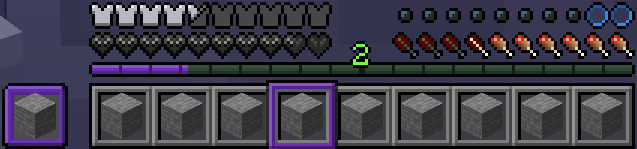
The wither effect
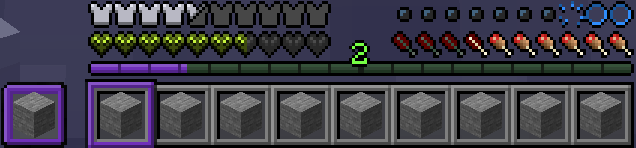
The poison effect
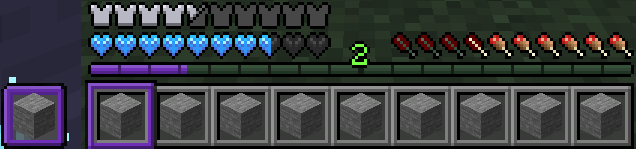
The freezing effect
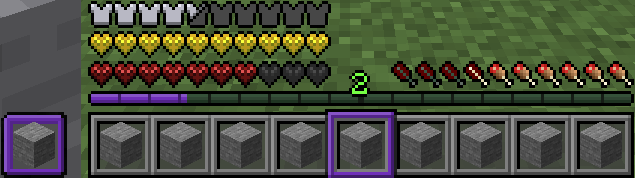
The absorption effect, along with the default red heardcore hearts


======================================================================


Here we are, heading on to the next phase: Normal (retextured).
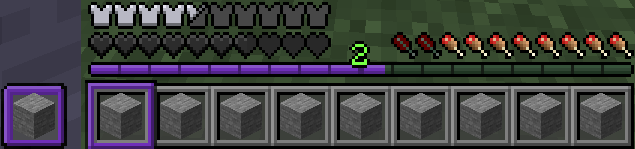
The wither effect
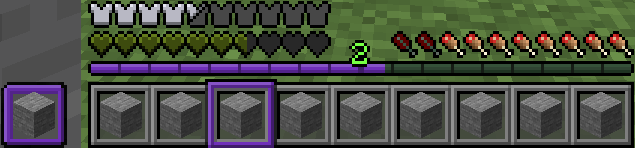
The poison effect
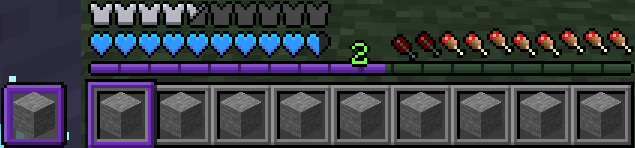
The freezing effect
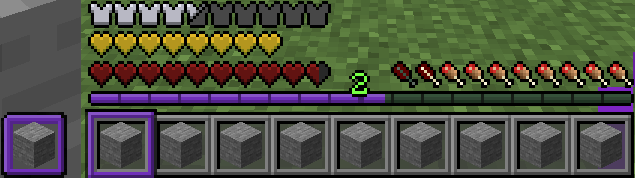
The absorption effect on survival hearts, as well as the default red survival hearts


======================================================================


And here's the final phase: Animals.
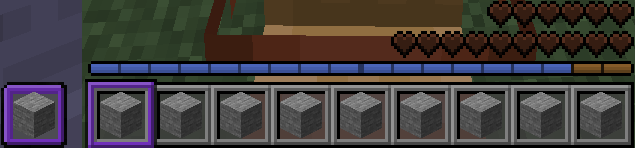

Animal hearts and fully charged jump bar
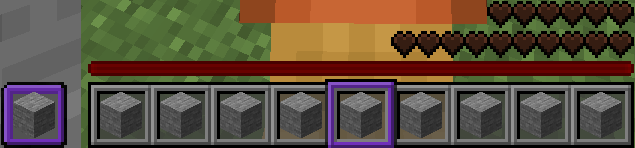
Animal hearts and cooldown bar
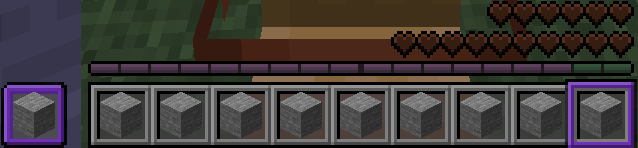
Animal hearts and jump bar background


And that's it! I hope you enjoy.

If you want to find more, my PMC is https://www.planetminecraft.com/member/garnishhat/

 

Garnish's Personal GUI
MC 1.21.2-Snapshot, 1.21, 1.21.6-snapshot, 1.21.5, 1.21.8, 1.21.1-Snapshot, 1.21.4, 1.21.5-Snapshot, 1.21-Snapshot, 1.21.3, 1.21.7, 1.21.1, 1.21.6, 1.21.4-Snapshot, 1.21.2
Release 2025-09-03 Get

Requirements & install

How to use this resource pack in Minecraft
Resolution
16x
Minecraft
1.21.4-Snapshot – 1.21.8
Install folder
.minecraft/resourcepacks

How to install resource packs

  1. Download the resource pack .zip file (do not extract it).
  2. In Minecraft open Options → Resource Packs → Open Pack Folder.
  3. Drop the .zip into the resourcepacks folder (.minecraft/resourcepacks).
  4. Move the pack to the Selected column and click Done.
Browse more: 16x resource packs 32x resource packs 64x resource packs 128x resource packs 256x resource packs 512x+ resource packs Resource Packs for 1.21.8 All resource packs

More from GarnishHat

Advertisement Remove ads with Premium →

You Might Also Like