Mineuniverse
Resource Packs
Furigana for Japanese

Furigana for Japanese

RESOURCE PACK
Learn Japanese using Minecraft!
by alex_shi7
Download Claim this project
Add a badge to your pageLink to Furigana for Japanese from a README, website or forum post.
Preview: Badge

Badges update automatically and link to the resource pack page on MineUniverse.

9,284 downloads
0 likes
0 followers
Updated Oct 14, 2026
0 hypes
Follow0
Data Packs Miscellaneous
Advertisement Remove ads with Premium →

If you're like me, video games were a big contribution in learning English.

Now, if you're still like me, you want to learn Japanese and thought about using Minecraft to learn it.


That's until you come across an endless sea of unreadable and pixelated kanji that you have to point the phone at to read.


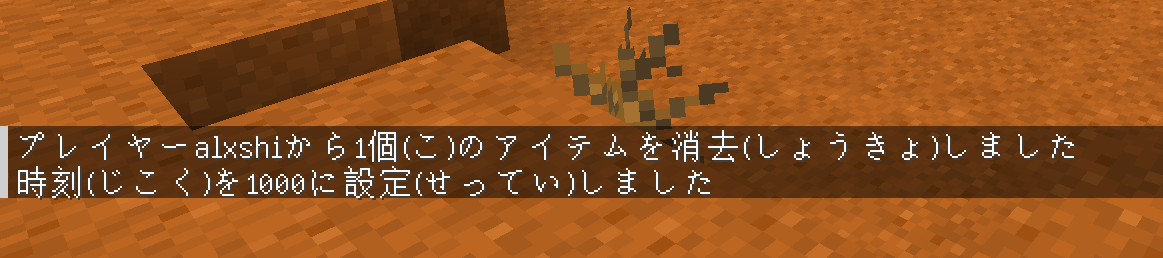
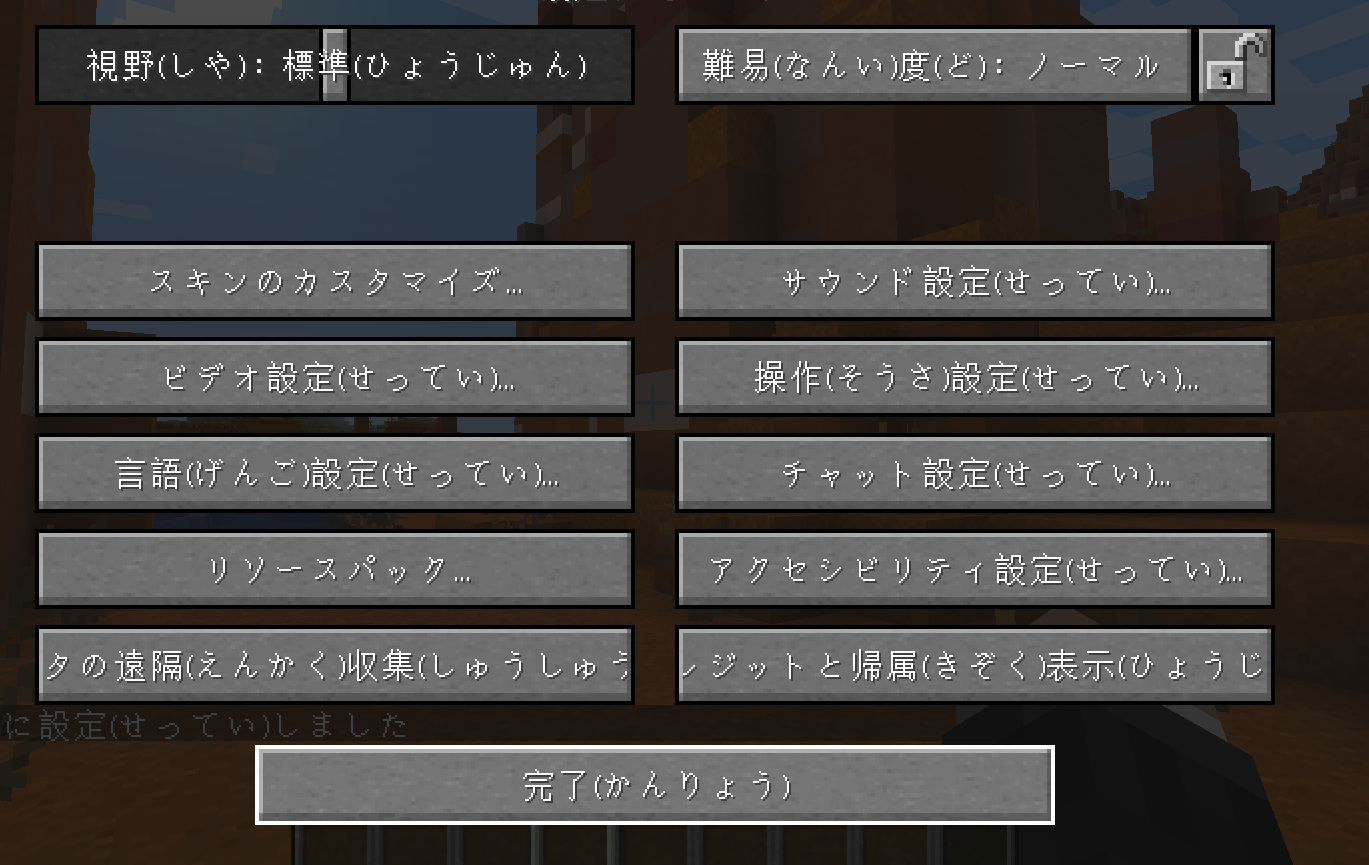
Well, I come with a solution! This resource pack adds the reading to every kanji in the game.


It comes with two styles:

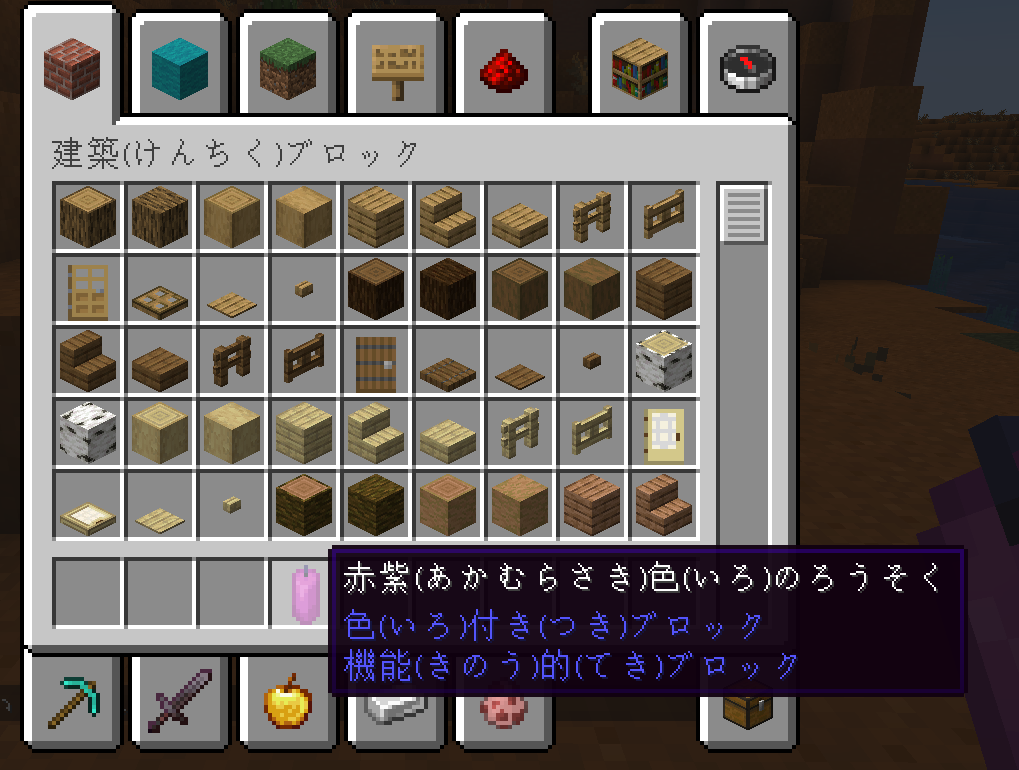
  • Word - every word in a text gets the reading added next to it. Eg: 鉄(てつ)格子(ごうし)
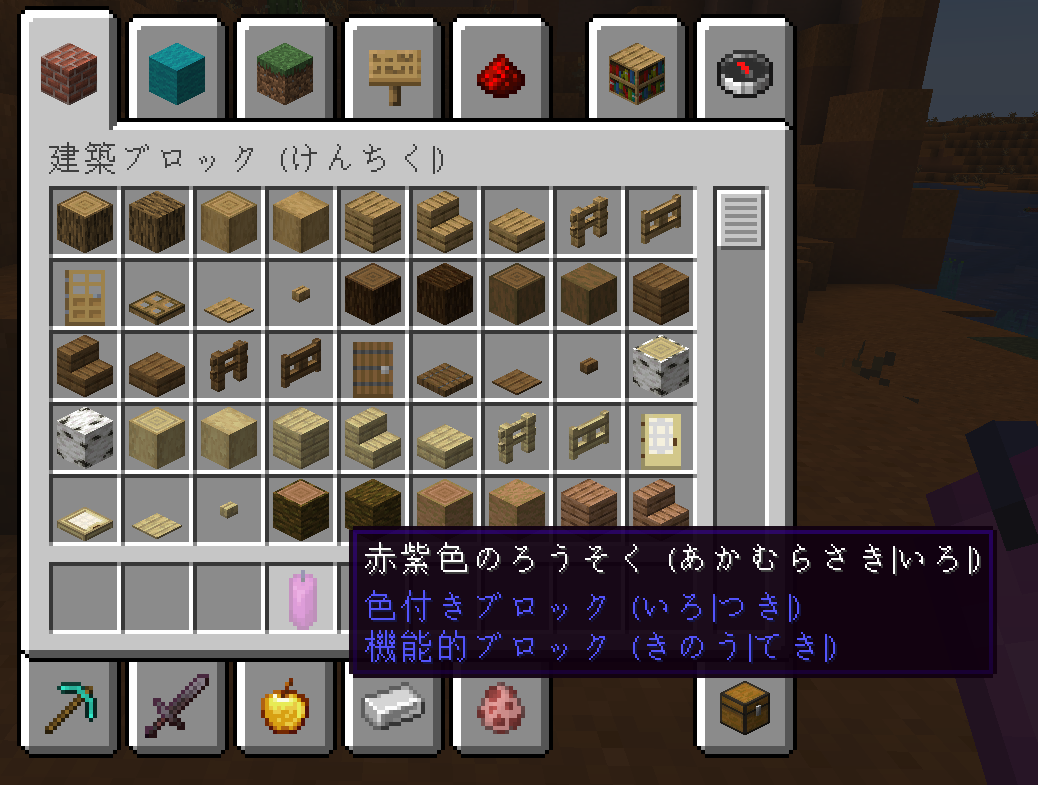
  • End - the reading of every kanji is added in the end of the text, in order of appearance. Eg: 鉄格子 (てつ|ごうし)

Important update: to ensure compatibility with Fabric, the mod now adds new languages. It does not work with the default japanese language. Also both styles are under the same file, so enabling the resource pack adds both languages.

Only works if you have your game set to the new japanese languages it adds after enabling the resource pack.

Although I only tested it for the current minecraft version, it probably works for any other, unless some text tags were removed or changed. If you find any incompatibility, let me know.


A word of caution: This pack was made using automated NLP tools. In particular, pykakasi and sudachipy. So there is a high possibility that some readings are not the most common ones, or even the ones that are correct for the given context. If you find any mistake, please report it, so I can correct it.

Thank you for awelotta and HiroTak for identifying incorrect readings!

furigana-pack.zip
MC 1.21.2-Snapshot, 1.21, 1.21.6-snapshot, 1.21.1-Snapshot, 1.21.8, 1.21.5, 1.21.4, 1.21.5-Snapshot, 1.21.1, 1.21.6, 1.21.3, 1.21.7, 1.21-Snapshot, 1.21.4-Snapshot, 1.21.2
Release 2026-09-21 Get
furigana-pack.zip
MC 1.21.2-Snapshot, 1.21, 1.21.6-snapshot, 1.21.1-Snapshot, 1.21.8, 1.21.5, 1.21.4, 1.21.5-Snapshot, 1.21.1, 1.21.6, 1.21.3, 1.21.7, 1.21-Snapshot, 1.21.4-Snapshot, 1.21.2
Release 2026-06-28 Get
furigana-pack.zip
MC 1.21.2-Snapshot, 1.21, 1.21.6-snapshot, 1.21.1-Snapshot, 1.21.8, 1.21.5, 1.21.4, 1.21.5-Snapshot, 1.21.1, 1.21.6, 1.21.3, 1.21.7, 1.21-Snapshot, 1.21.4-Snapshot, 1.21.2
Release 2026-03-29 Get
furigana-pack.zip
MC 1.16.3, 1.17.1, 1.21.2-Snapshot, 1.21, 1.21.6-snapshot, 1.16.1, 1.18.1, 1.20.2-Snapshot, 1.20.5-Snapshot, 1.16, 1.19-Snapshot, 1.21.1-Snapshot, 1.16.5, 1.19.3, 1.20.2, 1.19.4
Release 2025-11-27 Get
furigana-pack-end.zip
MC 1.21.2-Snapshot, 1.21.6-snapshot, 1.21.5, 1.21.8, 1.21.9, 1.21.10, 1.21.4, 1.21.5-Snapshot, 1.21.3, 1.21.7, 1.21.6, 1.21.4-Snapshot, 1.21.2, 1.21.9-snapshot
Release 2025-10-15 Get
furigana-pack-word.zip
MC 1.21.2-Snapshot, 1.21, 1.21.6-snapshot, 1.20.5-Snapshot, 1.21.1-Snapshot, 1.21.8, 1.20.5, 1.21.5, 1.21.4, 1.21.5-Snapshot, 1.20.6, 1.21.1, 1.21.6, 1.21.3, 1.21.7, 1.20.4
Release 2025-10-15 Get
furigana-pack-end.zip
MC 1.19.3, 1.20.2, 1.21.2-Snapshot, 1.21, 1.21.6-snapshot, 1.19.4-Snapshot, 1.20.5, 1.21.5, 1.20.2-Snapshot, 1.20.5-Snapshot, 1.19.4, 1.21.8, 1.19-Snapshot, 1.21.1-Snapshot, 1.21.4
Release 2025-07-20 Get
furigana-pack-word.zip
MC 1.19.3, 1.20.2, 1.21.2-Snapshot, 1.21, 1.21.6-snapshot, 1.19.4-Snapshot, 1.20.5, 1.21.5, 1.20.2-Snapshot, 1.20.5-Snapshot, 1.19.4, 1.21.8, 1.19-Snapshot, 1.21.1-Snapshot, 1.21.4
Release 2025-07-20 Get
furigana-pack-word.zip
MC 1.19.3, 1.20.2, 1.21.2-Snapshot, 1.21, 1.19.4-Snapshot, 1.20.5, 1.21.5, 1.20.2-Snapshot, 1.20.5-Snapshot, 1.19.4, 1.19-Snapshot, 1.21.1-Snapshot, 1.21.4, 1.21.5-Snapshot, 1.19.2
Release 2025-05-03 Get
furigana-pack-end.zip
MC 1.19.3, 1.20.2, 1.21.2-Snapshot, 1.21, 1.19.4-Snapshot, 1.20.5, 1.21.5, 1.20.2-Snapshot, 1.20.5-Snapshot, 1.19.4, 1.19-Snapshot, 1.21.1-Snapshot, 1.21.4, 1.21.5-Snapshot, 1.19.2
Release 2025-05-03 Get
furigana-pack-end.zip
MC 1.19.3, 1.20.2, 1.21.2-Snapshot, 1.21, 1.19.4-Snapshot, 1.20.5, 1.20.2-Snapshot, 1.20.5-Snapshot, 1.19.4, 1.21.1-Snapshot, 1.21.4, 1.19.2, 1.20.3-Snapshot, 1.20.3, 1.20.1, 1.20
Release 2025-02-09 Get
furigana-pack-word.zip
MC 1.19.3, 1.20.2, 1.21.2-Snapshot, 1.21, 1.19.4-Snapshot, 1.20.5, 1.20.2-Snapshot, 1.20.5-Snapshot, 1.19.4, 1.19-Snapshot, 1.21.1-Snapshot, 1.21.4, 1.19.2, 1.20.3-Snapshot, 1.20.3
Release 2025-02-09 Get
furigana-pack-end.zip
MC 1.20.2, 1.21, 1.20.5, 1.20.3, 1.20.1, 1.20, 1.20.6, 1.20.4
Release 2024-07-07 Get
furigana-pack-word.zip
MC 1.20.2, 1.21, 1.20.5, 1.20.3, 1.20.1, 1.20, 1.20.6, 1.20.4
Release 2024-07-07 Get
furigana-pack-word.zip
MC 1.16-Snapshot, 1.17.1, 1.16.3, 1.19.3, 1.16.1, 1.18.1, 1.19.4-Snapshot, 1.17, 1.16, 1.19.4, 1.19-Snapshot, 1.16.5, 1.18.2, 1.19.2, 1.20.1, 1.20, 1.19.1, 1.20-Snapshot
Release 2023-07-11 Get
furigana-pack-end.zip
MC 1.17.1, 1.19.3, 1.18.1, 1.19.4-Snapshot, 1.17, 1.19.4, 1.19-Snapshot, 1.18.2, 1.19.2, 1.20.1, 1.20, 1.19.1, 1.20-Snapshot, 1.17-Snapshot, 1.18, 1.18-Snapshot, 1.19
Release 2023-07-11 Get

Requirements & install

How to use this resource pack in Minecraft
Resolution
Not specified
Minecraft
1.21.5 – 1.21.10
Install folder
.minecraft/resourcepacks

How to install resource packs

  1. Download the resource pack .zip file (do not extract it).
  2. In Minecraft open Options → Resource Packs → Open Pack Folder.
  3. Drop the .zip into the resourcepacks folder (.minecraft/resourcepacks).
  4. Move the pack to the Selected column and click Done.
Browse more: 16x resource packs 32x resource packs 64x resource packs 128x resource packs 256x resource packs 512x+ resource packs Resource Packs for 1.21.10 All resource packs

More from alex_shi7

Advertisement Remove ads with Premium →

You Might Also Like