Mineuniverse
Resource Packs
Fuel Guide (Dark Mode)

Fuel Guide (Dark Mode)

RESOURCE PACK
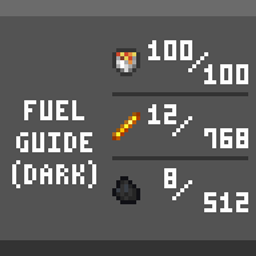
A handy fuel reference sheet for the Furnace/Smoker/BlastFurnace GUI - Now in Dark Mode!
by Abbanon
Download Claim this project
669 downloads
0 likes
0 followers
Updated Oct 14, 2026
0 hypes
Follow0
16x Miscellaneous Modern Traditional
Advertisement Remove ads with Premium →

- Fuel Guide (Dark Mode) - 

<< Now in Dark Mode! Works perfectly alongside the Vanilla Tweaks 'Dark UI' Resource Pack. >>

Downloads available for every Minecraft version from 1.15 to 1.17!

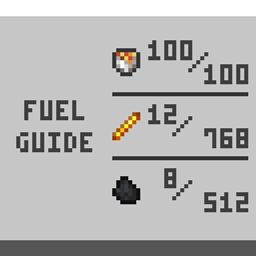
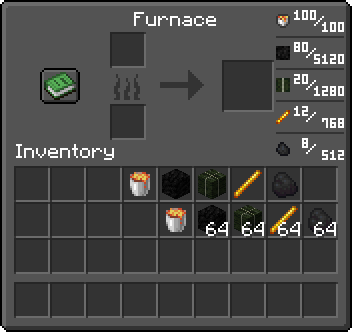
This is a simple Resource Pack that adds a small list of the top five fuel sources to the GUI of the Furnace, Blast Furnace, and Smoker.
(Bucket of Lava, Block of Coal, Dried Kelp Block, Blaze Rod, Coal/Charcoal)

It displays two numbers for each fuel type: How many items 1 piece can cook/smelt, and how many items a full stack can cook/smelt.

(Note: Bucket of Lava shows 100 for both Piece/Stack, because it cannot be stacked.)

Default version is available here!
 

Fuel Guide (Dark Mode) [1.16.2+]
MC 1.16.3, 1.16.5, 1.16.4, 1.16.2
Release 2021-04-22 Get
Fueld Guide (Dark Mode) [1.15+]
MC 1.16.1, 1.15, 1.16, 1.15.2, 1.15.1
Release 2021-04-22 Get
Fuel Guide (Dark Mode) [1.17+]
MC 1.17
Beta 2021-04-22 Get

Requirements & install

How to use this resource pack in Minecraft
Resolution
16x
Minecraft
1.15.2 – 1.17
Install folder
.minecraft/resourcepacks

How to install resource packs

  1. Download the resource pack .zip file (do not extract it).
  2. In Minecraft open Options → Resource Packs → Open Pack Folder.
  3. Drop the .zip into the resourcepacks folder (.minecraft/resourcepacks).
  4. Move the pack to the Selected column and click Done.
Browse more: 16x resource packs 32x resource packs 64x resource packs 128x resource packs 256x resource packs 512x+ resource packs Resource Packs for 1.17 All resource packs

More from Abbanon

Advertisement Remove ads with Premium →

You Might Also Like