Mineuniverse
Resource Packs
Flowers & Wishes - Soundpack

Flowers & Wishes - Soundpack

RESOURCE PACK
Adds (does not replace) new whimsical music to Minecraft from the Song of Flowers and Wishes!
by Kenevy
Download Claim this project
Add a badge to your pageLink to Flowers & Wishes - Soundpack from a README, website or forum post.
Preview: Badge

Badges update automatically and link to the resource pack page on MineUniverse.

90 downloads
0 likes
0 followers
Updated Oct 14, 2026
0 hypes
Follow0
Data Packs
Advertisement Remove ads with Premium →

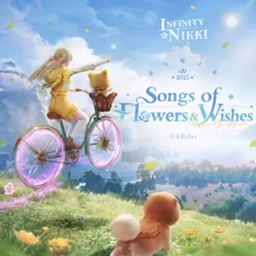
This resource pack adds 43 new songs to Minecraft. 
(DOES NOT REPLACE THE ORIGINAL SOUNDTRACK)

The song pack is focused on whimsy and lighter gameplay; the OST is from Infinity Nikki, specifically chapter 1 - The Song Of Flowers & Wishes. If you've never played the game, it's a dress-up game mostly focused on "girly" content, and it has a beautifully atmospheric soundtrack. A few of the tracks might be a bit darker or gloomier, but they've been configured to play only on darker biomes like the Deep Dark or Soul Sand Valley!

The game has a tremendous amount of music, but I do plan on building a soundtrack for every single expansion pack with time (it takes hours to listen to each song and map them to a biome). This is mostly targeted toward my own use, so by default I'll only make packs for the versions of the game I use. If you want a specific version, do leave it in the comments and I'll eventually get to updating it!

[1.21.1] BGM-FlowersAndWishes.zip
MC 1.21.1
Release 2026-07-31 Get
[1.18.2] BGM-FlowersAndWishes.zip
MC 1.18.2
Release 2026-07-19 Get
[1.7.10] BGM-FlowersAndWishes.zip
MC 1.7.10
Release 2026-07-19 Get

Requirements & install

How to use this resource pack in Minecraft
Resolution
Not specified
Minecraft
1.7.10 – 1.21.1
Install folder
.minecraft/resourcepacks

How to install resource packs

  1. Download the resource pack .zip file (do not extract it).
  2. In Minecraft open Options → Resource Packs → Open Pack Folder.
  3. Drop the .zip into the resourcepacks folder (.minecraft/resourcepacks).
  4. Move the pack to the Selected column and click Done.
Browse more: 16x resource packs 32x resource packs 64x resource packs 128x resource packs 256x resource packs 512x+ resource packs Resource Packs for 1.21.1 All resource packs

More from Kenevy

Advertisement Remove ads with Premium →

You Might Also Like