Mineuniverse
Resource Packs
Firewolf 3D x128

Firewolf 3D x128

RESOURCE PACK
A 3D texture pack with smooth realistic textures based on vanilla
by Keitsu42
Download Claim this project
1,753,134 downloads
0 likes
Updated Oct 14, 2026
0 hypes
128x Miscellaneous Mod Support Traditional
Advertisement Remove ads with Premium →

House

Firewolf by Keistu is licensed under a Creative Commons Attribution 4.0 International License.

Description

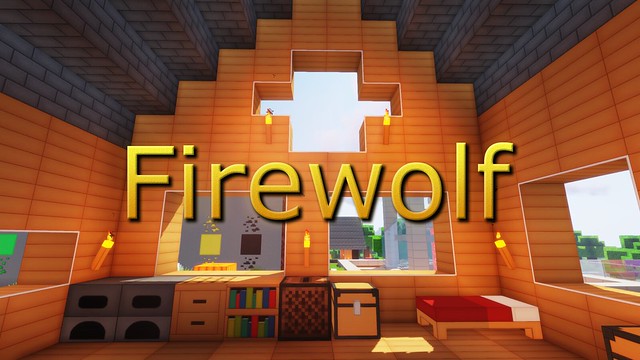
Firewolf is a 128x HD resource pack. It uses sharp and smooth textures that are easy on the eyes to make Minecraft look more realistic while still keeping most of the textures true to vanilla.

★ Over 300 custom textures
★ 3D models for doors, ladders and rails
★ Connecting textures for glass and stained glass
★ More vibrant grass and foliage
★ HD user interface (under development)

Compatible with Minecraft versions 1.9, 1.10, 1.11, 1.12, 1.13, 1.14, 1.15, 1.16 and 1.17

Recommended Add-ons

Bedrock Edition

A bedrock edition exists which can be downloaded here.

Social

- Facebook page

Featured Video

[1.17] Firewolf v1.85
MC 1.17.1, 1.17, 1.17-Snapshot
Release 2021-10-09 Get
[1.17] Firewolf v1.84
MC 1.17, 1.17-Snapshot
Release 2021-06-14 Get
1.8 Compatibility Patch
MC 1.8.7, 1.8.4, 1.8.8, 1.8-Snapshot, 1.8.3, 1.8.6, 1.8, 1.8.2, 1.8.5, 1.8.9, 1.8.1
Beta 2021-06-11 Get
[1.16] Firewolf v1.83
MC 1.16-Snapshot, 1.16.3, 1.16.1, 1.16, 1.16.5, 1.16.4, 1.16.2
Release 2021-05-29 Get
[1.16] Firewolf v1.82
MC 1.16-Snapshot, 1.16.3, 1.16.1, 1.16, 1.16.5, 1.16.4, 1.16.2
Release 2021-04-26 Get
[1.14] Firewolf v1.81
MC 1.16-Snapshot, 1.16.3, 1.13.1, 1.15-Snapshot, 1.16.1, 1.14.4, 1.14.1, 1.14.3, 1.15, 1.16, 1.13, 1.16.5, 1.15.2, 1.14, 1.16.4, 1.14.2, 1.16.2, 1.13-Snapshot, 1.14-Snapshot
Release 2021-04-07 Get
[1.14] Firewolf v1.80
MC 1.13.1, 1.14.4, 1.14.1, 1.14.3, 1.13, 1.14, 1.14.2, 1.13-Snapshot, 1.14-Snapshot, 1.13.2
Release 2019-07-23 Get
[1.14] Firewolf v1.79
MC 1.13.1, 1.14.1, 1.14.3, 1.13, 1.14, 1.14.2, 1.13-Snapshot, 1.14-Snapshot, 1.13.2
Release 2019-07-17 Get
[1.14] Firewolf v1.78
MC 1.13.1, 1.14.1, 1.14.3, 1.13, 1.14, 1.14.2, 1.13-Snapshot, 1.14-Snapshot, 1.13.2
Release 2019-06-19 Get
[1.14] Firewolf v1.77
MC 1.13.1, 1.14.1, 1.13, 1.14, 1.14.2, 1.13-Snapshot, 1.14-Snapshot, 1.13.2
Release 2019-06-02 Get
[1.12] Firewolf v1.74
MC 1.9.1, 1.9.3, 1.10-Snapshot, 1.9.4, 1.9.2, 1.12.1, 1.12, 1.10.2, 1.11, 1.10, 1.10.1, 1.9-Snapshot, 1.11.1, 1.11.2, 1.9, 1.11-Snapshot, 1.12.2, 1.12-Snapshot
Release 2019-03-25 Get
[1.13] Firewolf v1.76
MC 1.13.1, 1.13, 1.13-Snapshot, 1.13.2
Release 2019-03-25 Get

Requirements & install

How to use this resource pack in Minecraft
Resolution
128x
Minecraft
1.16.1 – 1.17.1
Install folder
.minecraft/resourcepacks

How to install resource packs

  1. Download the resource pack .zip file (do not extract it).
  2. In Minecraft open Options → Resource Packs → Open Pack Folder.
  3. Drop the .zip into the resourcepacks folder (.minecraft/resourcepacks).
  4. Move the pack to the Selected column and click Done.

Packs from 128x upwards need more video memory: install a performance mod such as Sodium for smooth frame rates.

Browse more: 16x resource packs 32x resource packs 64x resource packs 128x resource packs 256x resource packs 512x+ resource packs Resource Packs for 1.17.1 All resource packs

More from Keitsu42

Advertisement Remove ads with Premium →

You Might Also Like