Mineuniverse
Resource Packs
Fierce Deity Sword to True Master Sword Retexture

Fierce Deity Sword to True Master Sword Retexture

RESOURCE PACK
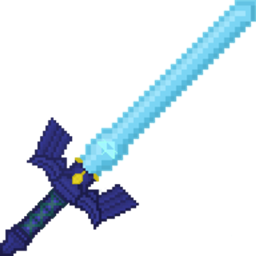
Changes the texture of the Fierce Deity Sword to resemble the Awakened Master Sword from BotW
by gabejr25
Download Claim this project
Add a badge to your pageLink to Fierce Deity Sword to True Master Sword Retexture from a README, website or forum post.
Preview: Badge

Badges update automatically and link to the resource pack page on MineUniverse.

5,859 downloads
0 likes
0 followers
Updated Oct 14, 2026
0 hypes
Follow0
16x Medieval Miscellaneous
Advertisement Remove ads with Premium →

True Master Sword

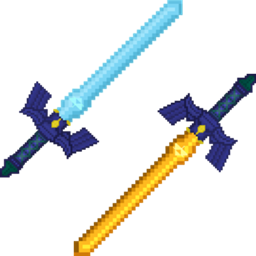
This is a retexture of the Fierce Deity Sword from the Zelda, Legend of the Master Sword mod by Mezimaru. This resource pack changes the texture of the Fierce Deity Sword to resemble that of the Awakened Master Sword from Breath of the Wild, and renames it to, "True Master Sword" as a reference to Skyward Sword.


This resource pack is mutually exclusive with my Blue Hilt Golden Master Sword retexture. If both are downloaded individually it will overwrite the others texture depending on the load order of the resource packs. The textures for the other weapon in each resource pack are untouched so to give people the choice of whether they want only one or the other, however there is a pack with both textures included in one if anyone wants both at the same time. If you want to use both this and the "Blue Hilt Golden Master Sword" textures at once, then the Blue Hilt Golden Master Sword and True Master Sword Retexture Combo Pack is available to use. 


3rd Person View of the True Master Sword

1st Person view of the True Master Sword

Item View of the True Master Sword

FierceDeity-to-TrueMasterSword.zip
MC 1.20.1
Release 2024-01-22 Get
FierceDeity-to-TrueMasterSword.zip
MC 1.20.1
Release 2024-01-06 Get

Requirements & install

How to use this resource pack in Minecraft
Resolution
16x
Minecraft
1.20.1
Install folder
.minecraft/resourcepacks

How to install resource packs

  1. Download the resource pack .zip file (do not extract it).
  2. In Minecraft open Options → Resource Packs → Open Pack Folder.
  3. Drop the .zip into the resourcepacks folder (.minecraft/resourcepacks).
  4. Move the pack to the Selected column and click Done.
Browse more: 16x resource packs 32x resource packs 64x resource packs 128x resource packs 256x resource packs 512x+ resource packs Resource Packs for 1.20.1 All resource packs

More from gabejr25

Advertisement Remove ads with Premium →

You Might Also Like