Mineuniverse
Resource Packs
FerreMcDurabilityOverlay

FerreMcDurabilityOverlay

RESOURCE PACK
This Pack shows the durability of armour.
by Player162584
Download Claim this project
7,959 downloads
0 likes
Updated Oct 14, 2026
0 hypes
16x Data Packs Mod Support Modern
Advertisement Remove ads with Premium →

🛡️ FerreMcDurabilityOverlay – Armor Durability Visualizer

Designed with PvP combat in mind, this resource pack provides a clear visual representation of your armor's durability, helping you make informed decisions during intense battles.

🔧 Features:

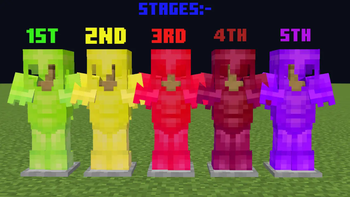
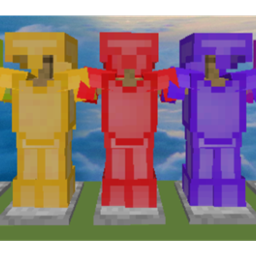
Dynamic Armor Textures: Armor textures change color based on durability levels:

  • 🟩 Green (80%–100%): Slightly worn

  • 🟨 Yellow (60%–79%): Moderately damaged

  • 🟥 Red (40%–59%): Significantly damaged

  • 🟥 Dark Red (20%–39%): Critical condition

  • 🟪 Purple (0%–19%): Broken

  • PvP Focused: Ideal for PvP scenarios, providing immediate visual cues to assess armor status during combat.

  • Compatibility: Designed for use with CIT Resewn on Fabric or Optifine.

  • Supported Armor Types: Applicable to Diamond and Netherite armor sets.

FMDO.zip
MC 1.21, 1.20.2, 1.21.8, 1.20.5, 1.21.5, 1.21.4, 1.20.1, 1.20, 1.20.6, 1.21.1, 1.21.6, 1.21.3, 1.21.7, 1.20.4, 1.20.3, 1.21.2, 1.21.9, 1.21.10, 1.21.11
Release 2026-01-19 Get

Requirements & install

How to use this resource pack in Minecraft
Resolution
16x
Minecraft
1.21.4 – 1.21.11
Install folder
.minecraft/resourcepacks

How to install resource packs

  1. Download the resource pack .zip file (do not extract it).
  2. In Minecraft open Options → Resource Packs → Open Pack Folder.
  3. Drop the .zip into the resourcepacks folder (.minecraft/resourcepacks).
  4. Move the pack to the Selected column and click Done.
Browse more: 16x resource packs 32x resource packs 64x resource packs 128x resource packs 256x resource packs 512x+ resource packs Resource Packs for 1.21.11 All resource packs

More from Player162584

Advertisement Remove ads with Premium →

You Might Also Like