Mineuniverse
Resource Packs
Faithful Tweaks

Faithful Tweaks

RESOURCE PACK
Small tweaks to Vattic's Faithful 32x
by Xarfram
Download Claim this project
14,673 downloads
0 likes
0 followers
Updated Oct 14, 2026
0 hypes
Follow0
32x Miscellaneous Traditional
Advertisement Remove ads with Premium →


This pack is an addon for Faithful x32 by Vattic and xMrVizzy. It is designed to change many small things about the game, while still keeping the default style. This was inspired by Xisumavoid's Vanilla Tweaks. I will add more textures as I find time.


Feel free to use this in a video, just provide a link here and don't claim it as your own.


For Vattic and xMrVizzy's Faithful, click here.

For Xisuma's Vanilla Tweaks, click here.


Important! Installation Instructions

  • This pack is in a modular  format - to install, simply copy the zip files within the download into your resource pack folder; each individual feature is its own mini-resource pack that can be individually enabled/disabled
  • Otherwise, just leave the download in your resource pack folder - it will function as a normal resource pack with every module


Future Plans

  • Create cobbled versions of the three stone versions
  • Put slime on the sides of sticky pistons
  • 3D modeling?
  • Make some sounds quieter
  • And a ton more!

Module List (as of 1.6)

  • Black Nether Brick
  • Clean Glass
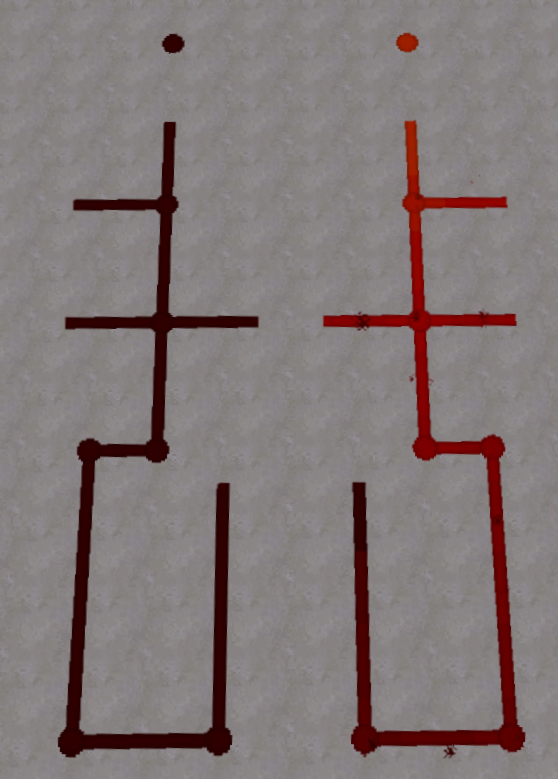
  • Clean Redstone
  • Clean Stained Glass
  • Dark Granite
  • Dark Granite Bricks
  • Lower Grass
  • Lower Mycelium
  • Lower Paths
  • Lower Podzol
  • Lower Snow
  • Grass Sides
  • Mycelium Sides
  • Path Sides
  • Podzol Sides
  • Snow Sides
  • Polished Stone Bricks
  • Redstoner's Wool
  • Sideways Nuggets
  • Smooth Stone Slabs
  • Super Clean Glass
  • Whiter Concrete
Faithful Tweaks 1.6
MC 1.13.1, 1.13
Release 2018-10-08 Get
Faithful Tweaks 1.5
MC 1.13, 1.13-Snapshot
Release 2018-08-01 Get
Faithful Tweaks 1.4
MC 1.12.1, 1.12, 1.11, 1.11.1, 1.11.2, 1.12.2, 1.12-Snapshot
Release 2018-05-05 Get
Faithful Tweaks 1.3
MC 1.12.1, 1.12, 1.11, 1.11.1, 1.11.2, 1.12.2, 1.12-Snapshot
Release 2018-02-04 Get
Faithful Tweaks 1.3.1
MC 1.12.1, 1.12, 1.11, 1.11.1, 1.11.2, 1.12.2, 1.12-Snapshot
Release 2018-02-04 Get
Faithful Tweaks 1.3.2
MC 1.12.1, 1.12, 1.11, 1.11.1, 1.11.2, 1.12.2, 1.12-Snapshot
Release 2018-02-04 Get
Faithful Tweaks MODULAR 1.2
MC 1.12.1, 1.12, 1.11, 1.11.1, 1.11.2, 1.12.2, 1.12-Snapshot
Release 2017-10-13 Get
Faithful Tweaks 1.1
MC 1.12.1, 1.12, 1.11, 1.11.1, 1.11.2, 1.12.2, 1.12-Snapshot
Release 2017-07-29 Get
Faithful Tweaks 1.0
MC 1.12.1, 1.12, 1.11, 1.11.1, 1.11.2, 1.12.2, 1.12-Snapshot
Release 2017-07-23 Get

Requirements & install

How to use this resource pack in Minecraft
Resolution
32x
Minecraft
1.11.2 – 1.13.1
Install folder
.minecraft/resourcepacks

How to install resource packs

  1. Download the resource pack .zip file (do not extract it).
  2. In Minecraft open Options → Resource Packs → Open Pack Folder.
  3. Drop the .zip into the resourcepacks folder (.minecraft/resourcepacks).
  4. Move the pack to the Selected column and click Done.
Browse more: 16x resource packs 32x resource packs 64x resource packs 128x resource packs 256x resource packs 512x+ resource packs Resource Packs for 1.13.1 All resource packs

More from Xarfram

Advertisement Remove ads with Premium →

You Might Also Like