Mineuniverse
Resource Packs
F+ PVP - Combat focused Faithful x32 add-on

F+ PVP - Combat focused Faithful x32 add-on

RESOURCE PACK
Essential PVP features for Faithful x32 | 1.8 / 1.12 / 1.18 / 1.19
by sasos__
Download Claim this project
Add a badge to your pageLink to F+ PVP - Combat focused Faithful x32 add-on from a README, website or forum post.
Preview: Badge

Badges update automatically and link to the resource pack page on MineUniverse.

430,322 downloads
0 likes
0 followers
Updated Oct 14, 2026
0 hypes
Follow0
32x Miscellaneous Traditional
Advertisement Remove ads with Premium →

This project has been discontinued.

Firstly, thanks to all of you for supporting 'F+ PVP' over the years. It was fantastic working on this project for this long but now it has become a burden for me since I lack the motivation to work on it like I used to. Not to mention that you can find dozens of addons on the Faithful website to make your own version of 'F+ PVP'.

This project will most likely never get a new release. Thank you all again.


F+ PVP is a simple add-on for Faithful 32x with well known PVP features:

  • Smaller, thinner swords
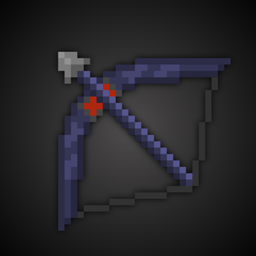
  • Colored bow and crossbow stages
  • Darker armor and horse armor textures
  • Transparent GUI
  • Slightly recolored items
  • Lower fire effect
  • New ore textures
  • Modified destroy effect
  • Removed pumpkin blur
  • Better underwater vision
  • Optifine features*
        (XP orb, durability status etc.)
  • New particles
  • More visible footprint

*You must install Optifine for these features!

New releases will be available for 1.8 / 1.12 / 1.19


How to use F+ PVP

  • Download Faithful 32x
  • Use F+ PVP 32x and Faithful 32x at the same time
  • Select the resource packs in this order:

Customize F+ PVP with various add-ons!


This is an add-on for Faithful 32x, textures are based on the original Resource pack. Check out the official Faithful website.
This CurseForge project is the only official source of F+ PVP. Reuploads on other sites have no connection with me.


F+ PVP v2.4 for 1.19.4
MC 1.19.4
Release 2023-03-15 Get
F+ PVP v2.4 for 1.19.3
MC 1.19.3
Release 2022-12-25 Get
F+ PVP v2.4 for 1.19
MC 1.19.2, 1.19.1, 1.19
Release 2022-07-02 Get
F+ PVP v2.4 for 1.8.x
MC 1.8.7, 1.8.4, 1.8.8, 1.8.3, 1.8.6, 1.8, 1.8.2, 1.8.5, 1.8.9, 1.8.1
Release 2022-02-12 Get
F+ PVP v2.4 for 1.12.x
MC 1.12.1, 1.12, 1.12.2
Release 2022-02-12 Get
F+ PVP v2.4 for 1.18.x
MC 1.18.1, 1.18.2, 1.18
Release 2022-02-12 Get
F+ PVP 2.3 for 1.17
MC 1.17
Release 2021-06-13 Get
F+ PVP v2.3 for 1.8.x
MC 1.8.7, 1.8.4, 1.8.8, 1.8.3, 1.8.6, 1.8, 1.8.2, 1.8.5, 1.8.9, 1.8.1
Release 2021-03-14 Get
F+ PVP v2.3 for 1.12.x
MC 1.12.1, 1.12, 1.12.2
Release 2021-03-14 Get
F+ PVP v2.3 for 1.16.2+
MC 1.16.3, 1.16.5, 1.16.4, 1.16.2
Release 2021-03-14 Get
F+ PVP v2.2 for 1.8.x
MC 1.8.7, 1.8.4, 1.8.8, 1.8.3, 1.8.6, 1.8, 1.8.2, 1.8.5, 1.8.9, 1.8.1
Release 2021-01-29 Get
F+ PVP v2.2 for 1.12.x
MC 1.12.1, 1.12, 1.12.2
Release 2021-01-29 Get
F+ PVP v2.2 for 1.16.2+
MC 1.16.3, 1.16.5, 1.16.4, 1.16.2
Release 2021-01-29 Get
F+ PVP v2.1 for 1.8.x
MC 1.8.7, 1.8.4, 1.8.8, 1.8.3, 1.8.6, 1.8, 1.8.2, 1.8.5, 1.8.9, 1.8.1
Release 2020-12-07 Get
F+ PVP v2.1 for 1.12.x
MC 1.12.1, 1.12, 1.12.2
Release 2020-12-07 Get
F+ PVP v2.1 for 1.16.2+
MC 1.16.3, 1.16.4, 1.16.2
Release 2020-12-07 Get
F+ PVP v2 for 1.8.x
MC 1.8.7, 1.8.4, 1.8.8, 1.8.3, 1.8.6, 1.8, 1.8.2, 1.8.5, 1.8.9, 1.8.1
Release 2020-11-08 Get
F+ PVP v2 for 1.12.x
MC 1.12.1, 1.12, 1.12.2
Release 2020-11-08 Get
F+ PVP v2.0.1 for 1.16.2+
MC 1.16.3, 1.16.4, 1.16.2
Release 2020-11-08 Get
F+ PVP v1.12.1 for 1.8.x
MC 1.8.7, 1.8.4, 1.8.8, 1.8.3, 1.8.6, 1.8, 1.8.2, 1.8.5, 1.8.9, 1.8.1
Release 2020-10-27 Get
F+ PVP v1.3 for 1.16.2+
MC 1.16.3, 1.16.4, 1.16.2
Release 2020-10-27 Get
F+ PVP v1.8 for 1.12.x
MC 1.12.1, 1.12, 1.12.2
Release 2020-10-25 Get

Requirements & install

How to use this resource pack in Minecraft
Resolution
32x
Minecraft
1.18 – 1.19.4
Install folder
.minecraft/resourcepacks

How to install resource packs

  1. Download the resource pack .zip file (do not extract it).
  2. In Minecraft open Options → Resource Packs → Open Pack Folder.
  3. Drop the .zip into the resourcepacks folder (.minecraft/resourcepacks).
  4. Move the pack to the Selected column and click Done.
Browse more: 16x resource packs 32x resource packs 64x resource packs 128x resource packs 256x resource packs 512x+ resource packs Resource Packs for 1.19.4 All resource packs

More from sasos__

Advertisement Remove ads with Premium →

You Might Also Like