Mineuniverse
Resource Packs
Epic Knights – Shield Tweaks

Epic Knights – Shield Tweaks

RESOURCE PACK
Adjusts Epic Knights shields with improved visuals.
by Fahrail
Download Claim this project
3,166 downloads
0 likes
0 followers
Updated Oct 14, 2026
0 hypes
Follow0
16x Medieval Miscellaneous
Advertisement Remove ads with Premium →

This resource pack adjusts shield positioning and scaling for Epic Knights, Epic Knights: Antique Legacy, and the Vanilla Minecraft shield. Shields have been lowered and resized to reduce how much of the screen they cover while blocking, along with minor inventory and GUI adjustments for a more consistent appearance.

Included Shields

Epic Knights

  • Elliptical Shield
  • Heater Shield
  • Pavese Shield
  • Rondache Shield
  • Round Shield
  • Tartsche Shield
  • Kite Shield
  • Targe Shield
  • Buckler Shield
  • Corrupted Round Shield

Epic Knights: Antique Legacy

  • Pelta
  • Hoplon
  • Tureos
  • Imperial Scutum
  • Republic Scutum

Adjustments

  • Lowered first-person shield positions while blocking
  • Improved first-person visibility
  • Adjusted shield scaling for a less intrusive experience
  • Tweaked inventory and GUI display positions
  • Consistent positioning across supported shields
  • Maintains the original shield designs and textures

Examples

Before — The default Epic Knights heater shield blocks more of the screen.
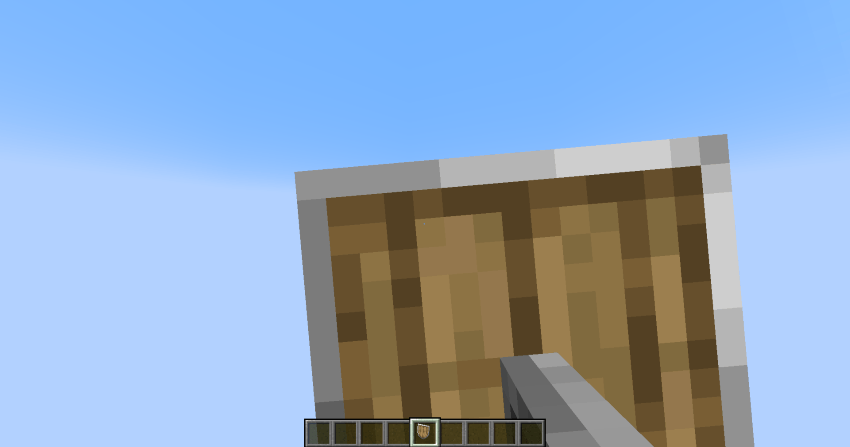
Before (blocking

After — The adjusted heater shield offers better visibility while blocking.
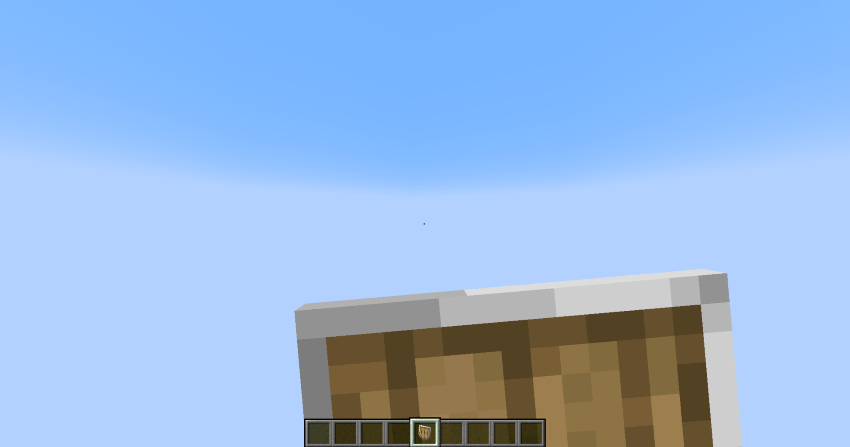
After (blocking)

Before — Shields use the default inventory positioning and scale.
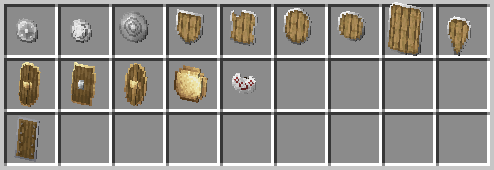
Before (default)

After — Adjusted shields for improved alignment, scaling, and consistency.
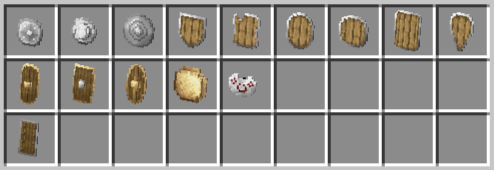
After (adjusted)

If there's an Epic Knights addon that includes shields not currently supported by this pack, feel free to leave a comment. I'm happy to add support for additional shield packs and addons when requested.

Shield Tweaks.zip
MC 1.20.1
Release 2026-06-23 Get

Requirements & install

How to use this resource pack in Minecraft
Resolution
16x
Minecraft
1.20.1
Install folder
.minecraft/resourcepacks

How to install resource packs

  1. Download the resource pack .zip file (do not extract it).
  2. In Minecraft open Options → Resource Packs → Open Pack Folder.
  3. Drop the .zip into the resourcepacks folder (.minecraft/resourcepacks).
  4. Move the pack to the Selected column and click Done.
Browse more: 16x resource packs 32x resource packs 64x resource packs 128x resource packs 256x resource packs 512x+ resource packs Resource Packs for 1.20.1 All resource packs

More from Fahrail

Advertisement Remove ads with Premium →

You Might Also Like