Mineuniverse
Resource Packs
Enhanced Water

Enhanced Water

RESOURCE PACK
A simple resource pack that improves Minecraft water clarity and visibility.
by joaoozn
Download Claim this project
1,872 downloads
0 likes
Updated Oct 14, 2026
0 hypes
16x Mod Support
Advertisement Remove ads with Premium →

Enhanced Water

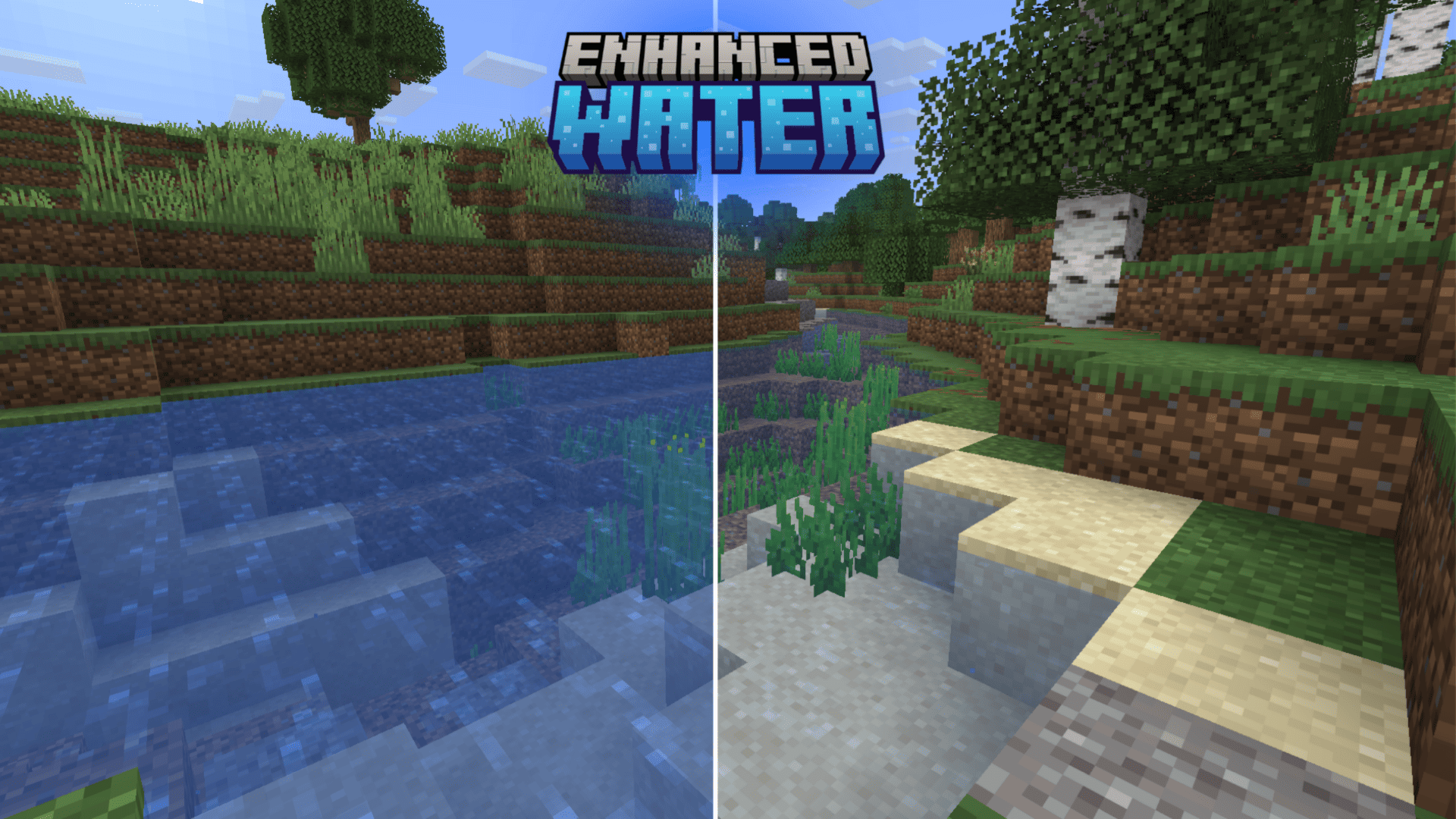
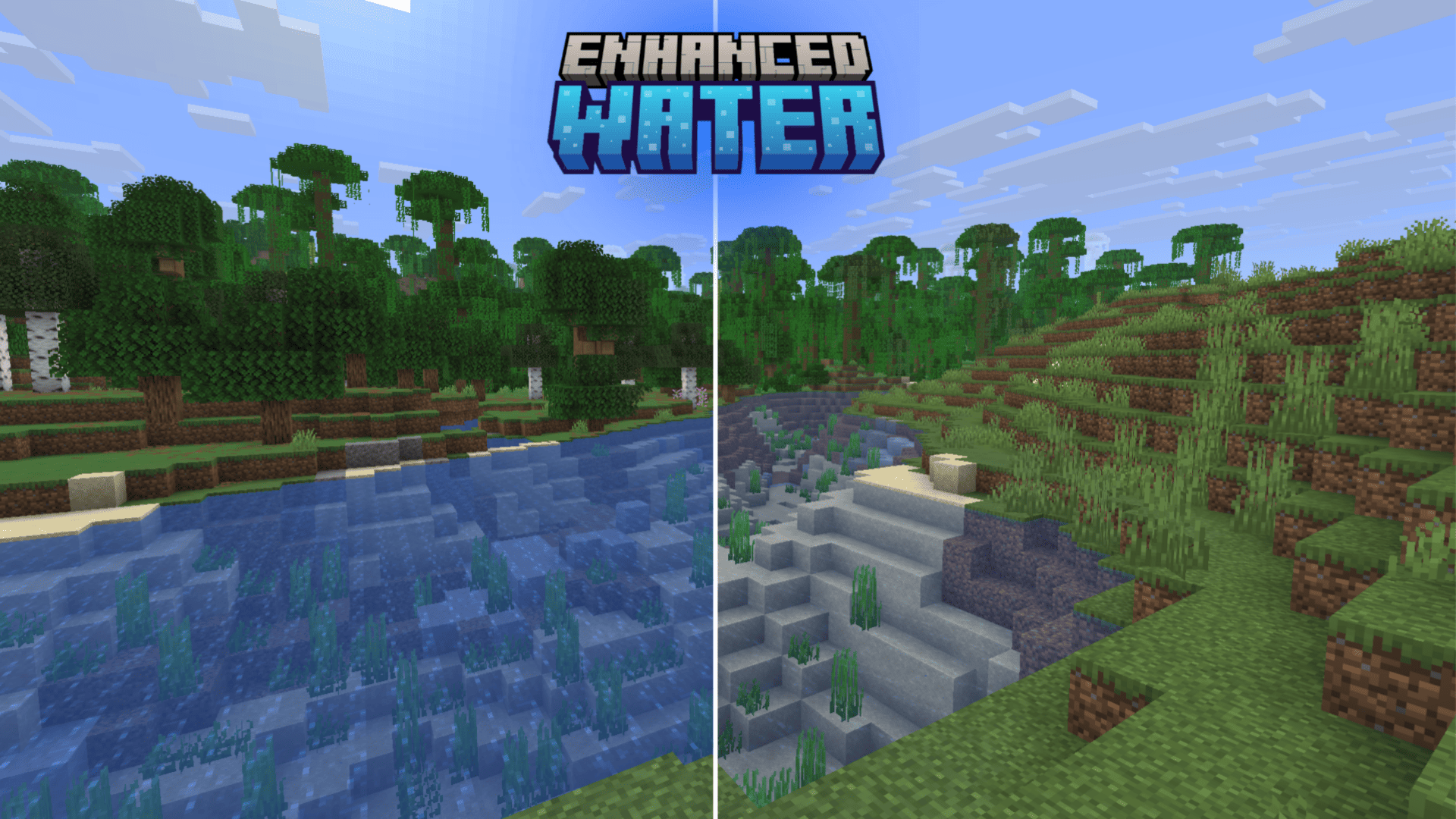
Enhanced Water is a simple Minecraft resource pack that improves water visibility by making it clearer and easier to see through.

It is designed for players who want better underwater visibility while exploring oceans, rivers, and lakes in Minecraft.


Features

  • Clearer water textures
  • Improved underwater visibility
  • Lightweight resource pack
  • Works with vanilla Minecraft
  • No performance impact

Why use Enhanced Water?

In vanilla Minecraft, water can sometimes make it difficult to see what is below the surface.

Enhanced Water improves visibility by adjusting the water textures, making underwater exploration and building much easier and more enjoyable.


Installation

  1. Download the resource pack

  2. Move the .zip file to your .minecraft/resourcepacks folder

  3. Open Minecraft

  4. Go to Options → Resource Packs

  5. Enable Enhanced Water


Compatibility

Works with most modern Minecraft versions and should be compatible with most texture packs and shaders.


Credits

Created by John

Enhanced Water v1.2.zip
MC 1.21, 1.19.3, 1.20.2, 1.19.4, 1.21.8, 1.20.5, 1.21.5, 1.21.4, 1.20.1, 1.20, 1.20.6, 1.21.1, 1.21.6, 1.21.3, 1.21.7, 1.19.1, 1.20.4, 1.19.2, 1.20.3, 1.19, 1.21.2, 1.21.9
Release 2026-09-27 Get
Enhanced Water v1.1.zip
MC 1.21, 1.19.3, 1.20.2, 1.19.4, 1.21.8, 1.20.5, 1.21.5, 1.21.4, 1.20.1, 1.20, 1.20.6, 1.21.1, 1.21.6, 1.21.3, 1.21.7, 1.19.1, 1.20.4, 1.19.2, 1.20.3, 1.19, 1.21.2, 1.21.9
Release 2026-08-31 Get
Enhanced Water v1.0.zip
MC 1.21, 1.19.3, 1.20.2, 1.19.4, 1.21.8, 1.20.5, 1.21.5, 1.21.4, 1.20.1, 1.20, 1.20.6, 1.21.1, 1.21.6, 1.21.3, 1.21.7, 1.19.1, 1.20.4, 1.19.2, 1.20.3, 1.19, 1.21.2, 1.21.9
Release 2026-03-26 Get

Requirements & install

How to use this resource pack in Minecraft
Resolution
16x
Minecraft
1.21.2 – 1.21.9
Install folder
.minecraft/resourcepacks

How to install resource packs

  1. Download the resource pack .zip file (do not extract it).
  2. In Minecraft open Options → Resource Packs → Open Pack Folder.
  3. Drop the .zip into the resourcepacks folder (.minecraft/resourcepacks).
  4. Move the pack to the Selected column and click Done.
Browse more: 16x resource packs 32x resource packs 64x resource packs 128x resource packs 256x resource packs 512x+ resource packs Resource Packs for 1.21.9 All resource packs
Advertisement Remove ads with Premium →

You Might Also Like