Mineuniverse
Resource Packs
Enhanced Menu Background

Enhanced Menu Background

RESOURCE PACK
Default menu background with shaders!
by vertexcubed
Download Claim this project
4,367 downloads
0 likes
Updated Oct 14, 2026
0 hypes
16x Miscellaneous
Advertisement Remove ads with Premium →

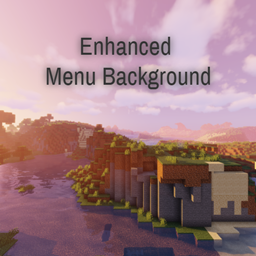
Very simple resource pack that changes the menu background to the old one from before 1.13, with shaders and the new textures. There's some small issues that I'll try to fix sometime soon though.

Panorama was taken in version 1.12.2 using the Quark mod, by Vazkii. It's not required for anything, but please show the mod some love!

I was using SIldur's Vibrant Shaders to take the screenshot, with some changes such as reduced lens flare and no waving flora.

The seed used is 8091867987493326313, in version Beta 1.7.3. Thank you so much to Tomlacko and the entire team at Minecraft@Home for making this possible!

Enhanced Menu Background v1.02
MC 1.18.1, 1.18.2, 1.18, 1.18-Snapshot
Release 2022-08-15 Get
Enhanced Menu Background v1.02
MC 1.17.1, 1.17, 1.17-Snapshot
Release 2022-08-14 Get
Enhanced Menu Background v1.02
MC 1.19-Snapshot, 1.19.2, 1.19.1, 1.19
Release 2022-08-14 Get
Enhanced Menu Background v1.01
MC 1.16.2
Release 2020-08-16 Get
EnhancedMenuBackground v1.0
MC 1.16.1, 1.15, 1.16, 1.15.2, 1.15.1
Release 2020-07-25 Get

Requirements & install

How to use this resource pack in Minecraft
Resolution
16x
Minecraft
1.18-Snapshot – 1.19.2
Install folder
.minecraft/resourcepacks

How to install resource packs

  1. Download the resource pack .zip file (do not extract it).
  2. In Minecraft open Options → Resource Packs → Open Pack Folder.
  3. Drop the .zip into the resourcepacks folder (.minecraft/resourcepacks).
  4. Move the pack to the Selected column and click Done.
Browse more: 16x resource packs 32x resource packs 64x resource packs 128x resource packs 256x resource packs 512x+ resource packs Resource Packs for 1.19.2 All resource packs

More from vertexcubed

Advertisement Remove ads with Premium →

You Might Also Like