Mineuniverse
Resource Packs
Enchanting Table Magic Circle

Enchanting Table Magic Circle

RESOURCE PACK
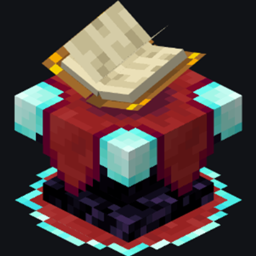
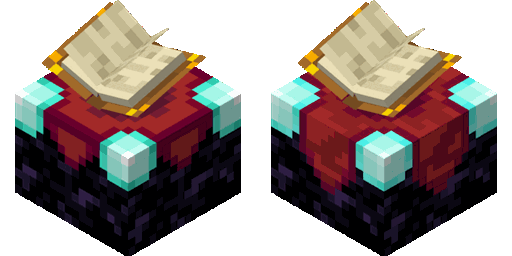
Adds a magic circle to the enchanting table that appears when you approach it
by Jacosvaldo
Download Claim this project
103,881 downloads
0 likes
Updated Oct 14, 2026
0 hypes
16x Animated Medieval Miscellaneous
Advertisement Remove ads with Premium →

Modrinth - My other projects Discord - Jacosvaldo's Not Too Cool Server Kofi - Tip me

🧩 Dependencies

if you're playing in versions above 1.21.6 you can download this version of Animatica, it works, but if you're playing in versions above 1.21.8 you'll need to activete the BRUTEFORCE mode in the texture settings (more about this below)

✅️ Mod Support

Should work for every mod that uses a book entity, like Easy Magic mod or Quark Oddities mod

🛠️ Shaders Troubleshooting

First make sure to enable labPBR support at your shaders config normally it looks like this:

Complementary shaders:

Resourcepack support (labPBR)

BSL (at the materials tab):

labPBR in BSL shaders

If just this doesn't fix it, try disabling the animated textures, 99% of the time it works

🚨 BRUTEFORCE mode:

Don't use BRUTEFORCE mode if you're trying to use shaders, it was only made to make the animated textures work in versions >= 1.21.9

To use it you'll probably have to set RenderLayer override to Translucent, to do this go to the mods tab, enter the Entity Model Features mod config and follow this path:

Per entity settings > Enchanting Table > Textures

Now set RenderLayer override to Translucent


🎨 Color Variants

Color variants Purple, Pink, Red, Orange, Flame, Gold, White, Green, Water

▶️ Video Preview

✨ Shaders Screenshots

BSL:

Red variant with BLS Shaders

Complementary Shader:

Water variant with Complementary Shaders

Pink variant with Complementary Shaders

Super Duper Vanilla:

White variant with Super Duper Vanilla

Miniature Shader (Custom build):

Pink variant with Miniature Shader

Use code JACOS for 25% discount at Sparked Host servers

v.2.5 (1.19 - 1.20.4)
MC 1.19.3, 1.20.2, 1.19.4, 1.20.1, 1.20, 1.19.1, 1.20.4, 1.19.2, 1.20.3, 1.19
Release 2026-04-06 Get
v.2.5 (1.20.5 - 1.21.8)
MC 1.21, 1.21.8, 1.20.5, 1.21.5, 1.21.4, 1.20.6, 1.21.1, 1.21.6, 1.21.3, 1.21.7, 1.21.2
Release 2026-04-06 Get
v.2.5 (1.21.9 - 1.21.11)
MC 1.21.9, 1.21.10, 1.21.11
Release 2026-04-06 Get
v2.4 (1.19 - 1.20.4)
MC 1.19.3, 1.20.2, 1.19.4, 1.20.1, 1.20, 1.19.1, 1.20.4, 1.19.2, 1.20.3, 1.19
Release 2026-02-19 Get
v2.4 (1.20.5 - 1.21.8)
MC 1.21, 1.21.8, 1.20.5, 1.21.5, 1.21.4, 1.20.6, 1.21.1, 1.21.6, 1.21.3, 1.21.7, 1.21.2
Release 2026-02-19 Get
v2.4 (1.21.9 - 1.21.11)
MC 1.21.9, 1.21.10, 1.21.11
Release 2026-02-19 Get
Enchanting Table Magic Circle v2.3 (1.19 - 1.20.4)
MC 1.19.3, 1.20.2, 1.19.4, 1.20.1, 1.20, 1.19.1, 1.20.4, 1.19.2, 1.20.3, 1.19
Release 2026-01-29 Get
Enchanting Table Magic Circle v2.3 (1.20.5 - 1.21.8)
MC 1.21, 1.21.8, 1.20.5, 1.21.5, 1.21.4, 1.20.6, 1.21.1, 1.21.6, 1.21.3, 1.21.7, 1.21.2
Release 2026-01-29 Get
Enchanting Table Magic Circle v2.3 (1.21.9 - 1.21.11)
MC 1.21.9, 1.21.10, 1.21.11
Release 2026-01-29 Get
Enchanting Table Magic Circle 1.19 - 1.20.4 v2.1
MC 1.19.3, 1.20.2, 1.19.4, 1.20.1, 1.20, 1.19.1, 1.20.4, 1.19.2, 1.20.3, 1.19
Release 2026-01-17 Get
Enchanting Table Magic Circle 1.20.5 - 1.21.8 v2.1
MC 1.21, 1.21.8, 1.20.5, 1.21.5, 1.21.4, 1.20.6, 1.21.1, 1.21.6, 1.21.3, 1.21.7, 1.21.2
Release 2026-01-17 Get
Enchanting Table Magic Circle 1.21.9 - 1.21.11 v2.1
MC 1.21.9, 1.21.10, 1.21.11
Release 2026-01-17 Get
Enchanting Table Magic Circle 1.19-1.20.4 v2.0
MC 1.19.3, 1.20.2, 1.19.4, 1.20.1, 1.20, 1.19.1, 1.20.4, 1.19.2, 1.20.3, 1.19
Release 2026-01-15 Get
Enchanting Table Magic Circle 1.20.5-1.21.8 v2.0
MC 1.21, 1.21.8, 1.20.5, 1.21.5, 1.21.4, 1.20.6, 1.21.1, 1.21.6, 1.21.3, 1.21.7, 1.21.2
Release 2026-01-15 Get
Enchanting Table Magic Circle 1.21.9-1.21.11 v2.0
MC 1.21.9, 1.21.10, 1.21.11
Release 2026-01-15 Get

Requirements & install

How to use this resource pack in Minecraft
Resolution
16x
Minecraft
1.21.4 – 1.21.11
Install folder
.minecraft/resourcepacks

How to install resource packs

  1. Download the resource pack .zip file (do not extract it).
  2. In Minecraft open Options → Resource Packs → Open Pack Folder.
  3. Drop the .zip into the resourcepacks folder (.minecraft/resourcepacks).
  4. Move the pack to the Selected column and click Done.
Browse more: 16x resource packs 32x resource packs 64x resource packs 128x resource packs 256x resource packs 512x+ resource packs Resource Packs for 1.21.11 All resource packs

More from Jacosvaldo

Advertisement Remove ads with Premium →

You Might Also Like