Mineuniverse
Resource Packs
Deepbloom

Deepbloom

RESOURCE PACK
The deep dark isn't empty — it's blooming. A bioluminescent reef below y=0; your torch is the last warm light.
by Zentsy
Download Claim this project
24 downloads
0 likes
Updated Oct 14, 2026
0 hypes
16x Animated Data Packs Miscellaneous
Advertisement Remove ads with Premium →

DEEPBLOOM

The dark isn't empty. It's blooming.

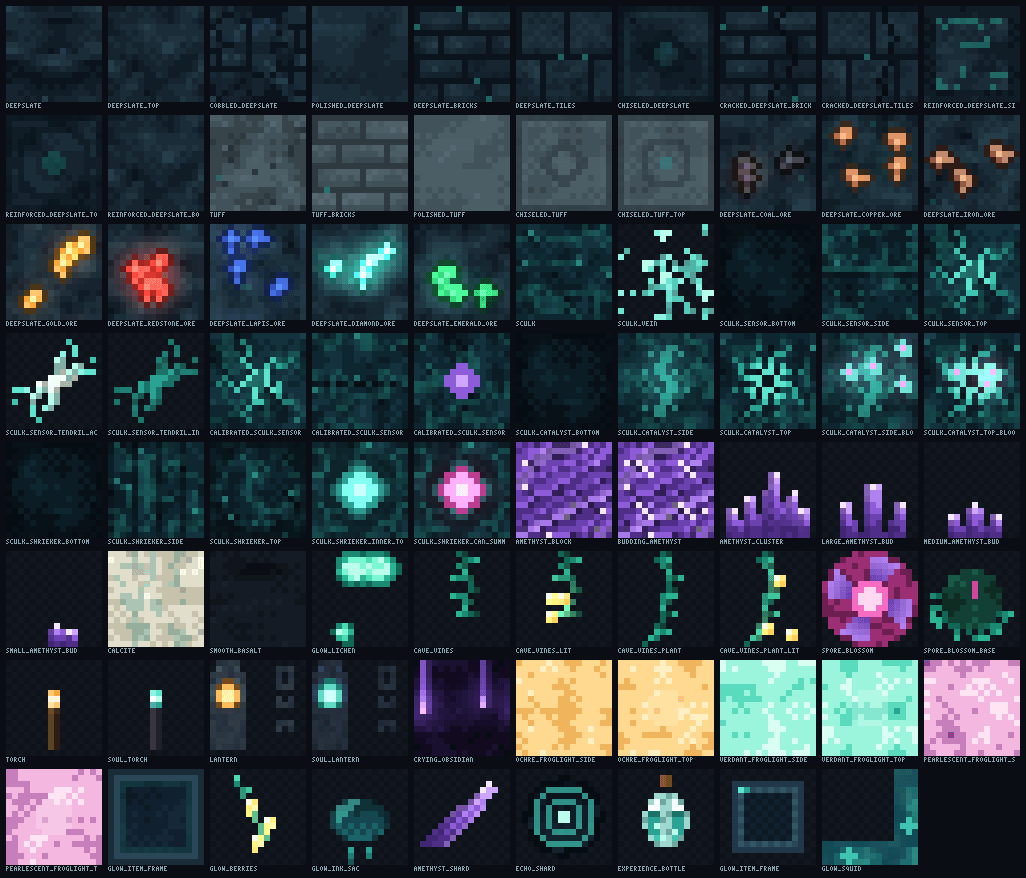
Deepbloom is a 16x resource pack that turns Minecraft's deep underground into a living bioluminescent reef. Everything below y=0 — deepslate, tuff, sculk, amethyst geodes, the flora and fauna of the dark — is reimagined as one ecology of cold light, with 82 original textures and 10 slow-breathing animated textures.

Your torches stay warm. That's the whole story: you are the last fire in a world of cold suns.


The hook — one rule, kept everywhere

Natural light down here is cold. The player's fire is warm.

  • Every living light — sculk veins, glow lichen, cave vines, resin, tears — glows aqua, violet or magenta.
  • Torches, lanterns and gold keep their ember warmth — deliberately, as the pack's only amber. And the deep returns the favor exactly once: its fruit, the glow berry, is warm too.
  • Regular stone, the surface and the sky stay vanilla. The bloom begins below y=0 — the descent itself is the experience.

What's inside

Feature Files
01 The Bloomstone — deepslate & tuff family; masonry with light seeping through the mortar 17
02 Lumen Ores — all 8 deepslate ores, glow-cored, crisp vanilla readability 8
03 The Sculk Reef — complete sculk family; stone, veins, tendrils, catalyst blooms and shrieker maws animate 20
04 Resin Geodes — amethyst crystal bands, budding hearts, bone-veined calcite, wet basalt 8
05 Bloomflora — patchy glow lichen, fruiting cave vines, ceiling anemones 7
06 The Last Warm Light — torch, soul torch, flickering 3-frame lanterns 4
07 Glimmer Accents — crying obsidian tears, froglights as light-glass, slate glow item frames 8
08 Curios — glow berries, bloom ink, sonar-disc echo shard, bottled bloomlight 6
09 Fauna & Atmosphere — the glow squid as a photophore-dotted reef drifter; coldfire glint (enchantments shimmer aqua) 3

Highlights

  • 10 animated textures — the reef breathes: pulsing sculk veins, blooming catalysts, shrieker maws that open in light (magenta when they can summon), flickering lanterns. Slow frametimes, no strobing.
  • Coldfire glint — enchanted items and armor shimmer aqua-violet instead of purple.
  • Zero dependencies — no OptiFine, no mods, no server files. Every glow is baked into the textures. Plays perfectly on vanilla and looks even better under shaders.
  • Vanilla-faithful silhouettes — nothing becomes harder to read, only harder to forget. Ores read at a glance; it never fights your load order.

Installation

Just click the download button on CurseForge.

OR

  1. Download the zip — do not unzip it.
  2. Drop it in your resource packs folder:
    • Windows: %appdata%\.minecraft\resourcepacks
    • macOS: ~/Library/Application Support/minecraft/resourcepacks
    • Linux: ~/.minecraft/resourcepacks
  3. Options → Resource Packs → move Deepbloom to Selected → Done.
  4. Dig past y=0. Turn your torch off for one minute. That's the demo.

Compatibility

Version Status
1.21 – 1.21.8 Supported (built and tuned on 1.21.8)
1.21.9+ Loads fine; may show an "older version" notice
Below 1.21 Not supported (deepslate/sculk content missing)

100% client-side and multiplayer-safe — servers never see it.

FAQ

Does it need shaders? No. Halos and glow are painted into the textures.

Is it compatible with other packs? Deepbloom only touches the deep-cave texture set (full manifest in the repository's TEXTURES.md). It stacks cleanly under UI packs and above terrain overhauls — let Deepbloom win conflicts for the deep.

Why isn't regular stone retextured? That's the point. The surface stays warm vanilla; the palette shifts only when you descend.


Deepbloom v1.0.0 · CC BY-NC-SA 4.0 · original generated art · not affiliated with Mojang or Microsoft.

bring a torch. you won't need it — but you'll want it.

Deepbloom v1.0.0 — MC 1.21.8
MC 1.21, 1.21.8, 1.21.5, 1.21.4, 1.21.1, 1.21.6, 1.21.3, 1.21.7, 1.21.2
Release 2026-09-04 Get

Requirements & install

How to use this resource pack in Minecraft
Resolution
16x
Minecraft
1.21.1 – 1.21.8
Install folder
.minecraft/resourcepacks

How to install resource packs

  1. Download the resource pack .zip file (do not extract it).
  2. In Minecraft open Options → Resource Packs → Open Pack Folder.
  3. Drop the .zip into the resourcepacks folder (.minecraft/resourcepacks).
  4. Move the pack to the Selected column and click Done.
Browse more: 16x resource packs 32x resource packs 64x resource packs 128x resource packs 256x resource packs 512x+ resource packs Resource Packs for 1.21.8 All resource packs

More from Zentsy

Advertisement Remove ads with Premium →

You Might Also Like