Mineuniverse
Resource Packs
Decaying Tools

Decaying Tools

RESOURCE PACK
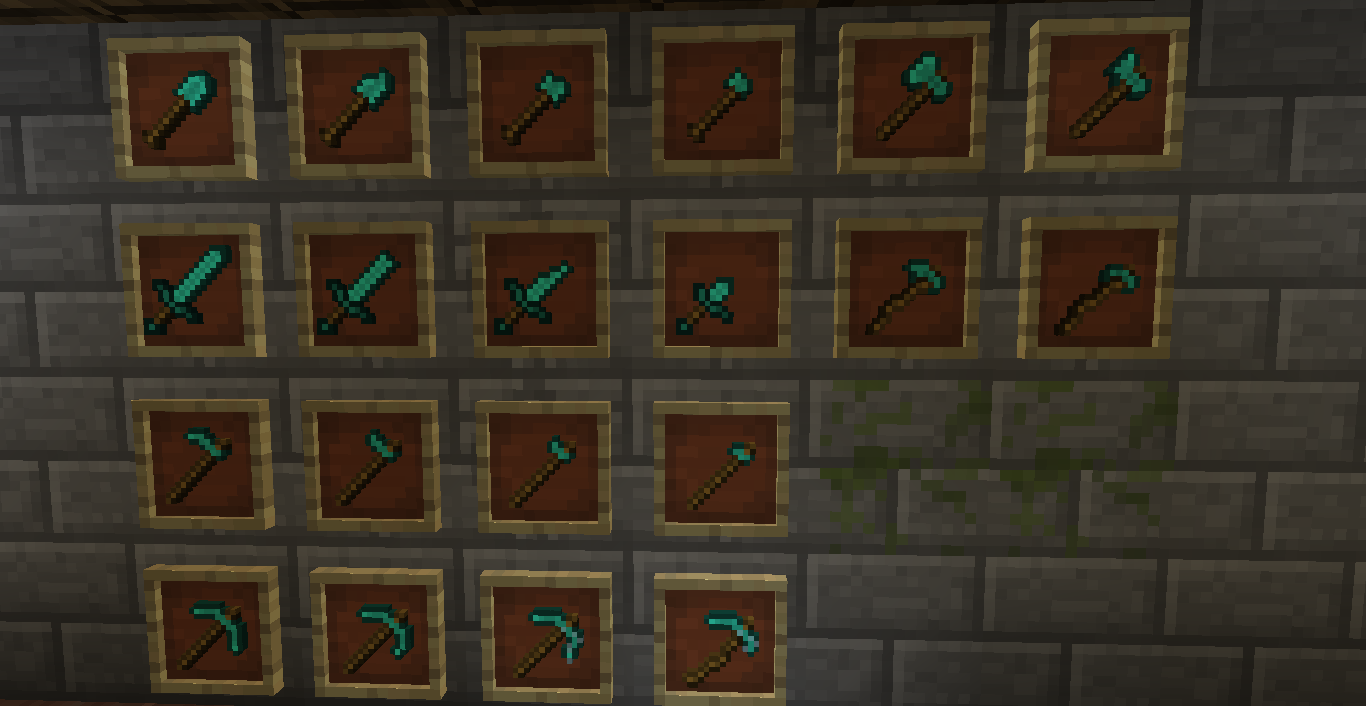
A simple pack to add decaying tools (And a custom sword)
by Setadokalo
Download Claim this project
Add a badge to your pageLink to Decaying Tools from a README, website or forum post.
Preview: Badge

Badges update automatically and link to the resource pack page on MineUniverse.

1,895 downloads
0 likes
0 followers
Updated Oct 14, 2026
0 hypes
Follow0
16x Miscellaneous Traditional
Advertisement Remove ads with Premium →

This simple resource pack adds a few simple changes to diamond tools, making a new sword possible using commands and making the tools appear to decay as you use them! Currently only diamond tools have degrading variants; I'll probably add iron tools by the end of the week jesus christ I let this project slip away for a while. I hope to find time to add more tools soon, but I won't promise anything.

PLANNED FEATURES:

  • Decaying version of all tools (Diamond) Added! (Gold) (Iron) (Stone) (Wood)
  • Changes to leather armor to remove the uncolored joints
  • Adding voices (Door Open, Door Close), usable with commands
  • Possibly adding some 3D models? Most likely not, as 3D models would completely change the focus of this pack.
  • Adding decaying armor Not possible with the vanilla JSON format. Perhaps in the future this functionality will be added, but for now it is beyond my powers without changing this resource pack into a mod.
ExtraSwords.zip
MC 1.9.1, 1.9.3, 1.10-Snapshot, 1.9.4, 1.9.2, 1.10.2, 1.10, 1.10.1, 1.9
Release 2016-08-22 Get
ExtraSwords.zip
MC 1.9.1, 1.9.3, 1.9.4, 1.9.2, 1.10.2, 1.10, 1.10.1, 1.9-Snapshot, 1.9
Release 2016-08-21 Get

Requirements & install

How to use this resource pack in Minecraft
Resolution
16x
Minecraft
1.9.1 – 1.10.2
Install folder
.minecraft/resourcepacks

How to install resource packs

  1. Download the resource pack .zip file (do not extract it).
  2. In Minecraft open Options → Resource Packs → Open Pack Folder.
  3. Drop the .zip into the resourcepacks folder (.minecraft/resourcepacks).
  4. Move the pack to the Selected column and click Done.
Browse more: 16x resource packs 32x resource packs 64x resource packs 128x resource packs 256x resource packs 512x+ resource packs Resource Packs for 1.10.2 All resource packs

More from Setadokalo

Advertisement Remove ads with Premium →

You Might Also Like