Mineuniverse
Resource Packs
Dark PVP Tools and Armors

Dark PVP Tools and Armors

RESOURCE PACK
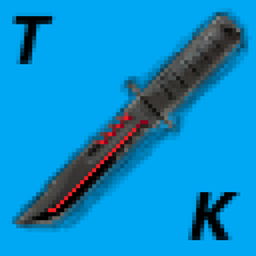
A dark-themed PvP resource pack that retextures tools, weapons, and armor with a clean, powerful design. Built for competitive gameplay, Lifesteal SMPs, and survival servers, giving every battle a darker and more epic feel.l
by Moka3abGIMryouby
Download Claim this project
Add a badge to your pageLink to Dark PVP Tools and Armors from a README, website or forum post.
Preview: Badge

Badges update automatically and link to the resource pack page on MineUniverse.

943 downloads
0 likes
0 followers
Updated Oct 14, 2026
0 hypes
Follow0
32x Modern
Advertisement Remove ads with Premium →

🛡️ Dark PVP Tools and Armor

Dark PVP Tools and Armor is a resource pack designed for Minecraft PvP enthusiasts who want a darker, more intimidating look for their gear. This pack retextures tools, weapons, and armor with a clean and powerful design while maintaining the classic Minecraft feel.

✨ Features

  • Complete redesign of tools, weapons, and armor.

  • Dark-themed textures with detailed and stylish visuals.

  • Improved gear appearance for a more immersive PvP experience.

  • Perfect for Lifesteal, SMP, Survival, Factions, and other multiplayer servers.

  • Lightweight and optimized for smooth gameplay.

  • Compatible with modern Minecraft versions.

⚔️ Why Choose This Pack?

Whether you're battling enemies, defending your base, or dominating a Lifesteal server, Dark PVP Tools and Armor gives your equipment a unique and legendary appearance that stands out from the crowd. Turn every fight into an epic experience with gear forged in darkness.

Download now and bring the power of the shadows to your Minecraft world! 🖤

Dark PVP Tools and Armors.zip
MC 1.21.11
Release 2026-06-03 Get

Requirements & install

How to use this resource pack in Minecraft
Resolution
32x
Minecraft
1.21.11
Install folder
.minecraft/resourcepacks

How to install resource packs

  1. Download the resource pack .zip file (do not extract it).
  2. In Minecraft open Options → Resource Packs → Open Pack Folder.
  3. Drop the .zip into the resourcepacks folder (.minecraft/resourcepacks).
  4. Move the pack to the Selected column and click Done.
Browse more: 16x resource packs 32x resource packs 64x resource packs 128x resource packs 256x resource packs 512x+ resource packs Resource Packs for 1.21.11 All resource packs

More from Moka3abGIMryouby

Advertisement Remove ads with Premium →

You Might Also Like