Mineuniverse
Resource Packs
Dandy's Red Netherite

Dandy's Red Netherite

RESOURCE PACK
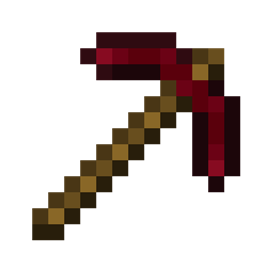
Makes netherite items red instead of gray (also changes enchant glow to gold)
by dandymcgee
Download Claim this project
6,820 downloads
0 likes
Updated Oct 14, 2026
0 hypes
16x
Advertisement Remove ads with Premium →

Makes netherite tools, armor, and scraps/ingot/blocks a dark, brooding red color.


Please note, this resource pack also replaces the default purple enchant glow with a gold one. It looks better on the red armor, but I also find it nicer on potions because you can actually tell which type a potion is instead of them all being the same purple color. If you don't like this change, feel free to replace the enchanted glow image file in the resource pack with the vanilla one.

All work or rights I would own pertaining to this resource pack are hereby released into the public domain, but this imagery is a derived work of assets licensed by Mojang, therefore usage is dependent on the Minecraft EULA, and all related licensing requirements. This is not a wholly original work.

dandys_red_netherite_1.17.1.zip
MC 1.17.1, 1.17, 1.17-Snapshot
Release 2021-07-19 Get
dandys_red_netherite_1.16.2.zip
MC 1.16.2
Release 2020-08-26 Get
dandys_red_netherite.zip
MC 1.16.1, 1.16
Release 2020-07-24 Get

Requirements & install

How to use this resource pack in Minecraft
Resolution
16x
Minecraft
1.16 – 1.17.1
Install folder
.minecraft/resourcepacks

How to install resource packs

  1. Download the resource pack .zip file (do not extract it).
  2. In Minecraft open Options → Resource Packs → Open Pack Folder.
  3. Drop the .zip into the resourcepacks folder (.minecraft/resourcepacks).
  4. Move the pack to the Selected column and click Done.
Browse more: 16x resource packs 32x resource packs 64x resource packs 128x resource packs 256x resource packs 512x+ resource packs Resource Packs for 1.17.1 All resource packs
Advertisement Remove ads with Premium →

You Might Also Like




