Badges update automatically and link to the resource pack page on MineUniverse.
Headings:
/data/twilightforest/tags/items/portal/ and open the file activator.json.{
"replace": true,
"values": [
{
"id": "minecraft:netherite_ingot",
"required": false
}
]
}In this case, minecraft:netherite_ingot is the item that will replace the diamond for activating the portal.
minecraft:netherite_ingot. Don't forget the quotes./saves/(WorldName)/datapacks/.To get an item ID, press the key combination F3 + H in the game, then hover over the item in your inventory.
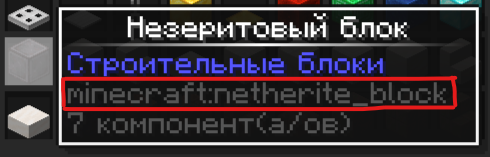
What is highlighted in red in the photo is the item ID you need to use in activator.json.
activator.json:{
"replace": true,
"values": [
{
"id": "minecraft:sniffer_egg",
"required": false
}
]
}{
"replace": true,
"values": [
{
"id": "minecraft:totem_of_undying",
"required": false
}
]
}Since the activator.json file is a tag, you can add multiple items (including other tags) that will activate the portal to the Twilight Forest.
{
  "replace": true,
  "values": [
    {
      "id": "minecraft:netherite_ingot",
      "required": false
    },
    {
      "id": "minecraft:egg",
      "required": false
    },
    {
      "id": "minecraft:trident",
      "required": false
    }
  ]
}For 1.12.2 follow this plan:
/config/ folder, find the twilightforest.cfg file there and open it.S:portalCreationItems <minecraft:diamond> - this line is responsible for changing the portal activator.Otherwise, do the same as in the instructions above: find out the item ID, write it instead of minecraft:diamond, and reload the game.
/data/twilightforest/tags/items/portal/ и откройте файл activator.json.{
"replace": true,
"values": [
{
"id": "minecraft:netherite_ingot",
"required": false
}
]
}В данном случае minecraft:netherite_ingot - является тем самым предметом, который будет заменять алмаз для активации портала.
minecraft:netherite_ingot ID того предмета, который вы хотите использовать. Не забудьте про кавычки./saves/(WorldName)/datapacks/.Чтобы получить ID предмета нужно нажать комбинацию клавиш F3 + H в игре, после чего навести курсор на предмет в инвентаре.
То, что выделено на фото красной рамкой и является ID предмета, который нужно использовать в activator.json.
activator.json:{
"replace": true,
"values": [
{
"id": "minecraft:sniffer_egg",
"required": false
}
]
}{
"replace": true,
"values": [
{
"id": "minecraft:totem_of_undying",
"required": false
}
]
}Т.к. файл activator.json является тегом, то предметов, которые будут активировать портал в Сумеречный лес, можно добавлять несколько (в том числе и другие теги).
{
  "replace": true,
  "values": [
    {
      "id": "minecraft:netherite_ingot",
      "required": false
    },
    {
      "id": "minecraft:egg",
      "required": false
    },
    {
      "id": "minecraft:trident",
      "required": false
    }
  ]
}На 1.12.2 следуйте этому плану:
/config/, там найдите файл twilightforest.cfg и откройте его.S:portalCreationItems <minecraft:diamond> - эта строка и отвечает за смену активатора портала.В остальном делаем то же самое, что в инструкции выше: узнаём ID предмета, вписываем его вместо minecraft:diamond и перезагружаем игру.







