Mineuniverse
Resource Packs
Custom Block Outline

Custom Block Outline

RESOURCE PACK
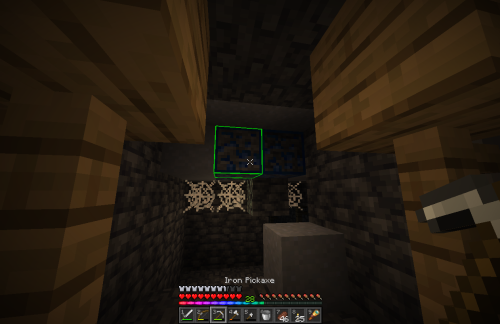
Minecraft shader to change the vanilla block highlight color
by DarkOnyx171
Download Claim this project
45,865 downloads
0 likes
Updated Oct 14, 2026
0 hypes
16x Animated Miscellaneous Traditional
Advertisement Remove ads with Premium →

This is a minecraft resource pack that alters the color of the vanilla block highlight. This was created as an accessibility accommodation for a visually impaired friend and it works in vanilla minecraft version 1.18+. If you want different colors go to the files tab, where you can download the specific block outline color you want. Current colors are, Red, Green, Blue, Purple, White, and my personal favorite RAINBOW. Hopefully some of you can find this resource pack helpful!

blockOutline_Rainbow.zip
MC 1.17.1, 1.19.3, 1.20.2, 1.18.1, 1.19.4-Snapshot, 1.17, 1.20.2-Snapshot, 1.20.5-Snapshot, 1.19.4, 1.19-Snapshot, 1.18.2, 1.19.2, 1.20.3-Snapshot, 1.20.3, 1.20.1, 1.20, 1.19.1
Beta 2021-12-10 Get
blockOutline_Purple.zip
MC 1.17.1, 1.19.3, 1.20.2, 1.18.1, 1.19.4-Snapshot, 1.17, 1.20.2-Snapshot, 1.20.5-Snapshot, 1.19.4, 1.19-Snapshot, 1.18.2, 1.19.2, 1.20.3-Snapshot, 1.20.3, 1.20.1, 1.20, 1.19.1
Beta 2021-12-09 Get
BlockOutline_Blue.zip
MC 1.17.1, 1.19.3, 1.20.2, 1.18.1, 1.19.4-Snapshot, 1.17, 1.20.2-Snapshot, 1.20.5-Snapshot, 1.19.4, 1.19-Snapshot, 1.18.2, 1.19.2, 1.20.3-Snapshot, 1.20.3, 1.20.1, 1.20, 1.19.1
Beta 2021-12-08 Get
BlockOutline_Red.zip
MC 1.17.1, 1.19.3, 1.20.2, 1.18.1, 1.19.4-Snapshot, 1.17, 1.20.2-Snapshot, 1.20.5-Snapshot, 1.19.4, 1.19-Snapshot, 1.18.2, 1.19.2, 1.20.3-Snapshot, 1.20.3, 1.20.1, 1.20, 1.19.1
Beta 2021-12-08 Get
BlockOutline_White.zip
MC 1.17.1, 1.19.3, 1.20.2, 1.18.1, 1.19.4-Snapshot, 1.17, 1.20.2-Snapshot, 1.20.5-Snapshot, 1.19.4, 1.19-Snapshot, 1.18.2, 1.19.2, 1.20.3-Snapshot, 1.20.3, 1.20.1, 1.20, 1.19.1
Beta 2021-12-08 Get
BlockOutline_Green.zip
MC 1.17.1, 1.19.3, 1.20.2, 1.18.1, 1.19.4-Snapshot, 1.17, 1.20.2-Snapshot, 1.20.5-Snapshot, 1.19.4, 1.19-Snapshot, 1.18.2, 1.19.2, 1.20.3-Snapshot, 1.20.3, 1.20.1, 1.20, 1.19.1
Release 2021-12-08 Get

Requirements & install

How to use this resource pack in Minecraft
Resolution
16x
Minecraft
1.19.4 – 1.20.5-Snapshot
Install folder
.minecraft/resourcepacks

How to install resource packs

  1. Download the resource pack .zip file (do not extract it).
  2. In Minecraft open Options → Resource Packs → Open Pack Folder.
  3. Drop the .zip into the resourcepacks folder (.minecraft/resourcepacks).
  4. Move the pack to the Selected column and click Done.
Browse more: 16x resource packs 32x resource packs 64x resource packs 128x resource packs 256x resource packs 512x+ resource packs Resource Packs for 1.20.5-Snapshot All resource packs
Advertisement Remove ads with Premium →

You Might Also Like