Mineuniverse
Resource Packs
Cup's Ultimate Pack - Patches

Cup's Ultimate Pack - Patches

RESOURCE PACK
Patches including sprites, fonts, audio volumes and more for Cup's Ultimate Pack
by Cup_70
Download Claim this project
793 downloads
0 likes
0 followers
Updated Oct 14, 2026
0 hypes
Follow0
16x Font Packs Miscellaneous Mod Support
Advertisement Remove ads with Premium →

Resource Pack

Contains UI patches for "Cup's Ultimate Pack" Modpack.


Features:

  • Various UI features of Unity as per their license.
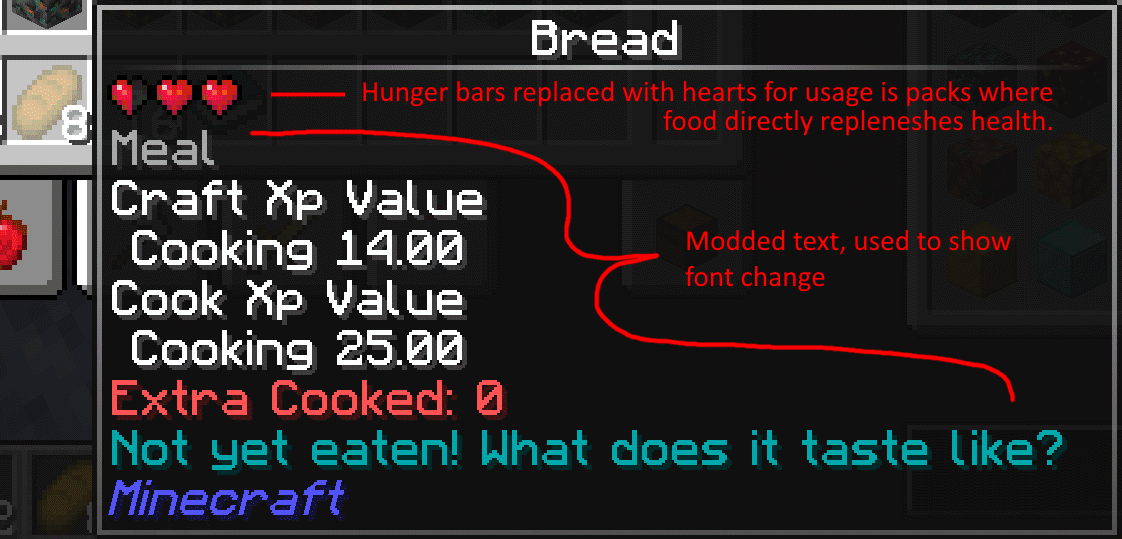
  • Replaces hunger icons with hearts as Cup's Ultimate Pack removes hunger.
  • Reduced enchantment glint
  • Cup's Ultimate Pack Title
  • Smoother more readable font (especially when poorly contrasting backgrounds are applied)
  • Reduced music volume in Blue Skies to match the volume of the music provided by other mods (This may not work correctly)
  • Various vanilla tweaks resources (if you are looking for just vanilla tweaks, go straight to the source: https://vanillatweaks.net/)


Additonal features will be listed here as they are implemented.


While this is meant to be used as part of Cup's Ultimate Pack, there is no reason you cannot use, copy, or modify it in for yourself as per the MIT license.


Cup's Ultimate Pack - Patches v6.zip
MC 1.18.2
Release 2024-10-05 Get
Cup's Ultimate Pack - Patches v5
MC 1.18.1, 1.18.2, 1.18, 1.18-Snapshot
Release 2022-07-23 Get
Cup's Ultimate Pack - UI Patches v4
MC 1.18.1, 1.18.2, 1.18, 1.18-Snapshot
Release 2022-07-06 Get
Cup's Ultimate Pack - UI Patches v3
MC 1.18.1, 1.19-Snapshot, 1.18.2, 1.18
Release 2022-06-09 Get
Cup's Ultimate Pack - UI Patches v2
MC 1.18.1, 1.19-Snapshot, 1.18.2, 1.18
Release 2022-06-06 Get
Cup's Ultimate Pack - UI Patches v1
MC 1.18.1, 1.19-Snapshot, 1.18.2, 1.18
Release 2022-06-05 Get

Requirements & install

How to use this resource pack in Minecraft
Resolution
16x
Minecraft
1.18-Snapshot – 1.19-Snapshot
Install folder
.minecraft/resourcepacks

How to install resource packs

  1. Download the resource pack .zip file (do not extract it).
  2. In Minecraft open Options → Resource Packs → Open Pack Folder.
  3. Drop the .zip into the resourcepacks folder (.minecraft/resourcepacks).
  4. Move the pack to the Selected column and click Done.
Browse more: 16x resource packs 32x resource packs 64x resource packs 128x resource packs 256x resource packs 512x+ resource packs Resource Packs for 1.19-Snapshot All resource packs

More from Cup_70

Advertisement Remove ads with Premium →

You Might Also Like